Battery models & part numbers
| Reference / P/N |
|---|
| HP 2EM63AA |
| HP 2LP34AA |
| HP 919682-121 |
| HP 919682-221 |
| HP 919682-231 |
| HP 919682-241 |
| HP 919682-421 |
| HP 919701-850 |
| HP 919701-850BU |
| HP HSTNN-DB8B |
| HP HSTNN-DB8F |
| HP HSTNN-LB7W |
| HP JC03 JC04041-CL |
| HP TPN-C129 |
| HP TPN-C130 |
| HP TPN-Q187 |
| HP TPN-W129 |
| HP TPN-W130 |
| HP-JC04-41.6Wh |
Compatible laptop models
| Model |
|---|
| HP 14-bs000s |
| HP 14-bs100s |
| HP 14-bs200s |
| HP 14-bs500s |
| HP 14-bw000s |
| HP 14g-br000s |
| HP 14g-bx000s |
| HP 14q-bu000s |
| HP 14q-bu103tus |
| HP 14q-by000s |
| HP 15-bs000s |
| HP 15-bs100s |
| HP 15-bs500s |
| HP 15-bs600s |
| HP 15-bs700s |
| HP 15-bw000s |
| HP 15-bw500s |
| HP 15-bw600s |
| HP 15-ra000s |
| HP 15-ra100s |
| HP 15-rb000s |
| HP 17-ak000s |
| HP 17-bs000s |
| HP 17-bs100s |
| HP 17-bs500s |
| HP 17g-br000s |
| HP 240 G6s |
| HP 245 G2s |
| HP 245 G6s |
| HP 246 G6s |
| HP 250 G6s |
| HP 250 G6 SPs |
| HP 255 G6s |
| HP 255 G6 SPs |
| HP Spectre x360 15-ch000s |
Introduction
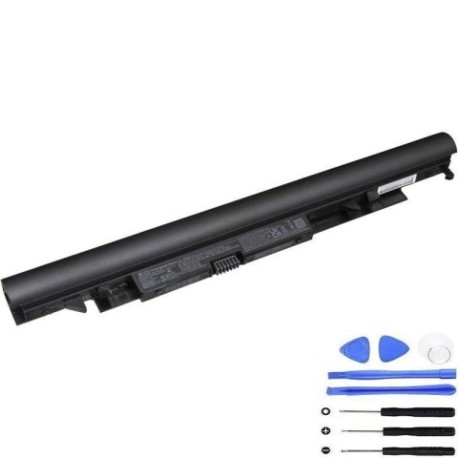
If your HP laptop is showing signs of battery fatigue, our HP JC04 41.6Wh replacement battery offers a reliable solution. This high-quality battery is compatible with numerous HP laptop models commonly used across Australia and New Zealand.
Common signs you need a replacement
| Symptom | Possible Cause | How to Verify | Recommendation |
|---|---|---|---|
| Short battery life | Ageing cells, reduced capacity | Check power settings, monitor usage time | Consider replacement if under 2 hours |
| Laptop won’t hold charge | Battery degradation, faulty cells | Test with different power adapters | Replace if immediate power loss occurs |
| Battery swelling | Internal damage, overheating | Visual inspection, check for bulging | Replace immediately for safety |
| Overheating during use | Inefficient power conversion | Monitor temperature, check vents | Replace to prevent damage |
| Charging indicator issues | Battery communication failure | Check LED lights, system reports | Replace if persistent errors occur |
How to check compatibility
Verify your laptop model matches our compatibility list above. Check your current battery’s part number (usually found on the battery itself or in system information) against our reference numbers. For HP laptops, you can also check compatibility through the HP Support Assistant software.
When to replace
Replace your battery when you notice significant performance decline, typically after 2-3 years of regular use. If your battery health shows less than 60% capacity in system diagnostics, or if you experience any safety concerns like swelling, replacement is recommended.
Installation guide (overview)
1. Power off your laptop and disconnect all cables. 2. Remove the bottom panel (consult your model’s service guide). 3. Disconnect the battery connector carefully. 4. Remove any screws securing the battery. 5. Install the new HP JC04 battery in reverse order. 6. Reassemble and charge fully before first use.
Usage & care tips
• Avoid extreme temperatures (ideal range 10-35°C)
• Calibrate your battery monthly by fully charging then discharging
• Store at 40-60% charge if not using for extended periods
• Use only authorised HP chargers
• Keep battery contacts clean and dry
Safety & recycling in AU/NZ
In Australia and New Zealand, lithium-ion batteries must be recycled properly. Do not dispose of in household waste. Use designated battery recycling centres or return to electronics retailers. Many council waste facilities accept batteries for safe disposal. Never attempt to open or modify the battery casing.
FAQ
How long does delivery take in Australia?
Typically 3-7 business days for metro areas, slightly longer for regional centres.
Is this battery genuine HP?
This is a high-quality replacement battery designed to meet or exceed original specifications.
What warranty do you offer?
Our batteries come with a 12-month warranty covering manufacturing defects.
Can I install this battery myself?
Yes, most HP laptops have user-replaceable batteries. Follow our installation guide or consult a professional if unsure.
How do I check my current battery health?
Use HP Support Assistant or Windows battery report (powercfg /batteryreport in Command Prompt).
What if my model isn’t on the list?
Contact our support team with your exact model number for compatibility verification.
Do you ship to New Zealand?
Yes, we ship to both Australia and New Zealand with competitive shipping rates.