Battery models & part numbers
| Reference / P/N |
|---|
| HP 901247-855 |
| HP 901307-2C1 |
| HP HSTNN-DB81 |
| HP HSTNN-DB8I |
| HP JI04 |
| HP JI04047XL-PL |
| HP JI04XL |
| HP-JI04XL |
Compatible laptop models
| Model |
|---|
| HP Elite x2 1012 G2s |
Introduction
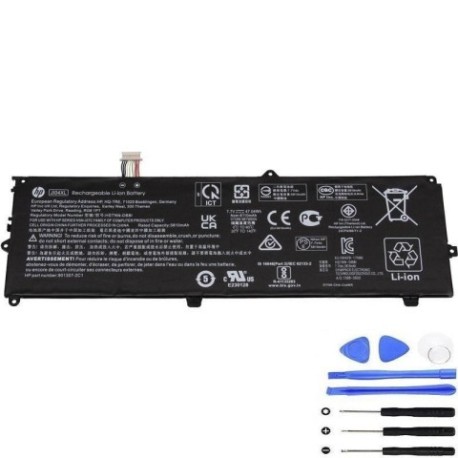
Keep your HP Elite x2 1012 G2s running at peak performance with our authorised HP JI04XL 47Wh replacement battery. This high-quality battery ensures reliable power for your mobile computing needs across Australia and New Zealand.
Common signs you need a replacement
| Symptoms | Causes | Verification | Recommendation |
|---|---|---|---|
| Battery drains quickly | Ageing cells | Check battery health in system settings | Consider replacement if under 50% capacity |
| Laptop shuts down unexpectedly | Voltage instability | Monitor battery percentage during use | Replace immediately for data safety |
| Battery won’t charge fully | Charging circuit failure | Test with different charger | Replace battery if issue persists |
| Battery swelling | Internal damage | Visual inspection | Replace urgently – safety hazard |
How to check compatibility
Verify your current battery part number matches one listed above. Check your laptop’s model number on the bottom casing or in system information. All HP JI04XL variants are cross-compatible with the HP Elite x2 1012 G2s.
When to replace
Replace your battery when runtime drops below 2 hours, charging takes longer than 4 hours, or you notice physical swelling. Most batteries need replacement after 2-3 years of regular use in AU/NZ conditions.
Installation guide (overview)
Power down and unplug your device. Remove the back panel using appropriate tools. Disconnect the old battery connector and lift it out. Insert the new HP JI04XL battery, reconnect the cable, and reassemble. Charge fully before first use.
Usage & care tips
Avoid extreme temperatures – ideal range 10-35°C. Don’t leave laptop plugged in constantly. Calibrate monthly by fully discharging then charging. Store at 40-60% charge if not using for extended periods.
Safety & recycling in AU/NZ
Never puncture or disassemble batteries. Dispose of old batteries at authorised recycling centres. In Australia, use Batteryback or council collection services. In New Zealand, utilise Reclaim programme drop-off points.
FAQ
How long does shipping take in Australia?
Most metropolitan areas receive orders within 3-5 business days.
Is this battery genuine HP?
This is a high-quality replacement battery compatible with HP devices, meeting original specifications.
What warranty do you offer?
All our batteries come with 12 months warranty covering manufacturing defects.
Can I use this battery in New Zealand?
Yes, this battery is compatible with power systems in both Australia and New Zealand.
How do I check battery health?
Use HP Support Assistant or Windows battery report to monitor capacity and health.
What tools do I need for installation?
Most HP Elite x2 models require a Torx T5 screwdriver and plastic spudger for safe disassembly.
Is professional installation available?
We recommend consulting authorised HP service centres for professional installation if unsure.