Battery models & part numbers
| Reference / P/N |
|---|
| 916368-421 |
| 916368-541 |
| 916814-855 |
| HP-LK03XL-52.5Wh |
| HSTNN-IB8M |
| HSTNN-IB8V |
| HSTNN-LB7U |
| HSTNN-LB8J |
| L09049-1B1 |
| L09049-1B2 |
| L09280-855 |
| L09281-855 |
| L09911-1B1 |
| LK03 |
| LK03055XL-PR |
| TPN-132 |
| TPN-I129 |
| TPN-W127 |
| TPN-W128 |
Compatible laptop models
| Model |
|---|
| HP Envy 17-ae000s |
| HP Envy 17-ae100s |
| HP Envy 17-bw0000s |
| HP Envy 17-bw0100s |
| HP Envy 17-bw0200s |
| HP Envy 17-bw0300s |
| HP Envy 17-ce0000s |
| HP Envy 17-ce1000s |
| HP Envy 17t-ae100s |
| HP Envy 17t-ce000s |
| HP Envy x360 15-bp000s |
| HP Envy x360 15-bp100s |
| HP Envy x360 15-bq000s |
| HP Envy x360 15-bq100s |
| HP Envy x360 15-bq200s |
| HP Envy x360 15-cn0000s |
| HP Envy x360 15-cn0100s |
| HP Envy x360 15-cn0200s |
| HP Envy x360 15-cn0300s |
| HP Envy x360 15-cn0400s |
| HP Envy x360 15-cn0700s |
| HP Envy x360 15-cn0800s |
| HP Envy x360 15-cn1000s |
| HP Envy x360 15-cn1600s |
| HP Envy x360 15-cn1800s |
| HP Envy x360 15-cp0000s |
| HP Envy x360 15-cp0800s |
| HP Envy x360 15m-bp000s |
| HP Envy x360 15m-bq000s |
| HP Envy x360 15m-cn0000s |
| HP Envy X360 15m-cp0000s |
| HP Envy x360 15z-bq100 CTOs |
| HP Envy x360 15z-bq100s |
| HP Pavilion x360 15-cr0000s |
| HP Pavilion x360 15-cr0100s |
| HP Pavilion x360 15-cr0200s |
| HP Pavilion x360 15-cr0300s |
| HP Pavilion x360 15-cr0400s |
| HP Pavilion x360 15-cr0900s |
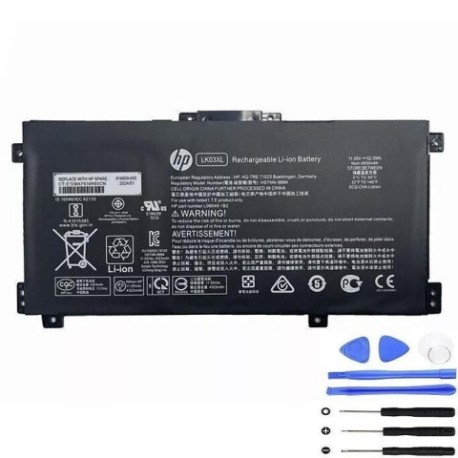
Introduction
Is your HP laptop struggling to hold a charge? The HP LK03XL 52.5Wh replacement battery restores your device’s mobility and performance. This high-quality battery is compatible with numerous HP Envy and Pavilion models commonly used across Australia and New Zealand.
Common signs you need a replacement
| Symptom | Possible Cause | How to Verify | Recommendation |
|---|---|---|---|
| Short battery life | Ageing cells, reduced capacity | Check power settings, run battery report | Consider replacement if under 2 hours |
| Laptop shuts down unexpectedly | Battery cannot maintain voltage | Monitor battery percentage drops | Replace immediately to prevent data loss |
| Battery not charging fully | Faulty charging circuit or cells | Check charging indicator and percentage | Test with different charger first |
| Physical swelling or bulging | Gas buildup from degraded cells | Visual inspection of battery compartment | Stop using immediately and replace |
| Overheating during use | Inefficient power delivery | Monitor temperature with software | Replace to prevent damage to laptop |
How to check compatibility
Verify your laptop’s compatibility by checking the model number on the bottom casing or in System Information. Cross-reference with our compatibility tables above. You can also remove your current battery and match the part number with our listed references.
When to replace
Most laptop batteries last 2-4 years with regular use. Consider replacement when your battery capacity drops below 60% of original, you experience sudden shutdowns, or notice physical swelling. In Australia’s climate, batteries may degrade faster due to heat exposure.
Installation guide (overview)
1. Power off laptop and disconnect charger
2. Remove bottom panel screws
3. Carefully disconnect battery connector
4. Remove old battery and insert new one
5. Reconnect connector and reassemble
6. Charge fully before first use
Usage & care tips
• Avoid extreme temperatures (ideal range 15-25°C)
• Calibrate battery monthly by fully charging then discharging
• Store at 40-60% charge if not using for extended periods
• Use authorised HP chargers only
• Keep battery contacts clean
Safety & recycling in AU/NZ
Never attempt to open or modify the battery. Damaged batteries should be taken to authorised recycling centres. In Australia, check with your local council for battery disposal services. In New Zealand, use dedicated battery recycling drop-off points. Never dispose of lithium batteries in household waste.
FAQ
How long does shipping take to Australia/New Zealand?
Typically 7-14 business days depending on your location.
Is this battery genuine HP?
This is a high-quality compatible replacement meeting original specifications.
What warranty is provided?
12-month warranty covering manufacturing defects.
Will this work with my HP Envy x360?
Yes, if your model appears in our compatibility list above.
How do I check my current battery health?
In Windows, open Command Prompt and type “powercfg /batteryreport”.
Can I install this battery myself?
Yes, with basic technical skills and proper tools. Follow our installation guide.
What if my laptop model isn’t listed?
Check your battery’s part number against our reference list for confirmation.