HP RG04XL 51Wh Battery Replacement Guide
Find the perfect replacement battery for your HP laptop with our comprehensive AU/NZ guide. This high-quality 51Wh battery ensures optimal performance for compatible HP models.
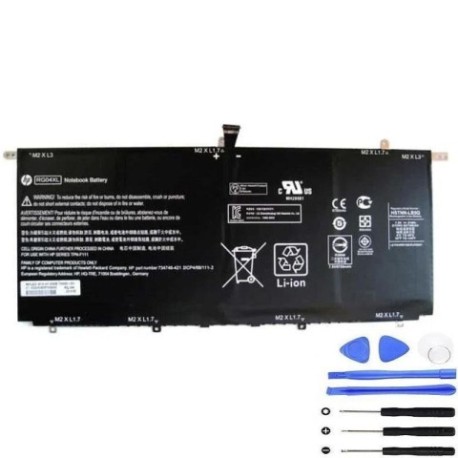
Battery models & part numbers
| Reference / P/N |
|---|
| HP 734746-421 |
| HP 734998-001 |
| HP HSTNN-LB5Q |
| HP RG04051XL |
| HP-RG04XL-51Wh |
Compatible laptop models
| Model |
|---|
| HP Spectre 13-3000 13t-3000 TPN-F111 |
Introduction
The HP RG04XL 51Wh battery is designed to provide reliable power for compatible HP laptops. Manufactured to meet original equipment specifications, this replacement battery offers the same performance and safety features as genuine HP batteries.
Common signs you need a replacement
| Symptom | Cause | Verification | Recommendation |
|---|---|---|---|
| Short battery life | Ageing cells | Check power settings | Replace battery |
| Laptop won’t charge | Faulty battery circuit | Test with different charger | Replace battery |
| Battery swelling | Internal damage | Visual inspection | Immediate replacement |
| Overheating | Cell degradation | Temperature check | Replace battery |
How to check compatibility
Verify your laptop’s compatibility by checking the model number on the bottom casing or in system information. Compare with our compatibility list above. For HP laptops, you can also check the original battery’s part number.
When to replace
Replace your battery when it holds less than 50% of its original capacity, shows physical damage, or fails to charge properly. Most laptop batteries need replacement after 2-3 years of regular use.
Installation guide (overview)
1. Power off laptop and disconnect charger
2. Remove bottom panel screws
3. Carefully disconnect old battery connector
4. Remove old battery
5. Install new HP RG04XL 51Wh battery
6. Reconnect battery connector
7. Replace bottom panel
8. Charge fully before first use
Usage & care tips
• Avoid complete discharges – charge when battery reaches 20%
• Store in cool, dry conditions (15-25°C)
• Calibrate battery monthly by fully charging then discharging
• Use original HP charger for optimal performance
• Avoid exposing to extreme temperatures
Safety & recycling in AU/NZ
In Australia and New Zealand, laptop batteries must be recycled through authorised collection centres. Never dispose of batteries in household waste. Check with your local council for battery recycling programs. Damaged or swollen batteries should be handled with care and taken to specialised recycling facilities.
FAQ
How long does the HP RG04XL 51Wh battery last?
Typically 2-4 hours depending on usage and laptop settings.
Is this battery genuine HP?
This is a high-quality replacement battery compatible with HP laptops.
Does it come with warranty?
Yes, check product page for warranty details.
How do I know if it’s compatible?
Compare your laptop model with our compatibility list above.
Can I install it myself?
Yes, with basic technical skills and proper tools.
How long for delivery in Australia?
Typically 3-7 business days depending on location.
What if it doesn’t fit my laptop?
Return within 30 days if unused and in original packaging.