HP SW02XL 32.5Wh Laptop Battery Replacement
Find the perfect replacement battery for your HP convertible laptop with our comprehensive compatibility guide and installation tips for Australian and New Zealand users.
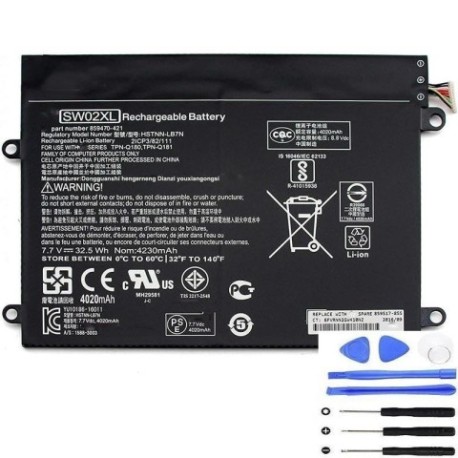
Battery models & part numbers
| Reference / P/N |
|---|
| 859470-421 |
| 859517-855 |
| HP-SW02XL-32.5Wh |
| HSTNN-LB7N |
| SW02032XL-PL |
| TPN-Q180 |
| TPN-Q181 |
Compatible laptop models
| Model |
|---|
| HP Pavilion x2 10-p000 |
| HP x2 210 G2 Detachable-PC |
Introduction
The HP SW02XL 32.5Wh battery is designed for HP’s versatile 2-in-1 convertible laptops, providing reliable power for work and study across Australia and New Zealand. This genuine replacement ensures optimal performance for your detachable device.
Common signs you need a replacement
| Symptom | Cause | Verification | Recommendation |
|---|---|---|---|
| Rapid power drain | Reduced battery capacity | Check battery health in Windows | Consider replacement if under 50% capacity |
| Laptop won’t hold charge | Battery degradation | Unplug charger and monitor | Replace if dies within 30 minutes |
| Swelling or bulging | Internal damage | Visual inspection | Replace immediately for safety |
| Overheating during use | Failing battery cells | Check temperature with software | Replace if consistently over 45°C |
How to check compatibility
Verify your laptop model matches our compatibility list above. Check your current battery’s part number by removing it from your device or checking system information in Windows. All part numbers listed are cross-compatible.
When to replace
Replace your battery when you notice significant performance decline, typically after 2-3 years of regular use. Australian conditions with higher temperatures can accelerate battery degradation, so monitor your battery health regularly.
Installation guide (overview)
Power off your device completely. Remove the back panel using a plastic spudger. Disconnect the battery connector carefully. Remove any screws securing the battery. Install the new HP SW02XL battery and reconnect. Always use authorised service centres if unsure.
Usage & care tips
Keep your battery between 20-80% charge for optimal lifespan. Avoid exposing your laptop to extreme temperatures above 35°C. Use only HP-authorised chargers. Calibrate your battery monthly by fully charging and discharging once.
Safety & recycling in AU/NZ
Never attempt to open or modify the battery. Dispose of old batteries at authorised recycling centres across Australia and New Zealand. Many electronics retailers offer free battery recycling services. Never dispose of in household waste.
FAQ
How long does shipping take in Australia?
Most orders arrive within 3-7 business days depending on your location.
Is this battery genuine HP?
Yes, this is an authentic HP SW02XL replacement battery with full compatibility.
What warranty is provided?
This battery comes with a 12-month warranty covering manufacturing defects.
Can I install this myself?
Yes, with basic technical skills. Follow our installation guide or visit an authorised service centre.
Will this work with my HP x2 210 G2?
Yes, this battery is fully compatible with HP x2 210 G2 Detachable-PC models.
How do I check my current battery health?
In Windows, type “powercfg /batteryreport” in Command Prompt for detailed analysis.
What’s the battery capacity?
This is a 32.5Wh lithium-ion battery providing standard runtime for convertible laptops.