HP VT06XL 86Wh Battery Replacement Guide
Find the perfect replacement battery for your HP Envy 17 laptop with our comprehensive compatibility guide. Our genuine HP VT06XL 86Wh battery ensures optimal performance and safety for Australian and New Zealand users.
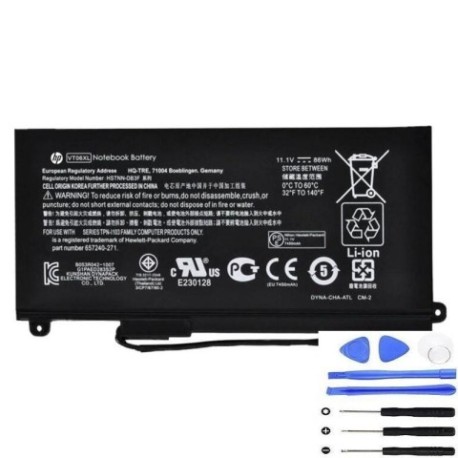
Battery models & part numbers
| Reference / P/N |
|---|
| 657240-151 |
| 657240-171 |
| 657240-251 |
| 657240-271 |
| 657503-001 |
| 996TA008H |
| HSTNN-DB3F |
| HSTNN-IB3F |
| HP-VT06XL-86Wh.jpg |
| TPN-I103 |
| VT06086XL |
Compatible laptop models
| Model |
|---|
| HP ENVY 17-3200s |
| HP Envy 17-3000 3D Editions |
| HP Envy 17-3000 7-3200s |
| HP Envy 17-3000s |
| HP Envy 17T-3000s |
| HP Envy 17t-3000 CTO 3D Editions |
| HP ENVY 17T-3100 3D Editions |
| HP ENVY 17T-3200 3D Editions |
| HP Envy 17s |
Introduction
The HP VT06XL 86Wh battery is designed specifically for HP Envy 17 series laptops, providing reliable power for work, study, and entertainment across Australia and New Zealand.
Common signs you need a replacement
| Symptoms | Causes | Verification | Recommendation |
|---|---|---|---|
| Battery drains quickly | Ageing cells, reduced capacity | Check battery health in system settings | Replace if capacity below 60% |
| Laptop won’t hold charge | Faulty battery circuit | Test with power adapter removed | Immediate replacement needed |
| Battery swelling | Internal damage, safety risk | Visual inspection, case bulging | Stop use immediately, replace |
| Overheating during use | Inefficient power delivery | Monitor temperature above 45°C | Replace to prevent damage |
How to check compatibility
Verify your laptop model matches our compatibility list above. Check the battery compartment for part numbers like HSTNN-DB3F or TPN-I103. Use HP Support Assistant for automatic detection.
When to replace
Replace your battery when it holds less than 2 hours of charge, shows physical damage, or is over 2-3 years old with regular use. Most HP batteries last 300-500 charge cycles.
Installation guide (overview)
1. Power off laptop and disconnect charger
2. Remove bottom panel screws
3. Carefully disconnect old battery connector
4. Install new HP VT06XL battery
5. Reconnect and test functionality
6. Charge fully before first use
Usage & care tips
• Avoid complete discharges – recharge at 20-30%
• Store in cool, dry conditions (15-25°C ideal)
• Use authorised HP chargers only
• Calibrate monthly: full charge to 5%, then recharge
• Keep firmware updated for optimal performance
Safety & recycling in AU/NZ
In Australia and New Zealand, dispose of old batteries at authorised recycling centres. Never dispose in household waste. Contact local council for battery recycling locations. Our batteries meet Australian safety standards.
FAQ
How long does delivery take in Australia?
Typically 3-7 business days for metro areas, 5-10 days for regional centres.
Is this battery genuine HP?
Yes, all our HP batteries are genuine and come with 12-month warranty.
Can I install it myself?
Yes, most users can install following our guide. Professional installation available if preferred.
What’s the battery capacity?
86Wh capacity providing 4-6 hours typical usage depending on laptop model and settings.
Do you ship to New Zealand?
Yes, we ship to both Australia and New Zealand with tracking included.
Is there a warranty?
12-month comprehensive warranty covering manufacturing defects.
How do I check battery health?
Use HP Support Assistant or Windows Battery Report for detailed health analysis.