Lenovo 01AV418 41Wh Battery Replacement Guide
Find the perfect replacement battery for your Lenovo laptop with our comprehensive compatibility guide for Australian and New Zealand users.
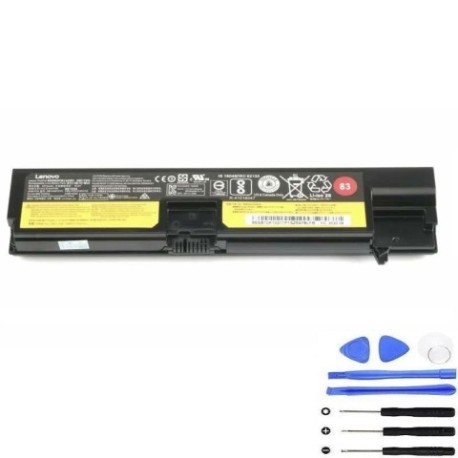
Battery models & part numbers
| Reference / P/N |
|---|
| Lenovo 01AV414 |
| Lenovo 01AV415 |
| Lenovo 01AV416 |
| Lenovo 01AV417 |
| Lenovo-01AV418-41Wh |
| Lenovo 4X50M33573 |
| Lenovo 4X50M33574 |
| Lenovo 82 83 |
| Lenovo SB10K97571 |
| Lenovo SB10K97572 |
| Lenovo SB10K97574 |
| Lenovo SB10K97575 |
Compatible laptop models
| Model |
|---|
| Lenovo ThinkPad E575 (20H8) |
Introduction
The Lenovo 01AV418 41Wh battery is a high-quality replacement solution designed specifically for various Lenovo laptop models. This guide helps Australian and New Zealand consumers identify compatibility and make informed purchasing decisions.
Common signs you need a replacement
| Symptoms | Causes | Verification | Recommendation |
|---|---|---|---|
| Short battery life | Ageing cells | Check power settings | Replace battery |
| Laptop won’t charge | Faulty battery circuit | Try different charger | Test with new battery |
| Battery swelling | Internal damage | Visual inspection | Replace immediately |
| Overheating | Poor ventilation | Temperature check | Clean vents & replace |
How to check compatibility
Check your laptop’s model number on the bottom casing or in system information. Compare with our compatibility tables above. Ensure the physical dimensions match (approximately 260mm x 70mm x 20mm).
When to replace
Replace your battery when it holds less than 50% of its original capacity, shows physical damage, or causes system instability. Most batteries last 2-3 years with regular use.
Installation guide (overview)
Power off your laptop and disconnect the charger. Remove the bottom panel, disconnect the old battery connector, and carefully remove any screws. Install the new battery, reconnect the connector, and replace the panel.
Usage & care tips
Avoid extreme temperatures (ideal range 15-25°C). Don’t leave your laptop plugged in constantly. Calibrate your battery monthly by fully charging and discharging. Store in a cool, dry place when not in use.
Safety & recycling in AU/NZ
Always purchase from authorised retailers. Damaged batteries should be recycled at designated e-waste centres. In Australia, use Batteryback or similar programmes. In New Zealand, check with local council recycling facilities.
FAQ
How long does shipping take to AU/NZ?
Typically 7-14 business days depending on your location.
Is this battery genuine Lenovo?
This is a high-quality compatible replacement meeting original specifications.
What’s the warranty period?
Most replacement batteries come with 12 months warranty.
Can I use this battery with different laptop models?
Only use with compatible models listed in our tables to avoid damage.
How do I dispose of my old battery?
Take it to your local e-waste recycling centre – never dispose in household rubbish.
Will this affect my laptop’s performance?
A new battery should restore original performance and battery life.
What if the battery doesn’t fit?
Double-check compatibility and contact the retailer for returns if incorrect.