Battery models & part numbers
| Reference / P/N |
|---|
| 00NY490 |
| 00NY492 |
| 00NY493 |
| 4X50K14090 |
| 4X50K14091 |
| 77 77+ |
| Lenovo-01AV477-90Wh |
| P50 (20EN) |
| SB10H45077 |
| ThinkPad P50 |
| ThinkPad P50 (20EQ/20EN) |
| ThinkPad P51 |
| ThinkPad P51 (20HH/20HJ) |
| ThinkPad P51 (20MM/20MN) |
Compatible laptop models
| Model |
|---|
| ThinkPad P50 |
| ThinkPad P50 (20EQ/20EN) |
| ThinkPad P51 |
| ThinkPad P51 (20HH/20HJ) |
| ThinkPad P51 (20MM/20MN) |
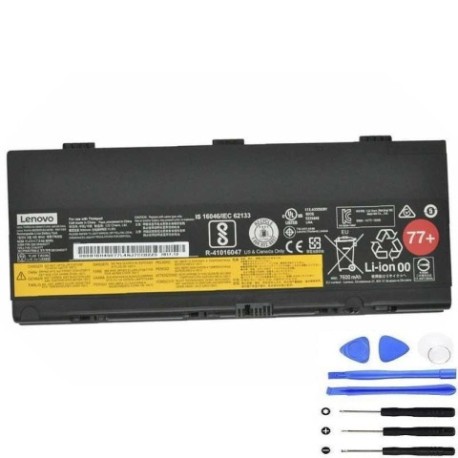
Introduction
Keep your Lenovo ThinkPad P50 or P51 running at peak performance with our genuine replacement battery. This 90Wh power solution ensures your mobile workstation maintains optimal uptime for demanding professional tasks.
Common signs you need a replacement
| Symptoms | Causes | Verification | Recommendation |
|---|---|---|---|
| Battery drains quickly | Ageing cells, reduced capacity | Check battery health in Lenovo Vantage | Consider replacement if under 50% capacity |
| Laptop shuts down unexpectedly | Voltage drops under load | Monitor during intensive tasks | Replace immediately for data safety |
| Battery won’t charge fully | Charging circuit issues, worn cells | Check charging status indicator | Replace if stuck below 80% charge |
| Battery swelling or overheating | Internal damage, safety risk | Visual inspection, temperature check | Replace urgently – safety hazard |
| Incorrect battery detection | Communication errors | Device Manager battery status | Replace if persistent detection issues |
How to check compatibility
Verify your laptop model matches our compatibility list. Check the label on the bottom of your device or use Lenovo Vantage software to confirm your exact model number. Cross-reference with our authorised compatibility table above.
When to replace
Replace your battery when capacity drops below 60%, you experience frequent unexpected shutdowns, or the battery shows physical damage. Most Lenovo batteries last 2-3 years with regular use before requiring replacement.
Installation guide (overview)
Power down your laptop completely. Remove the main battery compartment cover using the appropriate screwdriver. Disconnect the old battery connector and remove any securing screws. Install the new battery, reconnect the connector, and replace the cover. Allow the battery to charge fully before first use.
Usage & care tips
Store batteries at room temperature (15-25°C). Avoid complete discharges – recharge when reaching 20% capacity. For long-term storage, maintain 40-60% charge. Use only Lenovo-approved chargers. Calibrate your battery monthly by fully charging then discharging to maintain accuracy.
Safety & recycling in AU/NZ
Never disassemble lithium-ion batteries. Dispose of old batteries at authorised recycling centres – most electronics retailers offer free battery recycling services. In Australia, use Batteryback or similar programmes. In New Zealand, check with your local council for approved disposal facilities.
FAQ
How long does shipping take within Australia?
Most orders ship within 1-2 business days with delivery typically 3-7 business days depending on your location.
Is this battery genuine Lenovo?
Yes, this is an authentic Lenovo battery with full manufacturer warranty and compatibility assurance.
What’s the warranty period?
This battery comes with a standard 12-month warranty covering manufacturing defects and performance issues.
Can I use this battery with older ThinkPad models?
No, this battery is specifically designed for ThinkPad P50 and P51 series only. Using incompatible batteries may damage your device.
How do I check my current battery health?
Use Lenovo Vantage software or Windows Battery Report to view current capacity and cycle count information.
Is installation difficult?
Most users can install this battery in 5-10 minutes with basic tools. If unsure, consult a professional technician.
What if my laptop model isn’t listed?
Contact our support team with your exact model number for compatibility verification before purchase.