Lenovo 01AV493 32Wh Battery Replacement Guide
Find the perfect replacement battery for your Lenovo laptop with our comprehensive compatibility guide and expert advice for Australian and New Zealand users.
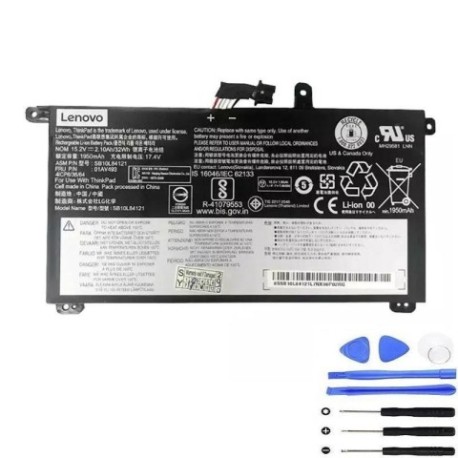
Battery models & part numbers
| Reference / P/N |
|---|
| 00UR890 |
| 00UR891 |
| Lenovo-01AV493-32Wh |
| SB10L84121 |
| SB10L84122 |
Compatible laptop models
| Model |
|---|
| Lenovo ThinkPad P51s (20HB/20HC) |
| Lenovo ThinkPad P51s (20JY/20K0) |
| Lenovo ThinkPad P52s (20LB/20LC) |
| Lenovo ThinkPad T570 (20H9/20HA) |
| Lenovo ThinkPad T570 (20JW/20JX) |
| Lenovo ThinkPad T580 (20L9/20LA) |
Introduction
The Lenovo 01AV493 32Wh battery is a high-quality replacement solution for various ThinkPad models. This authorised replacement ensures your laptop maintains optimal performance and mobility throughout Australia and New Zealand.
Common signs you need a replacement
| Symptoms | Causes | Verification | Recommendation |
|---|---|---|---|
| Rapid power drain | Ageing battery cells | Check battery health in system settings | Replace if capacity below 50% |
| Laptop won’t hold charge | Failed battery circuits | Test with power adapter removed | Immediate replacement needed |
| Battery swelling | Internal chemical breakdown | Visual inspection of battery case | Replace immediately for safety |
| Overheating during use | Inefficient power delivery | Monitor temperature with software | Replace to prevent damage |
How to check compatibility
Verify your laptop model matches our compatibility list above. Check your current battery’s part number (usually printed on the battery) or use Lenovo’s official support centre website with your serial number.
When to replace
Replace your battery when it no longer holds sufficient charge for your needs, shows physical damage, or reaches 2-3 years of regular use. Most batteries degrade significantly after 500 charge cycles.
Installation guide (overview)
Power off your laptop and disconnect the charger. Remove the bottom panel (usually secured with screws), disconnect the old battery connector, remove mounting screws, install the new battery, reconnect the connector, and reassemble. Always refer to your specific model’s service manual.
Usage & care tips
Keep your battery between 20-80% charge for optimal lifespan. Avoid extreme temperatures (ideal range 15-25°C). Store in a cool, dry place when not in use for extended periods. Calibrate your battery monthly by fully charging and discharging.
Safety & recycling in AU/NZ
Never attempt to open or modify the battery. Dispose of old batteries at authorised recycling centres – most electronics retailers in Australia and New Zealand offer free battery recycling services. Do not dispose of in household waste.
FAQ
How long does shipping take to AU/NZ?
Typically 7-14 business days depending on your location.
Is this battery genuine Lenovo?
This is a high-quality compatible replacement that meets or exceeds original specifications.
What warranty is provided?
Most replacement batteries come with a 12-month warranty covering manufacturing defects.
Can I use this battery with older ThinkPad models?
Only use with compatible models listed above to ensure proper fit and function.
How do I maximise battery life?
Avoid complete discharges, keep away from heat sources, and use power-saving modes when possible.
Is installation difficult?
Most ThinkPad batteries are user-replaceable with basic tools and following proper safety procedures.
What if my model isn’t listed?
Contact the supplier with your exact laptop model number for compatibility verification.