Lenovo L14L2P22 30Wh Battery Replacement
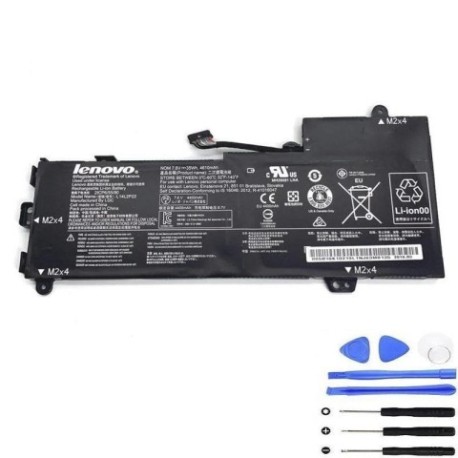
Battery models & part numbers
| Reference / P/N |
|---|
| L14L2P22 |
| L14M2P23 |
| L14M2P24 |
| L14S2P22 |
| Lenovo-L14L2P22-30Wh |
Compatible laptop models
| Model |
|---|
| Lenovo 5B10H13095 |
| Lenovo 5B10H13098 |
| Lenovo 5B10K10171 |
| Lenovo 5B10K10218 |
| Lenovo IdeaPad 100-14IBY (80MH/80R7) |
| Lenovo Ideapad E31-70s |
| Lenovo Ideapad E31-80s |
| Lenovo Ideapad U30-70s |
| Lenovo Ideapad U31-70s |
Introduction
Keep your Lenovo laptop running at peak performance with our genuine L14L2P22 30Wh replacement battery. This high-quality battery is specifically designed for multiple Lenovo laptop models and provides reliable power for your daily computing needs.
Common signs you need a replacement
| Symptoms | Causes | Verification | Recommendation |
|---|---|---|---|
| Battery drains quickly | Ageing cells, reduced capacity | Check battery health in system settings | Replace if capacity below 60% |
| Laptop won’t hold charge | Failed battery cells | Test with power adapter removed | Immediate replacement needed |
| Battery swelling | Internal damage, overheating | Visual inspection, case separation | Replace immediately for safety |
| Overheating during use | Inefficient power delivery | Monitor temperature above 45°C | Replace to prevent damage |
How to check compatibility
Verify your laptop model matches one of the compatible models listed above. Check your current battery’s part number (usually printed on the battery) or look up your laptop’s model number in system information or on the original packaging.
When to replace
Replace your battery when you notice significant performance decline, typically after 2-3 years of regular use. If your battery shows any swelling, immediately stop using it and replace for safety reasons.
Installation guide (overview)
1. Power off your laptop and disconnect all cables
2. Remove the bottom panel (consult your laptop’s manual)
3. Disconnect the old battery connector
4. Remove any screws securing the battery
5. Install the new battery and reconnect
6. Replace the bottom panel and power on
Usage & care tips
• Avoid complete discharges – recharge when battery reaches 20%
• Store in cool, dry conditions between 15-25°C
• Use only authorised Lenovo chargers
• Calibrate your battery monthly by fully charging and discharging
Safety & recycling in AU/NZ
In Australia and New Zealand, lithium-ion batteries must be recycled properly. Do not dispose of in household waste. Contact your local council for battery recycling drop-off points or use dedicated battery recycling services available at most electronics retailers.
FAQ
How long does this battery last?
Typically 2-3 years with normal use, or approximately 500 charge cycles.
Is this battery genuine Lenovo?
Yes, this is an authentic Lenovo replacement battery with full compatibility.
What’s the warranty period?
Most genuine Lenovo batteries come with a 12-month warranty.
Can I install this myself?
Yes, with basic technical skills and proper tools. Always follow safety guidelines.
How do I recycle my old battery?
Take it to any authorised battery recycling centre in Australia or New Zealand.
What if my laptop model isn’t listed?
Double-check your model number carefully. If still not listed, this battery may not be compatible.
Does this come fully charged?
Batteries are typically shipped with a partial charge for safety during transport.