Lenovo L14M2P22 30Wh Battery Replacement Guide
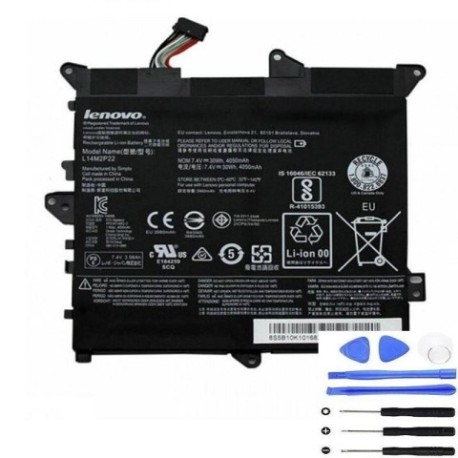
Battery models & part numbers
| Reference / P/N |
|---|
| Lenovo-L14M2P22-30Wh |
Compatible laptop models
| Model |
|---|
| Lenovo 5B10H09630 |
| Lenovo 5B10H09632 |
| Lenovo 5B10H11758 |
| Lenovo 5B10K10168 |
| Lenovo 5B10K10179 |
| Lenovo 5B10K10228 |
| Lenovo Flex 3-1120 |
| Lenovo Flex 3-1120 (80LX) |
| Lenovo Flex 3-1130 (80LY) |
| Lenovo IdeaPad 300S-11IBR (80KU) |
| Lenovo L14S2P21 |
| Lenovo Yoga 300-11IBR (80M1) |
| Lenovo Yoga 300-11IBY (80M0) |
Introduction
If your Lenovo laptop is experiencing battery issues, the L14M2P22 30Wh replacement battery is the authorised solution for multiple Lenovo models. This high-quality battery ensures optimal performance and reliability for your device.
Common signs you need a replacement
| Symptoms | Causes | Verification | Recommendation |
|---|---|---|---|
| Rapid battery drain | Ageing battery cells | Check battery health in system settings | Replace if capacity below 50% |
| Laptop won’t hold charge | Battery degradation | Test with power adapter removed | Immediate replacement needed |
| Battery swelling | Internal damage or overheating | Visual inspection of battery compartment | Replace immediately for safety |
| Inconsistent charging | Faulty battery circuitry | Monitor charging patterns | Replace to prevent damage |
How to check compatibility
Verify your laptop model matches one of the compatible models listed above. Check the label on the bottom of your laptop or in system information. The L14M2P22 battery is specifically designed for these Lenovo models and ensures perfect fit and performance.
When to replace
Replace your battery when you notice significant performance decline, typically after 2-3 years of regular use. If your battery shows any swelling or doesn’t hold charge for more than 30 minutes, immediate replacement is recommended for safety and optimal device performance.
Installation guide (overview)
1. Power off your laptop and disconnect all cables
2. Remove the bottom panel using appropriate screwdrivers
3. Disconnect the old battery connector carefully
4. Remove the old battery and insert the new L14M2P22
5. Reconnect the battery connector and replace the panel
6. Charge fully before first use
Usage & care tips
• Avoid extreme temperatures (ideal range 15-25°C)
• Don’t leave laptop plugged in constantly
• Perform regular full discharge cycles
• Store in cool, dry conditions when not in use
• Use only authorised Lenovo chargers
Safety & recycling in AU/NZ
In Australia and New Zealand, laptop batteries must be recycled properly. Do not dispose of in household waste. Contact your local council recycling centre or authorised battery recycling programs. Many electronics retailers offer free battery recycling services.
FAQ
How long does the L14M2P22 battery last?
Typically 2-3 years with normal use, or approximately 500 charge cycles.
Is this battery compatible with my Lenovo Flex 3?
Yes, it’s compatible with Flex 3-1120 and Flex 3-1130 models as listed.
Do you offer warranty?
Yes, our batteries come with a 12-month warranty for peace of mind.
How do I recycle my old battery in Australia?
Take it to any Battery World store or council recycling centre for proper disposal.
Will this battery improve my laptop’s performance?
Yes, a new battery restores original runtime and prevents unexpected shutdowns.
Is installation difficult?
Most users can install it following our guide, but professional installation is available.
Do you ship to New Zealand?
Yes, we ship throughout Australia and New Zealand with fast delivery options.