Lenovo L14M3P24 45Wh Battery Replacement Guide
Find the perfect replacement battery for your Lenovo laptop with our comprehensive compatibility guide and installation instructions.
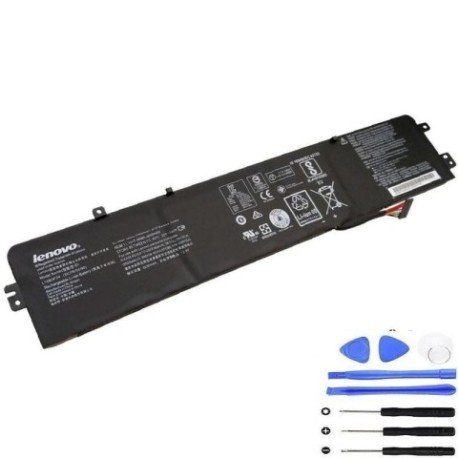
Battery models & part numbers
| Reference / P/N |
|---|
| 5B10H41180 |
| 5B10H52788 |
| A715IS |
| L14M3P24 |
| L14S3P24 |
| L16M3P24 |
| L16S3P24 |
| Lenovo-L14M3P24-45Wh |
Compatible laptop models
| Model |
|---|
| Lenovo IdeaPad 700-15ISK |
| Lenovo IdeaPad 700-15ISK (80RU) |
| Lenovo IdeaPad 700-17ISK (80RV) |
| Lenovo IdeaPad Y700-14ISK |
| Lenovo IdeaPad Y700-14ISK (80NU) |
| Lenovo Ideapad Y520-15IKBN |
| Lenovo Legion Y520-15IKBN (80WK) |
Introduction
The Lenovo L14M3P24 45Wh battery is a high-quality replacement designed specifically for various Lenovo laptop models. This genuine-compatible battery ensures optimal performance and reliability for your computing needs.
Common signs you need a replacement
| Symptoms | Causes | Verification | Recommendation |
|---|---|---|---|
| Rapid battery drain | Ageing cells | Check battery health in system settings | Replace if capacity below 50% |
| Laptop won’t hold charge | Battery degradation | Test with power adapter removed | Immediate replacement needed |
| Swollen battery case | Internal pressure build-up | Visual inspection | Replace immediately for safety |
| Overheating during use | Faulty battery management | Monitor temperature with software | Replace to prevent damage |
How to check compatibility
Verify your laptop model matches one of the compatible models listed above. Check your current battery’s part number or consult your laptop’s documentation. For additional confirmation, use Lenovo’s official support website with your serial number.
When to replace
Replace your battery when you notice significant performance degradation, typically after 2-3 years of regular use. Immediate replacement is required for swollen batteries or those that no longer hold charge. Regular Australian conditions (20-25°C) are ideal for battery longevity.
Installation guide (overview)
1. Power off your laptop and disconnect all cables
2. Remove the bottom panel using appropriate screwdrivers
3. Disconnect the old battery connector carefully
4. Remove any securing screws and lift out the old battery
5. Insert the new L14M3P24 battery and secure with screws
6. Reconnect the battery connector and replace the bottom panel
7. Charge fully before first use
Usage & care tips
• Avoid extreme temperatures – store between 15-25°C
• Calibrate your battery monthly by fully charging and discharging
• Use original or authorised chargers only
• Remove from laptop if storing for extended periods
• Keep battery contacts clean and dry
Safety & recycling in AU/NZ
In Australia and New Zealand, lithium-ion batteries must be recycled responsibly. Do not dispose of in household waste. Use authorised battery recycling centres available at most electronics retailers. Damaged or swollen batteries should be handled with care and recycled immediately.
FAQ
How long does this battery last?
Typically 2-4 years with normal use, providing 3-5 hours of runtime depending on usage.
Is this battery genuine Lenovo?
This is a high-quality compatible replacement that meets or exceeds original specifications.
What warranty is provided?
Most suppliers offer 12-24 month warranties for peace of mind.
How do I recycle my old battery?
Take it to any authorised battery recycling centre in Australia or New Zealand.
Can I install this battery myself?
Yes, with basic technical skills and proper tools, most users can complete the installation.
What if my model isn’t listed?
Double-check your laptop’s exact model number and consult with the supplier for confirmation.
How long for delivery in AU/NZ?
Typically 3-7 business days depending on your location within Australia or New Zealand.