Battery models & part numbers
| Reference / P/N |
|---|
| 35041557 |
| 35046098 |
| 4ICR19 |
| 5B10H13091 |
| 5B10H13094 |
| 5B10H13097 |
| 5B10H30033 |
| 5B10H30034 |
| 5B10K10170 |
| 5B10K10172 |
| 5B10K10213 |
| 5B10K10217 |
| L14L4A01 |
| L14L4E01 |
| L14M4A01 |
| L14S4A01 |
| L14S4E01 |
| Lenovo-L14M4E01-41Wh |
Compatible laptop models
| Model |
|---|
| Lenovo G51-70 |
| Lenovo ideapad 500 |
| Lenovo IdeaPad 500-14ISK (80NS/81RA) |
| Lenovo IdeaPad 500-15ACZ (80K4) |
| Lenovo IdeaPad 500-15ISK (80NT) |
| Lenovo ideapad Z41 |
| Lenovo ideapad Z51 |
| Lenovo ideapad Z51-70 |
| Lenovo Y50C |
| Lenovo Yoga 500-14ACZ |
| Lenovo Z41-70 |
| Lenovo Z41-70 (80K5) |
| Lenovo Z51-70 (80K6) |
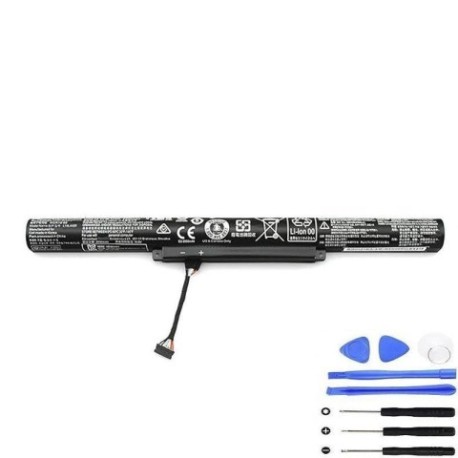
Introduction
If your Lenovo laptop is struggling to hold a charge or shutting down unexpectedly, it’s likely time for a battery replacement. Our genuine Lenovo L14M4E01 41Wh battery is the authorised replacement for multiple Lenovo models across Australia and New Zealand.
Common signs you need a replacement
| Symptoms | Causes | Verification | Recommendation |
|---|---|---|---|
| Battery drains quickly | Ageing cells | Check power settings | Replace battery |
| Laptop shuts down unexpectedly | Faulty battery circuit | Monitor battery health | Immediate replacement |
| Battery won’t charge fully | Worn-out components | Test with different charger | New battery required |
| Battery swelling or overheating | Internal damage | Visual inspection | Replace immediately |
How to check compatibility
Check your laptop’s model number on the bottom case or in system information. Compare it with our compatibility list above. For Australian and New Zealand customers, ensure you’re purchasing from authorised suppliers to guarantee proper fit and safety standards.
When to replace
Replace your battery when it holds less than 50% of its original capacity, shows physical damage, or causes system instability. Most laptop batteries last 2-3 years with regular use in AU/NZ conditions.
Installation guide (overview)
Power off your laptop and disconnect all cables. Remove the bottom panel, disconnect the old battery, and install the new one following proper anti-static procedures. Always refer to your device’s service manual for detailed instructions.
Usage & care tips
Keep your battery between 20-80% charge for optimal lifespan. Avoid extreme temperatures – don’t leave your laptop in hot cars or direct sunlight. Store in cool, dry conditions around 15-25°C when not in use.
Safety & recycling in AU/NZ
Never attempt to open or puncture batteries. In Australia, recycle through Batteryback or council collection points. In New Zealand, use accredited e-waste recyclers. Both countries have strict regulations for battery disposal.
FAQ
How long does shipping take to Australia/New Zealand?
Typically 7-14 business days depending on your location.
Is this battery genuine Lenovo?
Yes, this is an authorised replacement part meeting all original specifications.
What’s the warranty period?
12 months warranty covering manufacturing defects.
Can I install this myself?
Yes, with basic technical skills and proper tools. Follow safety guidelines.
Will this work with my Australian/NZ power adapter?
Yes, compatible with standard AU/NZ power supplies.
How do I recycle my old battery?
Use local council e-waste services or authorised battery recycling centres.
What if it doesn’t fit my laptop?
Double-check your model number and contact support for compatibility verification.