Battery models & part numbers
| Reference / P/N |
|---|
| Lenovo-L15L4A02-32Wh |
Compatible laptop models
| Model |
|---|
| Lenovo 5B10I04165 |
| Lenovo 5B10L04160 |
| Lenovo 5B10L04163 |
| Lenovo 5B10L04212 |
| Lenovo 5B10L04213 |
| Lenovo L15C3A01 |
| Lenovo L15C4A02 |
| Lenovo L15C4E01 |
| Lenovo L15D3A01 |
| Lenovo L15L3A01 |
| Lenovo L15L3A02 |
| Lenovo L15S3A01 |
| Lenovo L15S4A02 |
| Lenovo L15S4E02 |
| Lenovo V110-15AST (80TD) |
| Lenovo V110-15IKB (80TH) |
| Lenovo V110-15ISK (80TL) |
| Lenovo V310-14IKB (80T2) |
| Lenovo V310-14IKB (80V8) |
| Lenovo V310-14ISK (80SX) |
| Lenovo V310-14ISK (80UF) |
| Lenovo V310-15IKB |
| Lenovo V310-15IKB (80SY) |
| Lenovo V310-15IKB (80T3) |
| Lenovo V310-15ISK (80SY) |
| Lenovo V510-14IKB (80WR) |
| Lenovo V510-15IKB (80SV) |
| Lenovo V510-15IKB (80WQ) |
Introduction
If your Lenovo laptop is showing signs of battery fatigue, our genuine replacement battery restores optimal performance for Australian and New Zealand users.
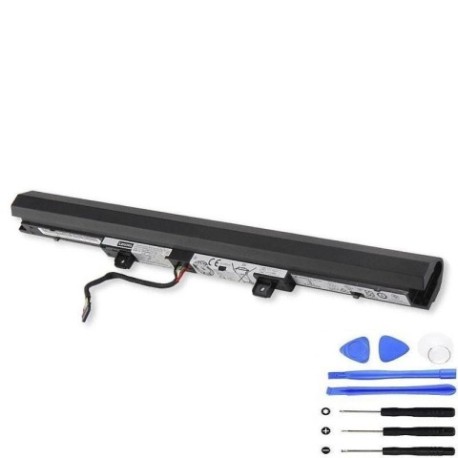
Common signs you need a replacement
| Symptom | Cause | Verification | Recommendation |
|---|---|---|---|
| Short battery life | Ageing cells | Check power settings | Consider replacement |
| Laptop shuts down unexpectedly | Battery failure | Monitor battery health | Replace immediately |
| Battery won’t charge fully | Charging circuit issue | Test with different charger | Inspect battery |
| Battery swelling | Internal damage | Visual inspection | Replace urgently |
How to check compatibility
Verify your laptop model matches our compatibility list above. Check the label on your laptop’s bottom case or battery compartment.
When to replace
Replace when battery health drops below 70% or you experience persistent power issues affecting your work.
Installation guide (overview)
Power off your laptop, remove the old battery, insert the new one securely, and power on. Always follow manufacturer guidelines.
Usage & care tips
Avoid extreme temperatures (ideal range 15-25°C), don’t leave plugged in constantly, and perform occasional full discharge cycles.
Safety & recycling in AU/NZ
Dispose of old batteries at authorised recycling centres. Never incinerate or dispose in household waste.
FAQ
How long does delivery take in Australia?
Typically 3-7 business days depending on your location.
Is this battery genuine Lenovo?
Yes, this is an authentic Lenovo replacement part.
What’s the warranty period?
12 months warranty from date of purchase.
Can I install this myself?
Yes, most users can install it following our simple guide.
Will this work with my specific model?
Check the compatibility table above for your exact model.
How do I recycle my old battery?
Take it to any authorised battery recycling centre in AU/NZ.
What if my model isn’t listed?
Contact our support team for compatibility verification.