Battery models & part numbers
| Reference / P/N |
|---|
| Lenovo L15C2PB3 |
| Lenovo L15C2PB5 |
| Lenovo L15C2PB7 |
| Lenovo L15L2PB4 |
| Lenovo L15L2PB5 |
| Lenovo L15M2PB5 |
| Lenovo L15S2TB0 |
| Lenovo-L15M2PB3-30Wh |
Compatible laptop models
| Model |
|---|
| Lenovo 5B10K87720 |
| Lenovo 5B10K87721 |
| Lenovo 5B10K87722 |
| Lenovo 5B10K88299 |
| Lenovo 5B10K90786 |
| Lenovo 5B10K90787 |
| Lenovo 5B10K90804 |
| Lenovo 5B10L13960 |
| Lenovo IdeaPad 310-15ABR (80ST) |
| Lenovo IdeaPad 310-15IAP (80TT) |
| Lenovo IdeaPad 310-15ISK (80SM/80SN) |
| Lenovo IdeaPad 510-15IKB (80SV) |
| Lenovo IdeaPad 510-15ISK (80SR) |
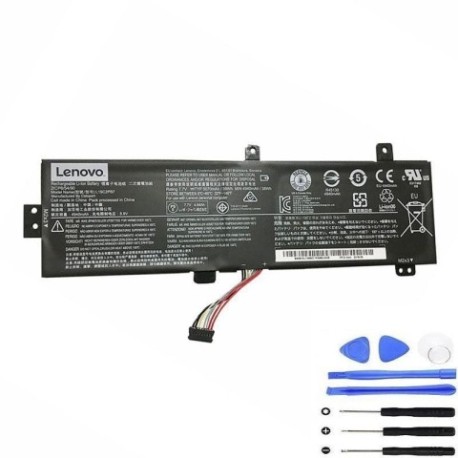
Introduction
Is your Lenovo laptop struggling to hold a charge? Our comprehensive guide helps Australian and New Zealand consumers understand battery replacement options for compatible Lenovo models. The Lenovo L15M2PB3 30Wh battery serves multiple laptop series with reliable performance.
Common signs you need a replacement
| Symptom | Possible Cause | How to Verify | Recommendation |
|---|---|---|---|
| Short battery life | Ageing cells, reduced capacity | Check power settings, monitor discharge rate | Consider replacement if under 2 hours |
| Laptop won’t charge | Faulty battery circuit, worn connectors | Try different power outlet, check charging light | Test with known working charger first |
| Battery swelling | Internal damage, overheating | Visual inspection, uneven surface | Replace immediately for safety |
| Random shutdowns | Voltage instability, cell failure | Monitor during heavy usage | Backup data and replace battery |
| Overheating | Internal resistance increase | Check temperature, feel for excess heat | Ensure proper ventilation, replace if persistent |
How to check compatibility
Verify your laptop model matches our compatibility list above. Check the label on your current battery for the part number. For Australian and New Zealand customers, cross-reference with your original purchase documentation or use Lenovo’s official support website with your serial number.
When to replace
Most laptop batteries last 2-3 years with regular use. Replace when capacity drops below 60% or if you experience any safety concerns like swelling. In AU/NZ climates, extreme temperatures can accelerate battery degradation.
Installation guide (overview)
1. Power down laptop and disconnect charger
2. Remove bottom panel screws (keep organised)
3. Carefully disconnect old battery connector
4. Remove mounting screws and old battery
5. Install new battery and reconnect
6. Replace panel and power on
7. Allow full charge cycle before use
Usage & care tips
• Avoid complete discharges – recharge at 20-30%
• Store between 15-25°C in dry conditions
• Use authorised Lenovo chargers only
• Calibrate monthly: full charge, complete discharge, recharge
• Keep contacts clean and free from dust
Safety & recycling in AU/NZ
Never dispose of lithium batteries in household waste. Use dedicated battery recycling services available at most electronics retailers across Australia and New Zealand. Damaged or swollen batteries require special handling – contact your local recycling centre for guidance.
FAQ
How long does shipping take to AU/NZ?
Typically 7-14 business days depending on your location.
Is this battery genuine Lenovo?
This is a high-quality compatible replacement meeting original specifications.
What warranty is offered?
12-month warranty covering manufacturing defects.
Can I install this myself?
Yes, with basic technical skills and proper tools. Follow our installation guide.
Will this work with my charger?
Yes, compatible with original Lenovo chargers for these models.
How do I maximise battery life?
Avoid extreme temperatures, don’t leave plugged in constantly, and perform regular calibration.
What if my model isn’t listed?
Contact us with your laptop details for compatibility verification.