Battery models & part numbers
| Reference / P/N |
|---|
| Lenovo L17C3PG0 |
| Lenovo L17M3PB0 |
| Lenovo L18D3PG1 |
| Lenovo-L17L3PB0-42Wh |
Compatible laptop models
| Model |
|---|
| Lenovo 100e 2nd Gen (81M8) |
| Lenovo 100e 2nd Gen (82GJ) |
| Lenovo 100e Chromebook (81ER) |
| Lenovo 100e ChromeBook 2nd Gen (81MA) |
| Lenovo 300e 2nd Gen (81M9) |
| Lenovo 300e 2nd Gen (82GK) |
| Lenovo 300e ChromeBook 2nd Gen (81MB) |
| Lenovo 500e Chromebook (81ES) |
| Lenovo 500e ChromeBook 2nd Gen (81MC) |
| Lenovo 5B10Q13162 |
| Lenovo 5B10Q13163 |
| Lenovo 5B10S73396 |
| Lenovo 5B10S73397 |
| Lenovo 5B10S75394 |
| Lenovo 5B10W67251 |
| Lenovo 5B10W67306 |
| Lenovo 5B10W67369 |
| Lenovo Chromebook C340-11 (81TA) |
| Lenovo Chromebook S340-14 (81TB/81V3) |
| Lenovo Chromebook S340-14 Touch (81V3) |
| Lenovo IdeaPad 3 CB-11IGL05 (82BA) |
| Lenovo IdeaPad 3 CB-14IGL05 (82C1) |
| Lenovo IdeaPad Flex 3 CB-11IGL05 (82BB) |
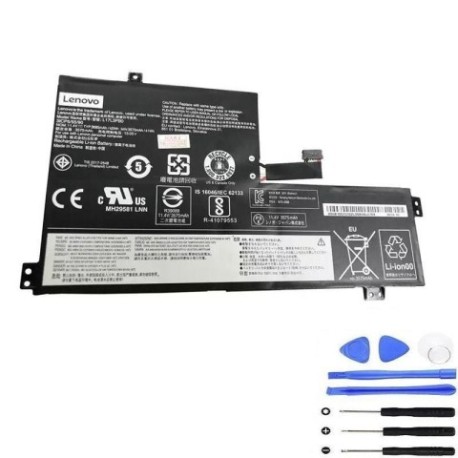
Introduction
Keep your Lenovo laptop running at peak performance with our authorised replacement batteries. The Lenovo L17L3PB0 42Wh battery is designed specifically for education and business Chromebook models, ensuring reliable power for your daily computing needs across Australia and New Zealand.
Common signs you need a replacement
| Symptoms | Possible Causes | How to Verify | Recommended Action |
|---|---|---|---|
| Battery drains quickly | Ageing battery cells | Check battery health in system settings | Consider replacement if under 50% capacity |
| Laptop won’t hold charge | Failed battery circuitry | Test with power adapter disconnected | Replace battery immediately |
| Swelling or bulging case | Battery degradation | Visual inspection of battery compartment | Stop using and replace urgently |
| Random shutdowns | Inconsistent power delivery | Monitor during heavy usage | Replace to prevent data loss |
How to check compatibility
Verify your laptop model matches exactly with our compatibility list above. Check your device’s model number on the bottom casing or in system information. For Australian and New Zealand customers, ensure you’re purchasing the correct regional variant.
When to replace
Replace your battery when it holds less than 50% of its original capacity, shows physical damage, or causes unexpected shutdowns. Most Lenovo batteries last 2-3 years with regular use in typical AU/NZ conditions.
Installation guide (overview)
1. Power off and unplug your laptop. 2. Remove the bottom cover screws. 3. Disconnect the old battery connector. 4. Remove mounting screws. 5. Install new battery and reconnect. 6. Replace cover and power on. Always refer to your device’s service manual for detailed instructions.
Usage & care tips
• Avoid extreme temperatures (ideal range 15-25°C)
• Don’t leave laptop plugged in constantly
• Calibrate battery monthly by full discharge/charge cycle
• Store in cool, dry place when not in use
• Use only authorised Lenovo chargers
Safety & recycling in AU/NZ
Dispose of old batteries responsibly through authorised e-waste recycling centres. In Australia, use Batteryback or similar programs. In New Zealand, utilise accredited e-waste collection services. Never dispose of lithium batteries in household waste.
FAQ
How long does shipping take to AU/NZ?
Typically 7-14 business days with express options available.
Is this battery genuine Lenovo?
Yes, these are authorised replacement batteries meeting original specifications.
What warranty do you offer?
12-month warranty covering manufacturing defects.
Can I install this myself?
Yes, with basic technical skills and proper tools. Professional installation available.
Will this work with my Australian charger?
Yes, compatible with standard AU/NZ power adapters.
How do I check battery health?
Use Chromebook battery diagnostics or third-party battery health tools.
What if my model isn’t listed?
Contact our support team for compatibility verification.