Battery models & part numbers
| Reference / P/N |
|---|
| Lenovo 5B10Q80766 |
| Lenovo 5B10Q82428 |
| Lenovo 5B10Q88561 |
| Lenovo 5B10Q93417 |
| Lenovo 5B10W67238 |
| Lenovo 5B10W67308 |
| Lenovo 5B10W67419 |
| Lenovo 5B10W67420 |
| Lenovo L17C3PG1 |
| Lenovo L17L3PG1 |
| Lenovo L17M3PG1 |
| Lenovo L17M3PG3 |
| Lenovo-L17M3PG1-52.5WhSHORT |
Compatible laptop models
| Model |
|---|
| Lenovo Legion Y530-15ICH (81FV) |
| Lenovo Legion Y530-15ICH (81FV/81GT/81M7/81LB) |
| Lenovo Legion Y530-15ICH (81GT) |
| Lenovo Legion Y540-15IRH-PG0 (81SY) |
| Lenovo Legion Y545-PG0 (81T2) |
| Lenovo Legion Y7000 1050 (81V4) |
| Lenovo Legion Y7000-2019-PG0 (81T0) |
| Lenovo Legion Y7000P (81HC/81LD) |
Introduction
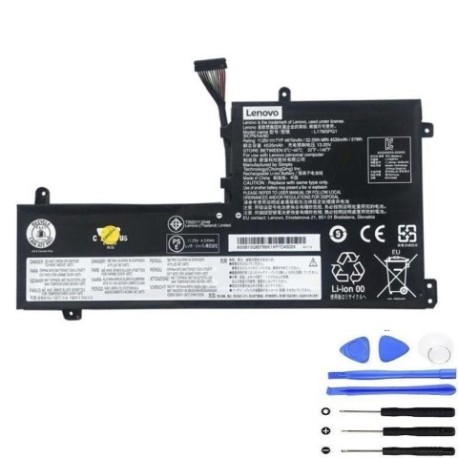
Keep your Lenovo Legion gaming laptop performing at its best with our authorised replacement battery. This 52.5Wh battery is designed specifically for Legion series models and delivers reliable power for gaming and productivity.
Common signs you need a replacement
| Symptom | Cause | Verification | Recommendation |
|---|---|---|---|
| Short battery life | Ageing cells | Check power settings | Consider replacement |
| Laptop won’t charge | Faulty battery circuit | Try different charger | Replace battery |
| Battery swelling | Internal damage | Visual inspection | Replace immediately |
| Random shutdowns | Power delivery issues | Monitor battery health | Test with new battery |
How to check compatibility
Verify your laptop model matches our compatibility list above. Check the label on your current battery for the part number. For Legion Y530, Y540, Y545, Y7000, and Y7000P models with the specified product codes, this battery is compatible.
When to replace
Replace your battery when runtime drops below 50% of original capacity, if swelling occurs, or if your laptop won’t hold charge. Most gaming laptop batteries last 2-3 years with regular use.
Installation guide (overview)
Power off your laptop and disconnect the charger. Remove the bottom panel screws, carefully disconnect the old battery connector, and install the new battery. Reassemble and charge fully before first use.
Usage & care tips
Avoid extreme temperatures (ideal range 15-25°C). Don’t leave your laptop plugged in constantly. Calibrate monthly by fully discharging then charging. Store at 40-60% charge if not using for extended periods.
Safety & recycling in AU/NZ
Never puncture or disassemble batteries. Dispose of old batteries at authorised recycling centres. In Australia, use Batteryback or council e-waste services. In New Zealand, use recognised e-waste recyclers.
FAQ
How long does this battery last?
Approximately 2-3 years with normal gaming use, or 500+ charge cycles.
Is installation difficult?
Moderate difficulty – requires screwdrivers and careful handling. Follow our guide or seek professional help.
Will this affect my warranty?
Installing third-party batteries may void manufacturer warranty. Check your warranty terms first.
How do I recycle my old battery?
Take to any authorised e-waste recycling centre in Australia or New Zealand – never dispose in household waste.
What’s the capacity?
52.5Wh, providing 3-5 hours of typical gaming use depending on settings.
Is fast charging supported?
Yes, compatible with Lenovo’s Rapid Charge technology when used with original chargers.
Temperature operating range?
Charging: 0-45°C, Discharging: -20-60°C. Optimal performance at 15-25°C.