Battery models & part numbers
| Reference / P/N |
|---|
| L18M3PF1 |
| Lenovo-L18C3PF1-45Wh |
| SB10T04976 |
| SB10W67243 |
Compatible laptop models
| Model |
|---|
| Lenovo 35064021 |
| Lenovo 5B10T04975 |
| Lenovo 5B10T04976 |
| Lenovo 5B10W67336 |
| Lenovo 5B10W67350 |
| Lenovo IdeaPad L340-15IRH (81LK) |
| Lenovo IdeaPad L340-15IRH (81TR) |
| Lenovo IdeaPad L340-17IRH (81LL) |
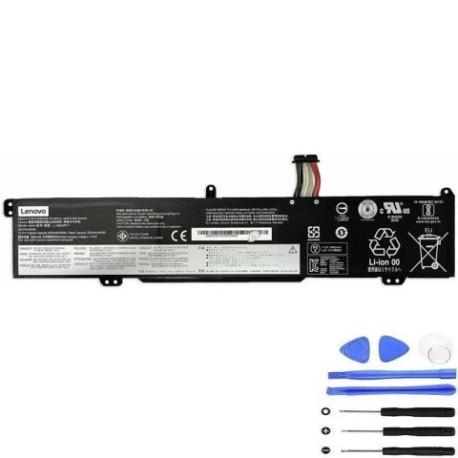
Introduction
Keep your Lenovo laptop running at peak performance with our genuine replacement battery. This 45Wh power solution is specifically designed for compatible Lenovo models used by Australian and New Zealand consumers.
Common signs you need a replacement
| Symptoms | Causes | Verification | Recommendation |
|---|---|---|---|
| Battery drains quickly | Ageing cells | Check power settings | Consider replacement |
| Laptop shuts down unexpectedly | Failing battery | Monitor battery health | Replace battery |
| Battery won’t charge fully | Worn components | Check charging cycles | Install new battery |
| Laptop bulges or overheats | Damaged cells | Visual inspection | Replace immediately |
How to check compatibility
Verify your laptop model matches our compatibility list above. Check your current battery’s part number or consult your laptop’s documentation. For Australian and New Zealand customers, ensure you’re purchasing the correct regional variant.
When to replace
Replace your battery when it holds less than 50% of its original capacity, shows physical damage, or causes system instability. Most laptop batteries need replacement every 2-3 years with regular use.
Installation guide (overview)
Power down your laptop completely. Remove the power adapter and any peripherals. Follow manufacturer guidelines for battery compartment access. Carefully disconnect the old battery and connect the new one, ensuring proper alignment.
Usage & care tips
Store batteries at room temperature (15-25°C). Avoid complete discharges. Calibrate your battery monthly by fully charging then discharging. Use authorised chargers only. Keep connectors clean and dry.
Safety & recycling in AU/NZ
Dispose of old batteries at authorised recycling centres. Never incinerate or puncture batteries. In Australia, use Batteryback or similar programmes. In New Zealand, utilise designated e-waste collection points.
FAQ
How long does shipping take to AU/NZ?
Typically 7-14 business days depending on your location.
Is this battery genuine Lenovo?
Yes, this is an authentic Lenovo replacement part.
What’s the warranty period?
12 months warranty applies to Australian and New Zealand customers.
Can I use this battery with different laptop models?
Only use with compatible models listed above.
How do I check my current battery’s health?
Use built-in system diagnostics or third-party battery health tools.
What if my laptop model isn’t listed?
Contact our support team for compatibility verification.
Are installation tools included?
No tools required – designed for easy user installation.