Battery models & part numbers
| Reference / P/N |
|---|
| 02DL007 |
| 02DL008 |
| 02DL009 |
| 02DL010 |
| 5B10W13877 |
| 5B10W13905 |
| 5B10W13906 |
| 5B10W13907 |
| 5B10W13908 |
| 5B10W13954 |
| 5B10W51826 |
| 5B10W51827 |
| 5B10W51829 |
| 5B10W51830 |
| L18C3P72 |
| L18L3P73-51Wh |
| L18M3P73 |
| SB10K97645 |
| SB10K97646 |
| SB10T83122 |
| SB10T83148 |
| SB10T83197 |
| SB10W51925 |
Compatible laptop models
| Model |
|---|
| Lenovo ThinkPad P14s (20S4/20S5) |
| Lenovo ThinkPad P14s Gen 1 (20S4/20S5) |
| Lenovo ThinkPad P14s Gen 1 (20Y1/20Y2) |
| Lenovo ThinkPad P43s (20RH/20RJ) |
| Lenovo ThinkPad T14 (20S3/20S2) |
| Lenovo ThinkPad T14 Gen 1 (20S0/20S1) |
| Lenovo ThinkPad T14 Gen 1 (20UD/20UE) |
| Lenovo ThinkPad T14 Gen 2 (20W0/20W1) |
| Lenovo ThinkPad T490 (20N2/20N3) |
| Lenovo ThinkPad T490 (20Q9/20QH) |
| Lenovo ThinkPad T490 (20RY/20RX) |
| Lenovo ThinkPad T495 |
| Lenovo ThinkPad T495 (20NJ) |
| Lenovo ThinkPad T495 (20NK) |
| Lenovo ThinkPad T495s |
| Lenovo ThinkPad T495s (20QJ) |
| Lenovo ThinkPad T495s (20QK) |
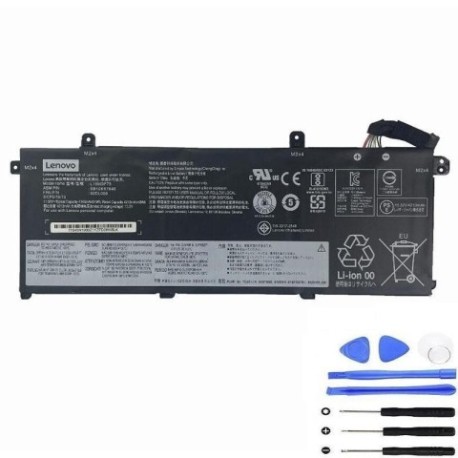
Introduction
If your Lenovo ThinkPad is struggling to hold charge or showing battery warning signs, our comprehensive guide helps Australian and New Zealand users understand when and how to replace their laptop battery safely.
Common signs you need a replacement
| Symptom | Cause | Verification | Recommendation |
|---|---|---|---|
| Short battery life | Ageing cells, reduced capacity | Check power settings, monitor usage | Consider replacement if under 2 hours |
| Laptop shuts down unexpectedly | Voltage drops under load | Monitor battery percentage drops | Replace immediately to prevent data loss |
| Battery won’t charge fully | Charging circuit issues, worn cells | Check charging indicator, BIOS report | Replace if stuck below 80% capacity |
| Battery swelling or overheating | Internal damage, safety risk | Visual inspection, temperature check | Replace urgently – safety hazard |
| System reports battery error | Communication failure with battery | Check device manager, Lenovo diagnostics | Replace battery to restore functionality |
How to check compatibility
Verify your laptop model matches our compatibility list above. Check your current battery part number (usually printed on the battery) or use Lenovo’s official support website with your serial number for confirmation.
When to replace
Replace your battery when it holds less than 50% of original capacity, shows physical damage, or causes system instability. Most laptop batteries last 2-4 years with regular use in Australian conditions.
Installation guide (overview)
1. Power off laptop and disconnect charger
2. Remove bottom panel screws
3. Carefully disconnect old battery connector
4. Install new battery and reconnect
5. Replace panel and power on
6. Allow full charge cycle before use
Usage & care tips
• Avoid extreme temperatures (ideal range 10-35°C)
• Don’t leave laptop plugged in constantly
• Perform regular full discharge cycles
• Store in cool, dry place when not in use
• Use authorised Lenovo chargers only
Safety & recycling in AU/NZ
In Australia and New Zealand, lithium-ion batteries must be recycled properly. Never dispose in household waste. Use battery recycling services at electronics retailers or local council recycling centres. Damaged batteries should be handled by professionals.
FAQ
How long does delivery take in Australia?
Typically 3-7 business days for metro areas, slightly longer for regional locations.
Is this battery genuine Lenovo?
This is a high-quality compatible replacement battery meeting original specifications.
What warranty is provided?
Most replacement batteries come with 12-month warranty covering manufacturing defects.
Can I install this myself?
Yes, with basic technical skills and proper tools. Follow our installation guide carefully.
Will this improve my laptop’s performance?
It will restore original battery performance but won’t improve other hardware capabilities.
How do I dispose of my old battery?
Take to any electronics retailer or council recycling centre – never in household bin.
What if my model isn’t listed?
Double-check your exact model number and contact support for compatibility confirmation.