Battery models & part numbers
| Reference / P/N |
|---|
| Lenovo 3ICP6/55/90 |
| Lenovo 5B10T09092 |
| Lenovo 5B10T09093 |
| Lenovo 5B10T09094 |
| Lenovo 5B10T09095 |
| Lenovo 5B10T09096 |
| Lenovo 5B10T09097 |
| Lenovo 5B10W67177 |
| Lenovo 5B10W67195 |
| Lenovo 5B10W67217 |
| Lenovo 5B10W67277 |
| Lenovo 5B10W67289 |
| Lenovo 5B10W67426 |
| Lenovo L18C3PF6 |
| Lenovo L18C3PF7 |
| Lenovo L18L3PF2-36Wh |
| Lenovo L18L3PF3 |
| Lenovo L18M3PF6 |
| Lenovo L18M3PF7 |
| Lenovo SB10W6718 |
| Lenovo SB10W67218 |
| Lenovo SB10W67332 |
Compatible laptop models
| Model |
|---|
| Lenovo IdeaPad C340-15IWL (81N5) |
| Lenovo IdeaPad Flex-15IIL (81XK) |
| Lenovo IdeaPad Flex-15IML (81XH) |
| Lenovo IdeaPad FLEX-15IWL (81SR) |
| Lenovo IdeaPad S340-14API (81NB) |
| Lenovo IdeaPad S340-14IIL (81VV/81WJ) |
| Lenovo IdeaPad S340-14IWL (81N7) |
| Lenovo IdeaPad S340-15API (81NC) |
| Lenovo IdeaPad S340-15API Touch (81QG) |
| Lenovo IdeaPad S340-15IWL (81N8) |
| Lenovo IdeaPad S340-15IWL (81RK) |
| Lenovo IdeaPad S340-15IWL Touch (81QF) |
Introduction
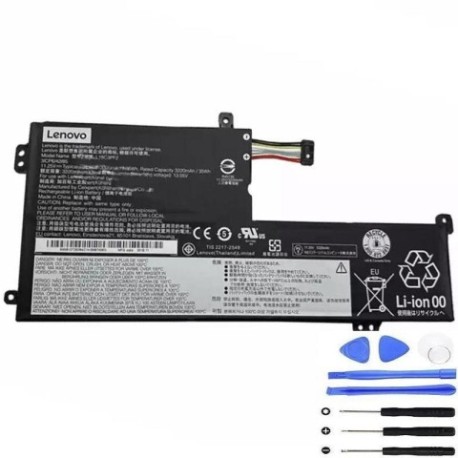
Is your Lenovo laptop not holding charge like it used to? The Lenovo L18L3PF2 36Wh replacement battery restores your device’s mobility and performance. This high-quality battery is compatible with multiple Lenovo IdeaPad models commonly used across Australia and New Zealand.
Common signs you need a replacement
| Symptoms | Causes | Verification | Recommendation |
|---|---|---|---|
| Battery drains quickly | Ageing cells, reduced capacity | Check battery health in system settings | Consider replacement if under 50% capacity |
| Laptop won’t power on without charger | Battery no longer holds charge | Remove charger – does laptop stay on? | Immediate replacement needed |
| Battery swelling or overheating | Internal damage, safety risk | Visual inspection, feel for heat | Stop using immediately and replace |
| Inaccurate battery percentage | Faulty battery management system | Compare reported % with actual runtime | Replace for reliable usage |
How to check compatibility
Verify your laptop model matches our compatibility list above. Check your current battery’s part number (usually printed on the battery) against our reference numbers. For Australian and New Zealand customers, ensure you’re purchasing from authorised retailers for warranty protection.
When to replace
Replace your battery when it holds less than 50% of its original capacity, shows physical damage, or causes unexpected shutdowns. Most laptop batteries last 2-3 years with regular use in typical AU/NZ conditions.
Installation guide (overview)
1. Power off laptop and disconnect charger
2. Remove bottom panel screws
3. Carefully disconnect old battery connector
4. Remove mounting screws and old battery
5. Install new battery and reconnect
6. Replace panel and power on
Always refer to your device’s service manual or seek professional installation from an authorised service centre.
Usage & care tips
• Avoid extreme temperatures (ideal range 15-25°C)
• Don’t leave laptop plugged in constantly
• Perform occasional full discharge cycles
• Store in cool, dry place when not in use
• Use only genuine or high-quality replacement batteries
Safety & recycling in AU/NZ
Never attempt to open or modify batteries. Damaged batteries should be taken to authorised e-waste recycling centres. In Australia, check with your local council for battery disposal options. In New Zealand, use dedicated battery recycling services. Never dispose of batteries in household waste.
FAQ
How long does shipping take to AU/NZ?
Typically 7-14 business days depending on your location.
Is this battery genuine Lenovo?
This is a high-quality compatible replacement meeting original specifications.
What warranty is offered?
Most reputable suppliers offer 12-24 month warranties for Australian and New Zealand customers.
Can I install it myself?
Yes, with basic technical skills and proper tools, though professional installation is recommended.
How do I maximise battery life?
Avoid full discharges, keep between 20-80% charge when possible, and store in cool conditions.
Is overnight charging safe?
Modern laptops have protection circuits, but unplugging when fully charged is recommended.
What if my model isn’t listed?
Contact the supplier with your exact laptop model and current battery part number for verification.