Lenovo L18M4PE0 51Wh Replacement Battery
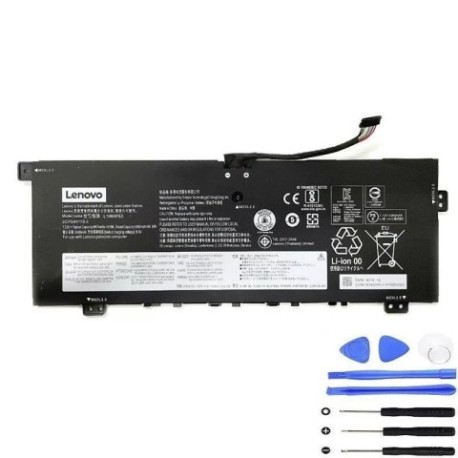
Battery models & part numbers
| Reference / P/N |
|---|
| Lenovo 2ICP5/41/110-2 |
| Lenovo 5B10U40209 |
| Lenovo 5B10U40210 |
| Lenovo 5B10W67185 |
| Lenovo 5B10W67296 |
| Lenovo L18L4PE0 |
| Lenovo SB10W67368 |
| Lenovo-L18M4PE0-51Wh |
Compatible laptop models
| Model |
|---|
| Lenovo IdeaPad 4G 14Q8C05 (82KE) |
| Lenovo IdeaPad 4G-14Q8C05 (82KE) |
| Lenovo IdeaPad 5G-14Q8X05 (82KF) |
| Lenovo Yoga C740-14IML (81TC) |
Introduction
Keep your Lenovo laptop running at peak performance with our genuine replacement battery. This 51Wh power solution is specifically designed for multiple Lenovo models commonly used across Australia and New Zealand.
Common signs you need a replacement
| Symptom | Cause | Verification | Recommendation |
|---|---|---|---|
| Battery drains quickly | Reduced capacity from age/cycles | Check battery health in system settings | Replace if capacity below 60% |
| Laptop won’t hold charge | Battery no longer accepts charge | Test with power adapter connected | Immediate replacement needed |
| Battery swelling | Internal chemical breakdown | Visual inspection of battery case | Replace immediately for safety |
| Overheating during use | Inefficient power delivery | Monitor temperature with software | Replace to prevent damage |
How to check compatibility
Verify your laptop model matches one of the compatible models listed above. Check your current battery’s part number by removing it from your laptop or checking system information in your operating system’s power settings.
When to replace
Replace your battery when it no longer holds sufficient charge for your needs, shows physical damage or swelling, or your system indicates poor battery health. Most laptop batteries last 2-4 years with regular use.
Installation guide (overview)
1. Power off your laptop and disconnect the charger
2. Remove the bottom panel using appropriate screwdriver
3. Disconnect the battery connector from motherboard
4. Remove old battery and insert replacement
5. Reconnect battery and reassemble laptop
6. Charge fully before first use
Usage & care tips
• Avoid frequent full discharges – charge between 20-80% for optimal lifespan
• Store in cool, dry conditions (15-25°C ideal)
• Use only authorised Lenovo chargers
• Calibrate battery monthly by fully charging then discharging
Safety & recycling in AU/NZ
Never attempt to open or puncture batteries. Dispose of old batteries at authorised recycling centres – most electronics retailers in Australia and New Zealand offer free battery recycling services. Never dispose of batteries in household waste.
FAQ
How long does shipping take to Australia/New Zealand?
Most orders arrive within 5-10 business days depending on your location.
Is this battery genuine Lenovo?
Yes, this is an original Lenovo battery with full manufacturer warranty.
What’s the battery capacity?
This is a 51Wh lithium-ion battery providing optimal performance for compatible models.
Do you provide installation service?
We provide detailed installation guides, but recommend professional installation if unsure.
What warranty do you offer?
All batteries come with 12 months warranty covering manufacturing defects.
Can I use this battery with different laptop models?
Only use with the compatible models listed above to ensure safety and performance.
How do I recycle my old battery in Australia?
Take to any Battery World, Officeworks, or similar electronics retailer for free recycling.