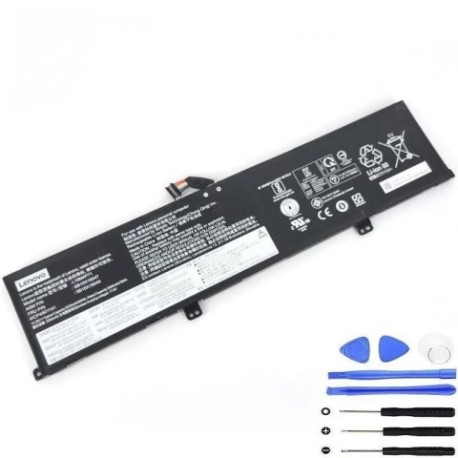
Keep your Lenovo ThinkPad performing at its best with our genuine replacement battery. Compatible with multiple P1 and X1 Extreme Gen 3 models, this 80Wh battery delivers reliable power for Australian and New Zealand professionals.
Battery models & part numbers
| Reference / P/N |
|---|
| 5B10X19048 |
| 5B10X19049 |
| 5B10X19050 |
| L19C4P71 |
| L19M4P71 |
| SB10X19048 |
Compatible laptop models
| Model |
|---|
| Lenovo ThinkPad P1 Gen 3 |
| Lenovo ThinkPad P1 Gen 3 (20TH/20TJ) |
| Lenovo ThinkPad X1 Extreme Gen 3 |
| Lenovo ThinkPad X1 Extreme Gen 3 (20TK/20TL) |
Common signs you need a replacement
| Symptom | Cause | Verification | Recommendation |
|---|---|---|---|
| Battery drains quickly | Reduced capacity from age/cycles | Check battery health in Lenovo Vantage | Replace if capacity below 60% |
| Laptop won’t hold charge | Battery failure or wear | Test with power adapter disconnected | Immediate replacement needed |
| Battery swelling | Internal damage or overheating | Visual inspection of battery compartment | Replace immediately for safety |
| Overheating during use | Battery degradation | Monitor temperature in system settings | Replace if consistently over 45°C |
How to check compatibility
Verify your laptop model matches our compatibility list above. Check your current battery part number by removing the battery or using Lenovo Vantage software. Ensure the physical dimensions match (approximately 260mm x 90mm x 5mm).
When to replace
Replace your battery when you notice significant performance decline, typically after 2-3 years of regular use or when battery health shows less than 60% capacity in diagnostic tools.
Installation guide (overview)
Power off your laptop and disconnect all cables. Remove the bottom cover using a Phillips screwdriver. Disconnect the battery connector and remove mounting screws. Install the new battery, reconnect all components, and reassemble. Always follow authorised service guidelines.
Usage & care tips
Avoid extreme temperatures (store between 15-25°C). Calibrate your battery monthly by fully charging then discharging. Use original Lenovo chargers for optimal performance. Don’t leave laptop plugged in constantly.
Safety & recycling in AU/NZ
Never attempt to open or modify the battery. Dispose of old batteries at authorised recycling centres. In Australia, use Batteryback or council e-waste services. In New Zealand, utilise Computer Recycling programmes. Never dispose in household waste.
FAQ
How long does this battery last?
Typically 2-4 years with normal use, providing 4-6 hours of runtime depending on usage patterns.
Is this battery genuine Lenovo?
Yes, this is an original Lenovo part with full compatibility and warranty coverage.
Do you ship to Australia and New Zealand?
Yes, we offer fast shipping to both countries with tracking and insurance.
What warranty do you offer?
12-month warranty covering manufacturing defects and performance issues.
How do I check my current battery health?
Use Lenovo Vantage software or Windows Battery Report to view current capacity and cycle count.
Can I install this battery myself?
Yes, with basic technical skills and proper tools. Follow our installation guide or seek professional help.
What if my model isn’t listed?
Contact our support team with your exact model number for compatibility verification.