Lenovo L19C4PC0 60WhShort Battery Replacement
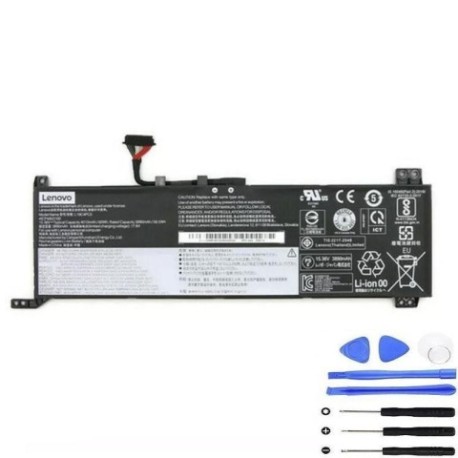
Battery models & part numbers
| Reference / P/N |
|---|
| 5B10W86192 |
| 5B10W86194 |
| 5B10W86195 |
| 5B10W86196 |
| L19C4PC0 |
| L19M4PC0 |
| Lenovo-L19C4PC0-60WhShort |
| SB10W86190 |
| SB10W86191 |
| SB10W86198 |
Compatible laptop models
| Model |
|---|
| Lenovo Legion 5-15ARH05 (82B5) |
| Lenovo Legion 5-15ARH05H (82B1) |
| Lenovo Legion 5-15IMH05 (82AU) |
| Lenovo Legion 5-15IMH05H (81Y6) |
| Lenovo Legion 5-15IMH05H (82CF) |
| Lenovo Legion 5-15IMH6 (82NL) |
| Lenovo Legion 5P 15ARH05H |
| Lenovo Legion 5P-15ARH05H (82GU) |
| Lenovo Legion 5P-15IMH05 (82AY) |
| Lenovo Legion 5P-15IMH05H (82AW) |
Introduction
If you’re experiencing battery issues with your Lenovo Legion 5 or 5P laptop, our genuine replacement battery is the perfect solution. This 60Wh battery is specifically designed for your gaming laptop and meets all original equipment specifications.
Common signs you need a replacement
| Symptom | Cause | Verification | Recommendation |
|---|---|---|---|
| Battery drains quickly | Ageing battery cells | Check battery health in Windows | Replace if capacity below 60% |
| Laptop won’t hold charge | Failed battery circuit | Test with power adapter removed | Immediate replacement needed |
| Battery swelling | Internal damage/overheating | Visual inspection | Replace immediately for safety |
| Overheating during use | Inefficient battery operation | Monitor temperature in BIOS | Replace to prevent damage |
How to check compatibility
Check your laptop’s model number on the bottom case or in System Information. Compare it with our compatible models list above. You can also check your current battery’s part number by removing the bottom panel – it should match one of our reference numbers.
When to replace
Replace your battery when it shows less than 60% of original capacity, won’t hold a charge, shows physical swelling, or causes unexpected shutdowns. Most gaming laptop batteries last 2-3 years with regular use.
Installation guide (overview)
1. Power off laptop and disconnect all cables
2. Remove bottom panel screws
3. Carefully disconnect battery connector
4. Remove old battery
5. Install new battery and reconnect
6. Replace bottom panel
7. Charge fully before first use
Usage & care tips
• Avoid complete discharges – charge when below 20%
• Store between 15-25°C when not in use
• Don’t leave plugged in constantly
• Calibrate monthly by fully discharging then charging
• Use original Lenovo power adapter
Safety & recycling in AU/NZ
Always purchase from authorised retailers. Never attempt to repair damaged batteries. In Australia and New Zealand, recycle old batteries at designated collection points – never dispose in household waste. Check with your local council for battery recycling options.
FAQ
Is this battery genuine Lenovo?
Yes, this is an original equipment manufacturer battery meeting all Lenovo specifications.
What’s the warranty period?
This battery comes with a 12-month warranty from date of purchase.
How long does installation take?
Most users can complete installation in 15-20 minutes with basic tools.
Will this improve gaming performance?
While it won’t increase processing power, a healthy battery ensures stable performance during gaming sessions.
Can I use this battery internationally?
Yes, the battery works worldwide – just use the appropriate power adapter for your location.
How do I dispose of my old battery?
Take it to an authorised battery recycling centre in your area – never throw in regular rubbish.
What tools do I need for installation?
You’ll need a Phillips screwdriver and a plastic spudger or guitar pick for safe removal.