Lenovo L19C4PC1 80WhLong Battery Replacement Guide
Find the perfect replacement battery for your Lenovo Legion laptop with our comprehensive compatibility guide for Australian and New Zealand users.
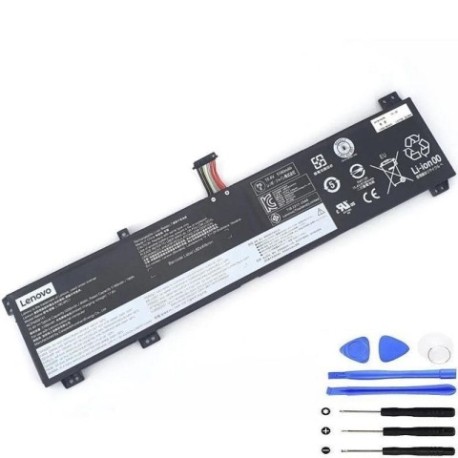
Battery models & part numbers
| Reference / P/N |
|---|
| 5B10W86192 |
| 5B10W86194 |
| 5B10W86195 |
| 5B10W86196 |
| L19M4PC1 |
| Lenovo-L19C4PC1-80WhLong |
| SB10W86190 |
| SB10W86191 |
| SB10W86198 |
Compatible laptop models
| Model |
|---|
| Lenovo Legion 5-15ARH05 (82B5) |
| Lenovo Legion 5-15ARH05H (82B1) |
| Lenovo Legion 5-15IMH05 (82AU) |
| Lenovo Legion 5-15IMH05H (81Y6) |
| Lenovo Legion 5-15IMH05H (82CF) |
| Lenovo Legion 5-15IMH6 (82NL) |
| Lenovo Legion 5P 15ARH05H |
| Lenovo Legion 5P-15ARH05H (82GU) |
| Lenovo Legion 5P-15IMH05 (82AY) |
| Lenovo Legion 5P-15IMH05H (82AW) |
Introduction
The Lenovo L19C4PC1 80WhLong battery is a high-performance replacement designed specifically for various Lenovo Legion 5 and 5P gaming laptops. This 80Wh capacity battery provides extended gaming and work sessions, making it ideal for Australian and New Zealand users who demand reliable power for their mobile computing needs.
Common signs you need a replacement
| Symptoms | Causes | Verification | Recommendation |
|---|---|---|---|
| Battery drains quickly (under 1 hour) | Ageing cells, reduced capacity | Check battery health in Windows | Consider replacement if capacity below 60% |
| Laptop won’t charge past certain percentage | Battery management system issues | Monitor charging behaviour | Replace if persistent charging issues |
| Battery swelling or physical damage | Internal short circuits, overheating | Visual inspection, check for bulging | Immediate replacement required |
| Random shutdowns when unplugged | Voltage drops under load | Test under normal usage conditions | Replace if consistent power loss |
How to check compatibility
To ensure the L19C4PC1 battery is compatible with your laptop:
- Check your current battery’s part number (usually printed on the battery)
- Verify your laptop model matches our compatibility list above
- Use Lenovo’s official support website with your serial number
- Compare physical dimensions and connector type
When to replace
Replace your battery when you notice significant performance degradation, typically after 2-3 years of regular use. Key indicators include reduced runtime, charging difficulties, or physical swelling. For gaming laptops used in AU/NZ climates, battery life may be affected by temperature variations.
Installation guide (overview)
Before installation: power off laptop, disconnect charger, and ground yourself. Remove the bottom panel using appropriate screwdrivers. Disconnect the old battery connector and remove mounting screws. Install the new L19C4PC1 battery, reconnect the connector, and reassemble. Always refer to official Lenovo service manuals or seek professional assistance if unsure.
Usage & care tips
- Avoid frequent full discharges – aim for 20-80% charge cycles
- Store at room temperature (15-25°C) when not in use
- Don’t leave laptop plugged in constantly after full charge
- Clean battery contacts periodically with isopropyl alcohol
- Use only authorised Lenovo chargers and accessories
Safety & recycling in AU/NZ
In Australia and New Zealand, lithium-ion batteries must be disposed of properly. Never dispose of batteries in household waste. Use dedicated battery recycling services available at most electronics retailers, council waste centres, or through programs like Batteryback or TechCollect. Damaged or swollen batteries should be handled with care and recycled immediately.
FAQ
How long does the L19C4PC1 battery last?
Typically 2-4 years with normal use, or approximately 500-800 charge cycles before capacity drops to 80% of original.
Is this battery genuine Lenovo?
Our batteries meet or exceed OEM specifications and are compatible with Lenovo Legion models listed above.
What’s the warranty period?
Most replacement batteries come with 12-24 months warranty, depending on the supplier.
Can I install it myself?
Yes, with basic technical skills and proper tools. However, professional installation is recommended if you’re unfamiliar with laptop disassembly.
How do I calibrate the new battery?
Charge to 100%, use until it shuts down, then charge uninterrupted to 100% again. Repeat every 2-3 months.
Will this affect my laptop’s performance?
No, a compatible replacement battery should restore original performance levels when your old battery was functioning properly.
Where can I recycle my old battery in Australia?
Most Officeworks, JB Hi-Fi, and Harvey Norman stores offer free battery recycling. Check your local council’s e-waste program for additional options.