Battery models & part numbers
| Reference / P/N |
|---|
| 5B10Z21197 |
| 5B10Z21198 |
| 5B10Z21202 |
| 5B10Z21210 |
| L19C3PDA |
| L19D3PDA-45Wh |
| L19L3PDA |
| L19M3PDA |
| SB10Z21196 |
| SB10Z21199 |
| SB10Z21203 |
Compatible laptop models
| Model |
|---|
| Lenovo ThinkBook 14 G2 ARE (20VF) |
| Lenovo ThinkBook 14 G2 ITL (20VD) |
| Lenovo ThinkBook 14 G3 ACL (21A2) |
| Lenovo ThinkBook 14 G3 ITL (21A3) |
| Lenovo ThinkBook 14 G4 (21DK) |
| Lenovo ThinkBook 14 G4 ABA (21DK) |
| Lenovo ThinkBook 14 G4 IAP (21DH) |
| Lenovo ThinkBook 15 G2 ARE (20VG) |
| Lenovo ThinkBook 15 G2 ITL (20VE) |
| Lenovo ThinkBook 15 G3 ACL (21A4) |
| Lenovo ThinkBook 15 G3 ITL (21A5) |
| Lenovo ThinkBook 15 G4 ABA (21DL) |
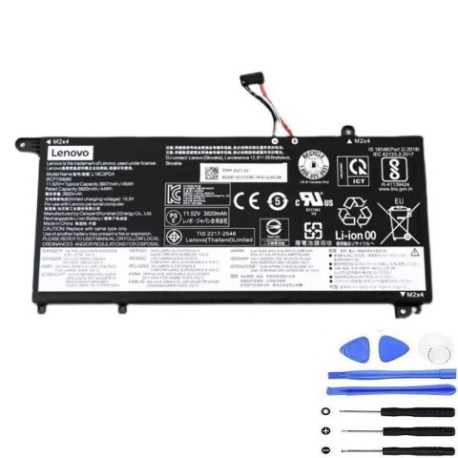
Introduction
Keep your Lenovo ThinkBook running at peak performance with our genuine replacement battery. This 45Wh power solution is specifically designed for multiple ThinkBook 14 and 15 models, ensuring reliable power delivery and extended usage time.
Common signs you need a replacement
| Symptoms | Causes | Verification | Recommendation |
|---|---|---|---|
| Battery drains quickly | Ageing cells, reduced capacity | Check battery health in system settings | Consider replacement if below 60% capacity |
| Laptop shuts down unexpectedly | Voltage drops under load | Monitor battery percentage during use | Replace if frequent shutdowns occur |
| Battery won’t charge fully | Charging circuit issues, worn cells | Check charging status and maximum charge | Replace if stuck below 80% charge |
| Battery swelling or overheating | Internal damage, safety risk | Visual inspection, temperature check | Immediate replacement required |
| System reports battery error | Communication failure with battery | Check device manager for errors | Replace battery to resolve |
How to check compatibility
Verify your laptop model matches one listed in our compatibility table. Check your current battery part number against our reference list. For additional confirmation, consult your laptop’s documentation or use Lenovo’s official support tools.
When to replace
Replace your battery when you notice significant performance degradation, typically after 2-3 years of regular use. Immediate replacement is necessary for any physical damage, swelling, or safety warnings from your system.
Installation guide (overview)
Power down your laptop completely and disconnect from power. Remove the bottom cover using appropriate tools. Disconnect the old battery connector and remove mounting screws. Install the new battery, reconnect the connector, and reassemble. Always follow manufacturer guidelines for safe installation.
Usage & care tips
Avoid extreme temperatures – ideal operating range is 10°C to 35°C. Don’t leave your laptop plugged in constantly; occasional discharge cycles help maintain battery health. Store in cool, dry conditions when not in use for extended periods.
Safety & recycling in AU/NZ
Only use authorised replacement batteries. Never attempt to open or modify batteries. In Australia and New Zealand, recycle old batteries at designated collection points – never dispose in household waste. Check with your local council for recycling options.
FAQ
How long does this battery last on a single charge?
Depending on usage and laptop model, expect 4-8 hours of typical use. Power-intensive tasks will reduce this time.
Is this battery genuine Lenovo?
This is a high-quality replacement battery designed to meet or exceed original specifications and compatibility requirements.
What’s the warranty period?
Most replacement batteries come with a 12-month warranty – check product details for specific coverage.
Can I install this battery myself?
Yes, with basic technical skills and proper tools. If unsure, seek professional installation services.
How do I dispose of my old battery?
Take it to an authorised battery recycling centre in your area. Many electronics retailers offer free battery recycling.
Will this battery work with my specific ThinkBook model?
Check the compatibility table above – if your model is listed, it’s fully compatible.
What if my laptop isn’t in the compatibility list?
This battery is specifically designed for the models listed. Using it with incompatible devices may cause damage or void warranties.