Lenovo L19M4PD2 62.3Wh Replacement Battery
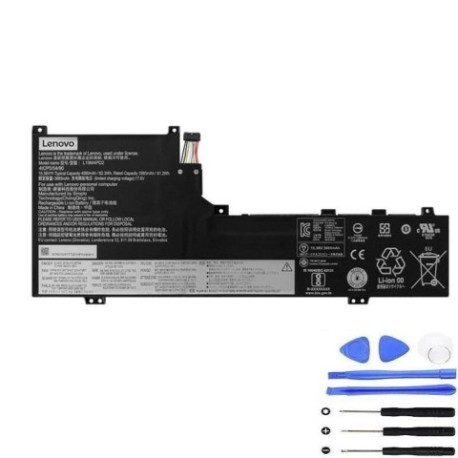
Battery models & part numbers
| Reference / P/N |
|---|
| L19L4PD2 |
| Lenovo-L19M4PD2-62.3Wh |
| SB10W67348 |
Compatible laptop models
| Model |
|---|
| Lenovo 5B10U97772 |
| Lenovo 5B10U97773 |
| Lenovo 5B10W67253 |
| Lenovo 5B10W67424 |
| Lenovo Yoga S740-14IIL (81RM) |
| Lenovo Yoga S740-14IIL (81RS) |
| Lenovo Yoga S740-14IIL (81RT) |
| Lenovo Yoga S740-IIL (81RS) |
Introduction
Keep your Lenovo laptop running at peak performance with our genuine replacement battery. This high-quality 62.3Wh battery is designed specifically for compatible Lenovo models and meets all Australian safety standards.
Common signs you need a replacement
| Symptom | Cause | Verification | Recommendation |
|---|---|---|---|
| Battery won’t hold charge | Ageing cells | Check battery health in system settings | Replace battery |
| Laptop shuts down unexpectedly | Faulty battery circuit | Monitor battery percentage drops | Immediate replacement needed |
| Battery swelling | Internal damage | Visual inspection | Stop using immediately |
| Short battery life | Reduced capacity | Compare to original runtime | Consider replacement |
How to check compatibility
Verify your laptop model matches exactly with our compatibility list above. Check the label on your current battery for the part number, or look up your laptop’s specifications in the system information panel.
When to replace
Replace your battery when it holds less than 50% of its original capacity, shows physical damage, or causes system instability. Most laptop batteries need replacement after 2-3 years of regular use.
Installation guide (overview)
Power off your laptop and disconnect from mains power. Remove the bottom panel using the appropriate screwdriver. Carefully disconnect the old battery connector and remove any mounting screws. Install the new battery, reconnect the connector, and reassemble your laptop.
Usage & care tips
For optimal battery life, avoid extreme temperatures (ideal range 15-25°C). Don’t leave your laptop plugged in constantly – occasional discharge cycles help maintain battery health. Store in a cool, dry place when not in use.
Safety & recycling in AU/NZ
This battery meets Australian/New Zealand safety standards. Never attempt to open or modify the battery. At end of life, recycle responsibly through authorised e-waste collection centres – never dispose of in household rubbish.
FAQ
How long does delivery take in Australia?
Most metropolitan areas receive delivery within 3-5 business days. Regional areas may take slightly longer.
Is this battery genuine Lenovo?
Yes, this is an authentic Lenovo replacement battery with full compatibility and warranty.
What’s the warranty period?
This battery comes with a 12-month warranty covering manufacturing defects.
Can I install it myself?
Yes, with basic technical skills and the right tools. Follow our installation guide carefully.
How do I check my current battery health?
On Windows, type “battery report” in the search bar and run the powercfg command to generate a detailed report.
What if my model isn’t listed?
Contact our support team with your exact laptop model number for compatibility verification.
Is overnight charging safe?
Modern laptops have protection circuits, but we recommend unplugging once fully charged for optimal battery longevity.