Battery models & part numbers
| Reference / P/N |
|---|
| 40068772 |
| Medion-A31-M15-42Wh20mm |
Compatible laptop models
| Model |
|---|
| Medion 40068772 |
| Medion Akoya E6245 |
| Medion Akoya E6245 (M15GUN) |
| Medion Akoya E6245 (MD 61126 MSN:30025295) |
| Medion Akoya E6245 (MD 61262 MSN:30025870) |
| Medion Akoya E6245 (MD 61275 MSN:30025871) |
| Medion Akoya E6245 (MD 61279 MSN:30025879) |
| Medion Akoya E6245 (MD 61418 MSN:30026374) |
| Medion Akoya E6245 (MSN:30026994) |
| Medion Akoya E6245 (MSN:30027050) |
| Medion Akoya E6246 |
| Medion Akoya E6246 (M15GUN) |
| Medion Akoya E6246 (MD 63200 MSN:30025991) |
| Medion Akoya E6246 (MD 63200 MSN:30027106) |
| Medion Akoya E6247 |
| Medion Akoya E6247 (MD 61651 MSN:30027519) |
| Medion Akoya E6247 (MSN:30028049) |
| Medion Akoya E6247/E6248 (M15GUN) |
| Medion Akoya E6248 |
| Medion Akoya E6248 (MD 61766 MSN:30028355) |
| Medion Akoya P15645 |
| Medion Akoya P15645 (MD 61606 MSN:30027203) |
| Medion Akoya P15645 (MD 61607 MSN:30027202) |
| Medion Akoya P15647 |
| Medion Akoya P15647 (MD 61562 MSN:30026986) |
| Medion Akoya P15647 (MD 61660 MSN:30027587) |
| Medion Akoya P15647 (MD 61660 MSN:30027653) |
| Medion Akoya P15647 (MD 61661 MSN:30027536) |
| Medion Akoya P15647 (MD 61662 MSN:30027558) |
| Medion Akoya P15648 |
| Medion Akoya P15648 (MD 63570 MSN:30028770) |
| Medion Akoya P15649 |
| Medion Akoya P15649 (MD 61839 MSN:30029254) |
| Medion Akoya P15649 (MD 61840 MSN:30029264) |
| Medion Akoya P15649 (MD 61840 MSN:30029265) |
| Medion Akoya P15649 (MD 61841 MSN:30029268) |
| Medion Akoya P15649 (MD 61841 MSN:30029269) |
| Medion Akoya P15651 (M15TNN) |
| Medion Akoya P6645 |
| Medion Akoya P6645 (M15WKN) |
| Medion Akoya P6645 (MD 61284 MSN:30025894) |
| Medion Akoya P6645 (MD 61421 MSN:30026356) |
| Medion Akoya P6645 (MD 61483 MSN:30026584) |
| Medion Akoya P6645 (MSN:30025892) |
| Medion Akoya P6645 (MSN:30025894) |
| Medion Akoya P6645 (MSN:30026612) |
| Medion Akoya P6645 (MSN:30027257) |
| Medion Akoya S15447 |
| Medion Akoya S15447 (M15CUN) |
| Medion Akoya S15447 (MD 61676 MSN:30027637) |
| Medion Akoya S15447 (MD 61993 MSN:30030143) |
| Medion Akoya S15447 (MSN:30032593) |
| Medion Akoya S15449 |
| Medion Akoya S15449 (MD 62096) |
| Medion Akoya S15449 (MD 63845) |
| Medion Akoya S15449 (MSN:30031342) |
| Medion Akoya S17402 |
| Medion Akoya S17402 (M17WUN) |
| Medion Akoya S17402 (MD 6300 MSN:30026241) |
| Medion Akoya S17402 (MD 6300 MSN:30028342) |
| Medion Akoya S17403 |
| Medion Akoya S17403 (30031462) |
| Medion Akoya S17403 (MD 61677 MSN:30027616) |
| Medion Akoya S17403 (MD61844 MSN:30029231) |
| Medion Akoya S17403 (MD61844 MSN:30029232) |
| Medion Akoya S6426 (F15KUR) |
| Medion Akoya S6445 |
| Medion Akoya S6445 (M15WUN) |
| Medion Akoya S6445 (MSN:30024203) |
| Medion Akoya S6445 (MSN:30025685) |
| Medion Akoya S6445 (MSN:30025872) |
| Medion Akoya S6445 (MSN:30025877) |
| Medion Akoya S6445 (MSN:30025878) |
| Medion Akoya S6445 (MSN:30025890) |
| Medion Akoya S6445 (MSN:30025891) |
| Medion Akoya S6445 (MSN:30026521) |
| Medion Akoya S6445 (MSN:30026582) |
| Medion Akoya S6445 (MSN:30026588) |
| Medion Akoya S6446 |
| Medion Akoya S6645 (MSN:30025878) |
| Medion Erazer P15609 (NH55RAQ-M1) |
| Medion Pegatron M15CLN |
| Medion Pegatron M15GUN |
| Medion Pegatron M17CUN |
Introduction
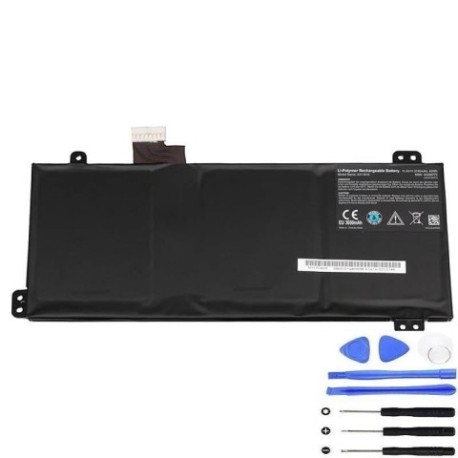
If your Medion laptop is struggling to hold a charge or won’t power on without being plugged in, you likely need a replacement battery. Our genuine Medion A31 M15 42Wh20mm battery is the authorised replacement for dozens of Medion laptop models across the E, P, and S series.
Common signs you need a replacement
| Symptom | Cause | Verification | Recommendation |
|---|---|---|---|
| Battery drains quickly | Reduced capacity from age/cycles | Check battery health in system settings | Replace if capacity below 60% |
| Laptop won’t charge fully | Battery cells degraded | Monitor charging percentage stops early | Replace battery immediately |
| Laptop shuts down unexpectedly | Voltage drops under load | Note if occurs during high CPU usage | Replace to prevent data loss |
| Battery swelling/bulging | Internal chemical breakdown | Visual inspection of battery compartment | Replace urgently – safety hazard |
| No power without charger | Battery completely failed | Test with known working charger | Replace battery to restore mobility |
How to check compatibility
Verify your laptop model matches one in our compatibility table above. Check the label on your current battery for “Medion-A31-M15-42Wh20mm” or “40068772”. You can also find your model number on the bottom case of your laptop or in system information (type “msinfo32” in Windows search).
When to replace
Most laptop batteries last 2-3 years with regular use. Replace when battery health shows less than 60% capacity, charging takes significantly longer, or you experience any of the warning signs listed above. Don’t wait until complete failure – proactive replacement ensures uninterrupted productivity.
Installation guide (overview)
1. Power off laptop and disconnect charger
2. Remove bottom panel screws (keep organised)
3. Carefully disconnect old battery connector
4. Remove mounting screws holding battery
5. Install new battery and reconnect
6. Replace bottom panel and power on
7. Allow full charge cycle before first use
Usage & care tips
• Avoid extreme temperatures (ideal range 15-25°C)
• Don’t leave laptop plugged in constantly
• Perform full discharge/charge monthly
• Store with 40-60% charge if not using
• Use only authorised Medion chargers
Safety & recycling in AU/NZ
Never attempt to repair damaged batteries. In Australia and New Zealand, take old batteries to authorised recycling centres. Many electronics retailers offer free battery recycling services. Never dispose of lithium batteries in household waste due to fire risk.
FAQ
How long does shipping take to AU/NZ?
Typically 7-14 business days with express options available.
Is this battery genuine Medion?
Yes, this is an authorised replacement part with identical specifications.
What’s the warranty period?
12 months warranty covering manufacturing defects.
Will this work with my specific MSN number?
Yes, all variations listed in our compatibility table are supported.
How do I calibrate the new battery?
Charge to 100%, use until 10%, then recharge fully. Repeat monthly.
Can I install this myself?
Yes, most users can follow our installation guide. Basic technical skill recommended.
What if my model isn’t listed?
Contact our support team with your exact model details for verification.