Medion A31-M15 42Wh35mm Replacement Battery
Find the perfect replacement battery for your Medion laptop with our comprehensive compatibility guide and expert installation advice.
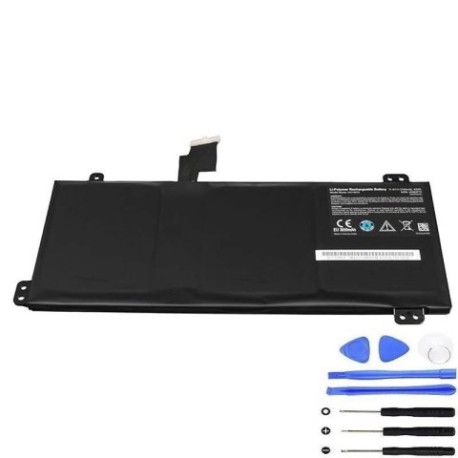
Battery models & part numbers
| Reference / P/N |
|---|
| 40071980 |
| Medion-A31-M15-42Wh35mm |
Compatible laptop models
| Model |
|---|
| Medion A31-M15 |
| Medion A31-M17 |
| Medion Akoya E17201 (M17GR) |
| Medion Akoya P17601 |
| Medion Akoya P17603 |
| Medion Akoya P17605 (M17CLN) |
| Medion Akoya P17607 (M17CMN) |
| Medion Akoya P17609 |
| Medion Akoya S17402 (M17WUN) |
| Medion Akoya S17403 |
| Medion Akoya S17405 |
Introduction
Keep your Medion laptop running at peak performance with our authorised replacement battery. Designed specifically for Australian and New Zealand conditions, this 42Wh35mm battery ensures reliable power for your computing needs.
Common signs you need a replacement
| Symptoms | Causes | Verification | Recommendation |
|---|---|---|---|
| Battery drains quickly | Ageing cells | Check battery health in system settings | Replace if capacity below 60% |
| Laptop won’t hold charge | Failed battery circuit | Test with power adapter removed | Immediate replacement needed |
| Battery swelling | Internal damage | Visual inspection | Replace immediately for safety |
| Overheating during use | Faulty temperature regulation | Monitor temperature above 45°C | Replace to prevent damage |
How to check compatibility
Verify your laptop model matches our compatibility list above. Check your current battery’s part number (usually printed on the battery) against our reference numbers. For Australian and New Zealand customers, ensure the battery meets local safety standards.
When to replace
Replace your battery when you notice significant performance decline, typically after 2-3 years of regular use. In AU/NZ’s varying climate conditions, batteries may degrade faster due to temperature fluctuations.
Installation guide (overview)
Power off your laptop and disconnect the charger. Remove the bottom panel using appropriate screwdrivers. Carefully disconnect the old battery connector and remove any securing screws. Install the new battery, reconnect the connector, and reassemble. Always refer to your device’s service manual for detailed instructions.
Usage & care tips
Avoid extreme temperatures – store and use between 10°C and 35°C. Don’t leave your laptop plugged in constantly. Calibrate your new battery by fully charging and discharging it once monthly. Keep contacts clean and dry.
Safety & recycling in AU/NZ
Never attempt to open or modify the battery. Dispose of old batteries at authorised recycling centres across Australia and New Zealand. Many electronics retailers offer free battery recycling services. Never dispose of batteries in household waste.
FAQ
How long does delivery take in Australia?
Most orders arrive within 3-7 business days depending on your location.
Is this battery covered by warranty?
Yes, our batteries come with a 12-month warranty for Australian and New Zealand customers.
Can I use this battery with newer Medion models?
Only use with compatible models listed above. Check your specific model before purchase.
What’s the battery capacity?
This is a 42Wh battery with 35mm thickness, providing optimal performance for compatible Medion laptops.
Do you ship to both Australia and New Zealand?
Yes, we ship to all major cities and regional areas in both countries.
Is professional installation required?
While many customers install themselves, we recommend professional installation if you’re not comfortable with electronics.
How do I recycle my old battery in NZ?
Take it to any authorised e-waste recycling centre – most are free for battery disposal.