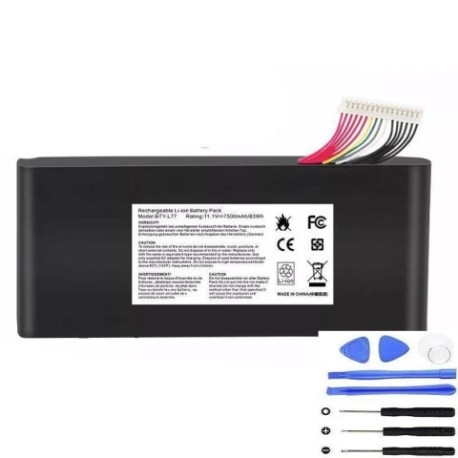
Keep your MSI laptop running at peak performance with our genuine replacement battery. This high-capacity 83.5Wh power solution is designed specifically for compatible MSI gaming and workstation models.
Battery models & part numbers
| Reference / P/N |
|---|
| MSI-BTY-L77-83.5Wh |
Compatible laptop models
| Model |
|---|
| MSI GT72 2QDs |
| MSI GT72S 6QFs |
| MSI GT80 2QEs |
| MSI WT72 2PE-022CN |
| MSI WT72 2QD-1019XCN |
| MSI WT72 2QD-292XCN |
| MSI WT72 MS-1781 MS-1783 |
Common signs you need a replacement
| Symptoms | Causes | Verification | Recommendation |
|---|---|---|---|
| Battery drains quickly | Ageing cells, reduced capacity | Check battery health in system settings | Consider replacement if under 50% capacity |
| Laptop shuts down unexpectedly | Voltage drops, unstable power | Monitor battery percentage during use | Replace immediately for data safety |
| Battery won’t charge fully | Charging circuit issues, worn cells | Check charging indicator and percentage | Test with different charger first |
| Laptop bulges or case warps | Battery swelling, safety hazard | Visual inspection, feel for uneven surfaces | Replace urgently – do not use |
| Overheating during charging | Internal resistance increase | Monitor temperature with software | Replace to prevent damage |
How to check compatibility
Verify your laptop model matches exactly with our compatibility list. Check the label on the bottom of your laptop or in system information. For MSI WT72 models, ensure the specific variant matches exactly as some models have different power requirements.
When to replace
Replace your battery when it holds less than 50% of its original capacity, shows physical damage, or causes system instability. Most laptop batteries last 2-3 years with regular use. Gaming laptops like MSI GT series may require more frequent replacement due to higher power demands.
Installation guide (overview)
Power off your laptop and disconnect all cables. Remove the bottom panel using the appropriate screwdriver. Disconnect the battery connector from the motherboard. Remove any securing screws and carefully lift out the old battery. Insert the new MSI BTY L77 battery, reconnect the connector, and reassemble. Always refer to your laptop’s service manual for detailed instructions.
Usage & care tips
Avoid extreme temperatures – store and use between 10°C and 35°C. Don’t leave your laptop plugged in constantly; occasional discharge cycles help maintain battery health. For gaming sessions, consider using AC power to reduce battery strain. Calibrate your battery monthly by fully charging then discharging to maintain accurate capacity readings.
Safety & recycling in AU/NZ
Never attempt to open or modify the battery casing. Damaged batteries should be handled with care and recycled properly. In Australia and New Zealand, take old laptop batteries to authorised collection points at electronics retailers or council recycling centres. Never dispose of lithium-ion batteries in household waste due to fire risk.
FAQ
How long does this battery last on a full charge?
Depending on usage and laptop model, expect 2-4 hours for gaming and 4-6 hours for light tasks. GT series models typically have shorter runtimes due to higher power components.
Is this battery genuine MSI?
Yes, this is an original MSI battery with the correct specifications and safety certifications for your laptop.
Do you provide installation service?
We recommend professional installation for warranty purposes. Check with local computer repair centres for installation services.
What’s the warranty period?
This battery comes with a standard 12-month warranty covering manufacturing defects.
Can I use this battery with newer MSI models?
No, this battery is specifically designed for the compatible models listed. Using it with incompatible models may cause damage.
How do I recycle my old battery in Australia?
Use the B-cycle program available at most Officeworks, JB Hi-Fi, and council waste facilities across Australia.
What if my laptop model isn’t listed?
This battery is only compatible with the specific models shown. Using it with unlisted models may damage your device.