Razer RC30-0220-70Wh Replacement Battery Guide
Find the perfect replacement battery for your Razer Blade Pro 17 laptop. Our comprehensive guide helps Australian and New Zealand customers identify compatible models, understand when to replace, and ensure proper installation.
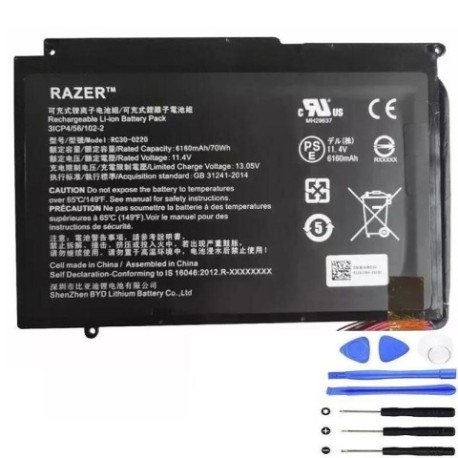
Battery models & part numbers
| Reference / P/N |
|---|
| 3ICP4 56 102-2 |
| 3ICP4/56/102-2 |
| Razer-RC30-0220-70Wh |
Compatible laptop models
| Model |
|---|
| Razer Blade Pro 17 RZ09-03147W02-R3W1 |
| Razer Blade Pro 17 RZ09-03148E02-R3U1 |
| Razer Blade Pro 17 RZ09-03148E13-R341 |
| Razer Blade Pro 17 RZ09-03148E13-R3B1 |
| Razer Blade Pro 17 RZ09-03148E13-R3E1 |
| Razer Blade Pro 17 RZ09-03148E13-R3G1 |
| Razer Blade Pro 17 RZ09-03148E13-R3J1 |
| Razer Blade Pro 17 RZ09-03148E13-R3N1 |
| Razer Blade Pro 17 RZ09-03148E13-R3U1 |
| Razer Blade Pro 17 RZ09-03148E13-R3W1 |
| Razer Blade Pro 17 RZ09-03148W02-R3W1 |
| Razer Blade Pro 17 RZ09-03148W13-R3W1 |
| Razer Blade Pro GTX 1060 |
Introduction
The Razer RC30-0220-70Wh battery is designed specifically for Razer Blade Pro 17 laptops, providing reliable power for gaming and professional use across Australia and New Zealand.
Common signs you need a replacement
| Symptoms | Causes | Verification | Recommendation |
|---|---|---|---|
| Battery won’t hold charge | Ageing cells, excessive cycles | Check system power report | Replace if capacity below 60% |
| Laptop shuts down unexpectedly | Voltage drops under load | Monitor during gaming sessions | Immediate replacement needed |
| Battery swelling or bulging | Internal gas buildup | Visual inspection, trackpad lift | Stop use immediately |
| Overheating during charging | Internal resistance increase | Temperature monitoring | Replace to prevent damage |
How to check compatibility
Verify your laptop model matches one of the compatible models listed above. Check the label on your current battery for part numbers: Razer-RC30-0220-70Wh, 3ICP4 56 102-2, or 3ICP4/56/102-2.
When to replace
Replace your battery when it shows significant capacity loss (less than 2 hours runtime), physical swelling, or fails to charge properly. Most Razer batteries last 2-3 years with regular use.
Installation guide (overview)
Power off and unplug your laptop. Remove the bottom panel using a Phillips screwdriver. Disconnect the battery connector, remove mounting screws, and install the new battery in reverse order. Always use authorised service centres if unsure.
Usage & care tips
Avoid extreme temperatures (ideal range 15-25°C). Don’t leave your laptop plugged in constantly. Calibrate monthly by fully discharging then charging to 100%. Store between 40-60% charge if not using for extended periods.
Safety & recycling in AU/NZ
Never puncture or disassemble batteries. In Australia, use Batteryback.org.au for recycling. In New Zealand, check with local council recycling centres. Both countries have strict e-waste regulations for proper disposal.
FAQ
How long does shipping take to AU/NZ?
Typically 7-14 business days with express options available.
Is this battery genuine Razer?
Yes, these are original manufacturer batteries with full warranty.
What’s the battery capacity?
70Wh capacity providing 4-6 hours of typical use.
Do you provide installation service?
We recommend using authorised Razer service centres in major cities.
What’s the warranty period?
12 months warranty covering manufacturing defects.
Can I use this with newer Blade models?
No, this battery is specifically designed for the listed Blade Pro 17 models only.
How do I recycle my old battery?
Contact your local council or use dedicated battery recycling programs.