Battery models & part numbers
| Reference / P/N |
|---|
| Razer-RC30-0328-65Wh |
Compatible laptop models
| Model |
|---|
| Razer Blade 15 Advanced 2020 RZ09-0330x |
| Razer Blade 15 Base 2020 RZ09-0328x |
| Razer Blade 15 Base 2021 RZ09-0328x |
| Razer Blade 15 RZ09-03286 |
| Razer Blade 15 RZ09-03286E22-R341 |
| Razer Blade 15 RZ09-03286E22-R3B1 |
| Razer Blade 15 RZ09-03286E22-R3U1 |
| Razer Blade 15 RZ09-03286G22-R3G1 |
| Razer Blade 15 RZ09-03286N22-R3N1 |
| Razer Blade 15 RZ09-03286W22-R3W1 |
| Razer Blade 15 RZ09-03287 |
| Razer Blade 15 RZ09-03287E22-R341 |
| Razer Blade 15 RZ09-03287E22-R3B1 |
| Razer Blade 15 RZ09-03287E22-R3U1 |
| Razer Blade 15 RZ09-03287E72-R3B1 |
| Razer Blade 15 RZ09-03287E72-R3U1 |
| Razer Blade 15 RZ09-03287EM2-R3U1 |
| Razer Blade 15 RZ09-03287N22-R3N1 |
| Razer Blade 15 RZ09-03287W72-R3W1 |
| Razer Blade 15 RZ09-03289 |
| Razer Blade 15 RZ09-03289E21-R341 |
| Razer Blade 15 RZ09-03289E21-R3B1 |
| Razer Blade 15 RZ09-03289E21-R3E1 |
| Razer Blade 15 RZ09-03289E21-R3U1 |
| Razer Blade 15 RZ09-03289EQ1-R3U1 |
| Razer Blade 15 RZ09-03289J21-R3J1 |
| Razer Blade 15 RZ09-03289N21-R3N1 |
| Razer Blade 15 RZ09-03289W21-R3W1 |
| Razer Blade 15 RZ09-03304 |
| Razer Blade 15 RZ09-03304E42-R341 |
| Razer Blade 15 RZ09-03304E42-R3B1 |
| Razer Blade 15 RZ09-03304E42-R3G1 |
| Razer Blade 15 RZ09-03304E42-R3J1 |
| Razer Blade 15 RZ09-03304E42-R3N1 |
| Razer Blade 15 RZ09-03304E42-R3U1 |
| Razer Blade 15 RZ09-03304E42-R3W1 |
| Razer Blade 15 RZ09-03304x |
| Razer Blade 15 RZ09-03305 |
| Razer Blade 15 RZ09-03305E43-R3U1 |
| Razer Blade 15 RZ09-03305E53-R341 |
| Razer Blade 15 RZ09-03305E53-R3B1 |
| Razer Blade 15 RZ09-03305E53-R3G1 |
| Razer Blade 15 RZ09-03305E53-R3J1 |
| Razer Blade 15 RZ09-03305E53-R3N1 |
| Razer Blade 15 RZ09-03305E53-R3U1 |
| Razer Blade 15 RZ09-03305E53-R3W1 |
| Razer Blade 15 RZ09-03305x |
Introduction
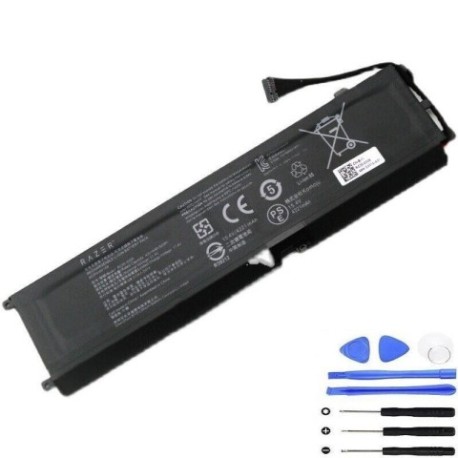
Keep your Razer Blade 15 performing at its best with our authorised replacement battery. The Razer-RC30-0328-65Wh is specifically designed for multiple Blade 15 models, ensuring perfect compatibility and reliable power delivery for gaming and productivity.
Common signs you need a replacement
| Symptom | Cause | Verification | Recommendation |
|---|---|---|---|
| Short battery life | Ageing cells, reduced capacity | Check system power report | Consider replacement if under 2 hours |
| Battery not charging | Faulty battery circuit | Try different power adapter | Replace battery if adapter works |
| Laptop swelling | Battery expansion | Visual inspection | Immediate replacement required |
| Overheating during use | Internal resistance increase | Monitor temperature | Replace if consistently over 45°C |
| Random shutdowns | Voltage drops under load | Stress test monitoring | Replace if occurring frequently |
How to check compatibility
Locate your laptop’s model number on the bottom label or in system information. Cross-reference with our compatibility table above. For additional verification, measure your current battery’s dimensions (typically 210mm × 70mm × 5mm) and compare with specifications.
When to replace
Replace your battery when capacity drops below 60% of original, physical swelling occurs, or you experience consistent power issues. Most Razer batteries last 2-3 years with regular use before requiring replacement.
Installation guide (overview)
Power down and unplug your laptop. Remove the bottom panel using appropriate screwdrivers. Disconnect the battery connector, remove mounting screws, and carefully lift out the old battery. Install the new battery in reverse order, ensuring all connections are secure before reassembly.
Usage & care tips
Avoid extreme temperatures (store between 15-25°C), don’t leave plugged in constantly at 100%, and perform regular calibration cycles. For optimal performance, maintain charge between 20-80% for daily use and perform full discharge cycles monthly.
Safety & recycling in AU/NZ
Never attempt to open or modify the battery. Dispose of old batteries at authorised recycling centres – most electronics retailers in Australia and New Zealand offer free battery recycling services. Do not dispose in household waste.
FAQ
How long does shipping take to Australia/New Zealand?
Most orders arrive within 5-10 business days depending on your location.
Is this battery genuine Razer quality?
Yes, this is an authorised replacement battery meeting original manufacturer specifications.
What warranty do you offer?
All our batteries come with a 12-month warranty covering manufacturing defects.
Can I install this myself?
Yes, with basic technical skills and proper tools. Follow our installation guide carefully.
Will this improve my gaming performance?
While it won’t increase processing power, a healthy battery ensures stable power delivery during intensive gaming sessions.
How do I calibrate the new battery?
Charge to 100%, use until it shuts down, then charge uninterrupted to 100% again.
What if my model isn’t listed?
Contact our support team with your exact model number for compatibility verification.