Toshiba PA5212U 1BRS 45Wh Laptop Battery Replacement
Find the perfect replacement battery for your Toshiba or dynabook laptop with our comprehensive compatibility guide and installation tips.
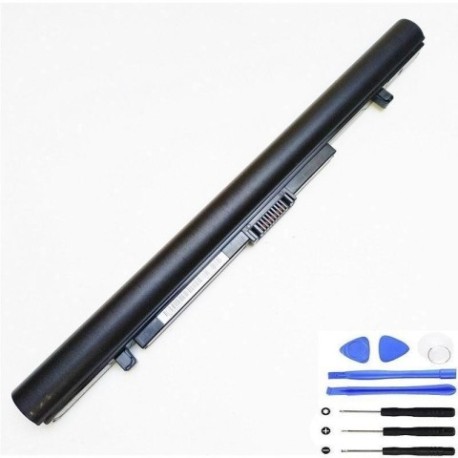
Battery models & part numbers
| Reference / P/N |
|---|
| Toshiba-PA5212U-1BRS-45Wh |
Compatible laptop models
| Model |
|---|
| dynabook Satellite Pro A30t-D |
| dynabook Satellite Pro R50-EC |
| Toshiba G71C000JM110 |
| Toshiba G71C000JM510 |
| Toshiba G71C000JM610 |
| Toshiba G71C000L6110 |
| Toshiba P000621760 |
| Toshiba P000659100 |
| Toshiba P000664910 |
| Toshiba P000697540 |
| Toshiba P000697580 |
| Toshiba P000731930 |
| Toshiba P000748330 |
| Toshiba P000779500 |
| Toshiba PABAS283 |
| Toshiba Portege A30-C |
| Toshiba Portege A30-D |
| Toshiba Portege A30T-C |
| Toshiba Portege R30-C |
| Toshiba Satellite Pro A30-C |
| Toshiba Satellite Pro A40 |
| Toshiba Satellite Pro A40-C |
| Toshiba Satellite Pro A40-D |
| Toshiba Satellite Pro A50-C |
| Toshiba Satellite Pro R40-C |
| Toshiba Satellite Pro R40-D |
| Toshiba Satellite Pro R50-B |
| Toshiba Satellite Pro R50-C |
| Toshiba Satellite Pro R50-D |
| Toshiba Tecra C50-B |
Introduction
The Toshiba PA5212U 1BRS 45Wh battery is a high-quality replacement designed specifically for a wide range of Toshiba and dynabook laptop models. This 45Wh lithium-ion battery provides reliable power for your mobile computing needs across business and personal use.
Common signs you need a replacement
| Symptoms | Causes | Verification | Recommendation |
|---|---|---|---|
| Battery drains quickly | Ageing cells, reduced capacity | Check battery health in system settings | Replace if capacity below 60% |
| Laptop won’t hold charge | Failed battery cells | Test with power adapter removed | Immediate replacement needed |
| Battery swelling | Internal damage, overheating | Visual inspection of battery case | Replace immediately for safety |
| Overheating during use | Inefficient power delivery | Monitor temperature during charging | Replace to prevent damage |
| Charging indicator issues | Battery communication failure | Check charging light behaviour | Replace battery unit |
How to check compatibility
Verify your laptop model matches one of the compatible models listed above. Check your laptop’s bottom label or system information for the exact model number. For additional confirmation, compare your current battery’s part number with PA5212U-1BRS specifications.
When to replace
Replace your battery when you notice significant performance degradation, typically after 2-3 years of regular use. Immediate replacement is required for swollen batteries or those that no longer hold any charge. Regular Australian office conditions (20-25°C) are ideal for battery longevity.
Installation guide (overview)
1. Power off your laptop and disconnect the AC adapter
2. Remove the old battery by releasing the locking mechanism
3. Align the new battery with the connector and slide into place
4. Secure the battery lock and connect the power adapter
5. Allow the battery to charge fully before first use
Usage & care tips
• Avoid complete discharge cycles – recharge when battery reaches 20-30%
• Store in cool, dry conditions between 15-25°C
• Use only authorised Toshiba chargers for optimal performance
• Calibrate your battery monthly by fully charging and discharging
• Keep battery contacts clean and free from debris
Safety & recycling in AU/NZ
In Australia and New Zealand, laptop batteries must be recycled through authorised e-waste collection centres. Never dispose of lithium-ion batteries in household rubbish. Many electronics retailers offer free battery recycling services. Damaged or swollen batteries should be handled with care and taken to specialised recycling facilities immediately.
FAQ
How long does this battery last on a single charge?
Depending on usage and laptop model, expect 3-5 hours of typical office use.
Is this battery compatible with my dynabook laptop?
Yes, this battery is compatible with specific dynabook Satellite Pro models as listed above.
Do you offer warranty on this battery?
Check with the retailer for specific warranty terms, typically 12 months for quality replacements.
How do I properly dispose of my old battery?
Take it to any authorised battery recycling centre in your local area – most electronics stores accept them.
Can I use this battery with different laptop brands?
No, this battery is specifically designed for compatible Toshiba and dynabook models only.
What’s the charging time for this battery?
Approximately 2-3 hours for a full charge from empty using the original charger.
Is this battery genuine Toshiba?
This is a high-quality replacement battery designed to meet or exceed original specifications.