Acer AL12A72 37Wh Battery Replacement Guide for Australian & New Zealand Users
If your Acer laptop is struggling to hold charge or showing battery warning signs, you’ve come to the right place. This comprehensive guide covers everything Australian and New Zealand users need to know about replacing their Acer battery with the genuine AL12A72 37Wh model.
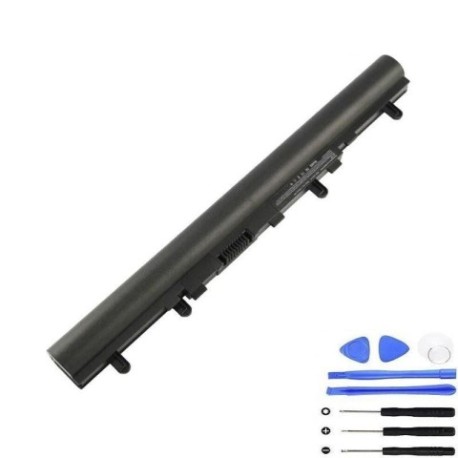
Battery models & part numbers
| Reference / P/N |
|---|
| Acer AL12A32 |
| Acer KT.00403.012 |
| Acer KT.00403.033 |
| Acer KT.00407.001 |
| Acer-AL12A72-37Wh |
Compatible models
| Model |
|---|
| Acer Aspire E1-410 |
| Acer Aspire E1-410G |
| Acer Aspire E1-422G |
| Acer Aspire E1-430G |
| Acer Aspire E1-430P |
| Acer Aspire E1-432G |
| Acer Aspire E1-432P |
| Acer Aspire E1-470 |
| Acer Aspire E1-470G |
| Acer Aspire E1-470P |
| Acer Aspire E1-470P-6659 |
| Acer Aspire E1-470PG |
| Acer Aspire E1-472 |
| Acer Aspire E1-472G |
| Acer Aspire E1-472G-6844 |
| Acer Aspire E1-472P |
| Acer Aspire E1-472PG |
| Acer Aspire E1-510 |
| Acer Aspire E1-510P |
| Acer Aspire E1-522 |
| Acer Aspire E1-522-3407 |
| Acer Aspire E1-522-5460 |
| Acer Aspire E1-522-5659 |
| Acer Aspire E1-522-5824 |
| Acer Aspire E1-522-7618 |
| Acer Aspire E1-522-7820 |
| Acer Aspire E1-522-7843 |
| Acer Aspire E1-530 |
| Acer Aspire E1-530G |
| Acer Aspire E1-532 |
| Acer Aspire E1-532G |
| Acer Aspire E1-532P |
| Acer Aspire E1-532P-4471 |
| Acer Aspire E1-532P-4819 |
| Acer Aspire E1-532PG |
| Acer Aspire E1-570 |
| Acer Aspire E1-570G |
| Acer Aspire E1-572 |
| Acer Aspire E1-572-6870 |
| Acer Aspire E1-572G |
| Acer Aspire E1-572P |
| Acer Aspire E1-572PG |
| Acer Aspire EC-470G |
| Acer Aspire ES1-411 |
| Acer Aspire ES1-431 |
| Acer Aspire V5-431 |
| Acer Aspire V5-431G |
| Acer Aspire V5-431P |
| Acer Aspire V5-431PG |
| Acer Aspire V5-471 |
| Acer Aspire V5-471-6569 |
| Acer Aspire V5-471G |
| Acer Aspire V5-471P |
| Acer Aspire V5-471PG |
| Acer Aspire V5-531 |
| Acer Aspire V5-531G |
| Acer Aspire V5-531P |
| Acer Aspire V5-531P-4129 |
| Acer Aspire V5-531P-4693 |
| Acer Aspire V5-531P-4878 |
| Acer Aspire V5-531PG |
| Acer Aspire V5-551 |
| Acer Aspire V5-551G |
| Acer Aspire V5-561 |
| Acer Aspire V5-561G |
| Acer Aspire V5-561P |
| Acer Aspire V5-561PG |
| Acer Aspire V5-571 |
| Acer Aspire V5-571G |
| Acer Aspire V5-571P |
| Acer Aspire V5-571PG |
| Acer Extensa 2408 |
| Acer TravelMate P245-MG |
| Acer TravelMate P245-MP |
| Acer TravelMate P255-M |
| Acer TravelMate P255-M-4839 |
| Acer TravelMate P255-M-5467 |
| Acer TravelMate P255-M-6836 |
| Acer TravelMate P255-MG |
| Acer TravelMate P255-MP |
| Acer TravelMate P255-MPG |
| Acer TravelMate P455-M |
| Acer TravelMate P455-MG |
Common signs you need a replacement
| Symptom | Cause | Verification | Recommendation |
|---|---|---|---|
| Rapid power drain | Aged battery cells losing capacity | Check battery health in Windows Power Report | Replace battery if capacity below 60% |
| Laptop won’t hold charge | Failed battery circuitry | Battery drains even when powered off | Immediate replacement needed |
| Swollen battery case | Gas buildup from cell degradation | Visual inspection of battery compartment | Replace immediately – safety hazard |
| Overheating during use | Inefficient power delivery | Check temperature with monitoring software | Replace battery to prevent damage |
| Random shutdowns | Voltage drops under load | System logs show unexpected power loss | New battery required for stable operation |
How to check compatibility
Finding your exact Acer model is crucial for battery compatibility. Check the bottom label of your laptop for the complete model number including any suffixes. For Acer Aspire and TravelMate models, the full model number is typically printed near the serial number. You can also check through Windows System Information or Acer Care Centre software. Cross-reference your model with our comprehensive compatibility list above to ensure perfect fit.
When to replace your Acer battery
Most Acer batteries last 2-3 years with regular use. Replace when you notice significant capacity loss (less than 60% of original), physical swelling, or if the battery no longer charges properly. For business users with TravelMate models, consider proactive replacement after 18 months to maintain productivity.
Installation guide
Replacing your Acer battery is straightforward. First, power off your laptop and disconnect the AC adapter. Flip the laptop over and locate the battery release latches – most compatible models have two sliding locks. Slide both latches to unlock position and gently lift the battery out. Align your new AL12A72 battery with the connectors, press firmly until it clicks into place, then slide the locks back to secure. Power on and allow the system to recognise the new battery.
Usage & care tips
Extend your new battery’s lifespan by avoiding extreme temperatures. Ideal operating range is 15-25°C. Calibrate your battery monthly by fully charging then discharging to 5%. For storage, charge to 50-60% and store in cool, dry conditions. Avoid leaving your Acer plugged in constantly – occasional battery use maintains cell health.
Safety & recycling in AU/NZ
Never dispose of lithium-ion batteries in household waste. In Australia, use Batteryback or council e-waste services. New Zealand residents can utilise Computer Recycling schemes. Damaged or swollen batteries should be handled by authorised e-waste centres immediately. Always transport batteries in protective packaging to prevent short circuits.
FAQ
How long does the AL12A72 battery last on a single charge?
Depending on your specific Acer model and usage, expect 3-5 hours of typical use. Aspire E1 series typically achieve 4+ hours, while V5 models may see slightly less due to higher performance components.
Is this battery genuine Acer quality?
Yes, the AL12A72 meets original equipment specifications with proper certification for Australian and New Zealand markets.
What warranty comes with this battery?
Most suppliers offer 12-24 month warranties compliant with Australian Consumer Law guarantees.
Can I use this battery if my original had different part numbers?
Yes, provided your laptop model appears in our compatibility list. Multiple part numbers often indicate regional variations of the same battery.
How do I maximise battery health?
Avoid complete discharges, keep between 20-80% charge for daily use, and store at room temperature away from direct sunlight.
What if my laptop isn’t recognising the new battery?
Try a power reset: disconnect AC, remove battery, hold power button for 30 seconds, then reconnect and power on.
Are there any compatibility issues with specific Acer models?
All models listed have been verified compatible. Ensure you have the exact model number including any suffixes for perfect fit.
Don’t let a failing battery disrupt your work or studies. With our comprehensive compatibility guide and genuine AL12A72 batteries, you can restore your Acer laptop to full mobility. Order today and enjoy fast delivery across Australia and New Zealand.