Acer AP14C8S 32Wh Battery Replacement & Compatibility Guide
If you’re experiencing battery issues with your Acer Switch device, you’ve come to the right place. This comprehensive guide covers everything Australian and New Zealand consumers need to know about the Acer AP14C8S 32Wh replacement battery, including compatibility, installation, and local safety standards.
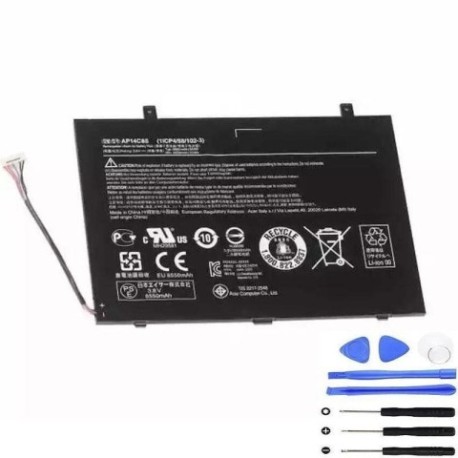
Battery models & part numbers
| Reference / P/N |
|---|
| Acer-AP14C8S-32Wh |
Compatible models
| Model |
|---|
| Acer KT0030G005 |
| Acer Switch 11 (SW5-111) |
| Acer Switch Pro 11 (SW5-111P) |
Introduction
The Acer AP14C8S 32Wh battery is specifically designed for Acer’s convertible Switch series, offering reliable power for your mobile computing needs. As an authorised replacement part, it maintains the original specifications and performance standards that Australian and New Zealand users expect from their Acer devices.
Common signs you need a replacement
| Symptoms | Causes | Verification | Recommendation |
|---|---|---|---|
| Battery drains quickly (under 2 hours) | Ageing cells, reduced capacity | Check battery health in Windows | Consider replacement if capacity below 60% |
| Laptop shuts down unexpectedly | Voltage drops under load | Monitor during intensive tasks | Replace immediately for data safety |
| Battery won’t charge fully | Charging circuit issues, worn cells | Check charging percentage | Replace if stuck below 80% capacity |
| Battery swelling or bulging | Gas buildup, internal damage | Visual inspection | Replace immediately – safety hazard |
| Overheating during charging | Internal resistance increase | Temperature monitoring | Replace if consistently over 45°C |
How to check compatibility
Before purchasing any replacement battery for your Acer device, proper compatibility verification is essential. For Acer Switch models, you can find the exact model number on the bottom casing or in the system information. The KT0030G005, Switch 11 (SW5-111), and Switch Pro 11 (SW5-111P) all share the same battery specifications. You can also use Acer’s official support website by entering your serial number or check the original battery’s part number – it should match AP14C8S-32Wh. Many Australian computer repair centres offer free compatibility checks if you’re uncertain.
When to replace
Most Acer Switch batteries last 2-3 years with regular use before showing significant degradation. Consider replacement when your battery health drops below 70% of original capacity, when you experience sudden shutdowns at 20-30% charge, or if the battery shows physical damage. For Australian and New Zealand users, it’s better to replace proactively rather than risk data loss during important work or study sessions.
Installation guide
Replacing the battery in Acer Switch devices requires careful handling. First, power off the device completely and disconnect all cables. Use a plastic spudger to carefully pry open the bottom case starting from the edges. The battery is secured with screws and a connector – note the screw positions as they may vary in length. Disconnect the battery cable gently using a plastic tool, then remove the old battery. Install the new AP14C8S-32Wh battery, reconnect the cable, and reassemble the device. It’s recommended to perform a full charge cycle before first use for optimal calibration.
Usage & care tips
To maximise your new battery’s lifespan, avoid frequent full discharges – partial charges between 20-80% are ideal. Keep your device in cool environments (below 35°C) and avoid leaving it in hot cars. For Australian summers, never leave your laptop in direct sunlight. Use only Acer-authorised chargers and perform monthly calibration cycles (full discharge followed by full charge). Store your device with 50-60% charge if not using for extended periods.
Safety & recycling in AU/NZ
Battery safety is regulated under Australian and New Zealand standards. Never attempt to open or modify lithium-ion batteries. If you notice swelling, overheating, or leakage, stop using immediately and contact a professional. For recycling, most Australian states and New Zealand regions have e-waste programs that accept laptop batteries free of charge. Check with your local council or authorised electronics recyclers – never dispose of batteries in household waste due to fire risk and environmental concerns.
FAQ
How long does shipping take to AU/NZ?
Most suppliers offer 5-10 business day delivery to major Australian and New Zealand cities, with rural areas taking slightly longer.
Is this battery genuine Acer quality?
The AP14C8S-32Wh replacement batteries meet original specifications and are tested to match Acer’s performance standards.
What warranty comes with the battery?
Typically 12 months warranty covering manufacturing defects, though check with your specific supplier.
Can I install it myself?
Yes, with basic technical skills and proper tools. However, if unsure, use an authorised service centre.
Will it affect my device warranty?
In Australia and New Zealand, using compatible replacement parts shouldn’t void your device warranty for unrelated issues.
How do I calibrate the new battery?
Charge to 100%, use until it shuts down, then charge uninterrupted to 100% again.
What’s the expected lifespan?
Approximately 500-800 charge cycles or 2-3 years with proper care.