Acer AP15O5L 53.9Wh Battery Replacement Guide for Australian & New Zealand Users
If you’re experiencing battery issues with your Acer laptop, you’ve come to the right place. This comprehensive guide covers everything Australian and New Zealand consumers need to know about the Acer AP15O5L 53.9Wh replacement battery, including compatible models, installation instructions, and local safety standards.
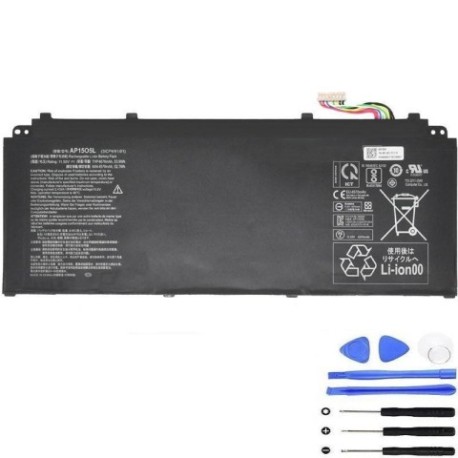
Battery models & part numbers
| Reference / P/N |
|---|
| Acer AP15O3K |
| Acer KT.00303.023 |
| Acer KT.00305.001 |
| Acer KT.00305.003 |
| Acer KT.00305.007 |
| Acer KT.00305.008 |
| Acer KT00303023 |
| Acer-AP15O5L-53.9Wh |
Compatible models
| Model |
|---|
| Acer Aspire S5-371 |
| Acer Aspire S5-371T |
| Acer Chromebook 13 (CB713-1W) |
| Acer Chromebook 315 (CB315-1H) |
| Acer Chromebook 315 (CB315-1HT) |
| Acer Chromebook 315 (CB315-2HT) |
| Acer Chromebook R13 (CB5-312T) |
| Acer Chromebook Spin 13 (CP713-1WN) |
| Acer Chromebook Spin 15 (CP315-1H) |
| Acer Predator Triton 700 (PT715-51) |
| Acer Spin 5 (SP513-52N) |
| Acer Spin 5 (SP513-53N) |
| Acer Spin 5 Pro (SP513-52NP) |
| Acer Swift 1 (SF114-32) |
| Acer Swift 5 (SF514-51) |
| Acer Swift 5 (SF515-51T) |
Introduction
Welcome to your complete guide for Acer AP15O5L 53.9Wh battery replacement. As an Australian or New Zealand consumer, you deserve reliable information about maintaining your Acer laptop’s performance. This battery model serves numerous Acer devices across different series, making it one of the most versatile replacement options available in our region.
Laptop batteries naturally degrade over time, especially in our varied climates from Sydney’s humidity to Wellington’s coastal conditions. Understanding when and how to replace your battery can extend your laptop’s lifespan and maintain optimal performance for work, study, or entertainment.
Common signs you need a replacement
| Symptom | Cause | Verification | Recommendation |
|---|---|---|---|
| Rapid battery drain | Reduced capacity from chemical aging | Check battery health in Windows Power Report | Replace if capacity below 60% of original |
| Laptop shuts down unexpectedly | Voltage drops under load | Monitor battery percentage during use | Immediate replacement recommended |
| Battery won’t charge fully | Charging circuit or cell failure | Try different power adapter first | Replace battery if issue persists |
| Physical swelling or bulging | Gas buildup from chemical reactions | Visual inspection, trackpad may rise | Replace immediately – safety hazard |
| Overheating during charging | Internal resistance increase | Feel battery temperature | Replace to prevent damage |
| Battery indicator errors | Firmware communication issues | Reset battery in BIOS/UEFI | Replace if errors continue |
How to check compatibility
Before purchasing any replacement battery, verifying compatibility is crucial. For Acer laptops in Australia and New Zealand, follow these steps:
Locate your model information: Turn your laptop over and find the sticker containing model details. For Acer devices, this typically includes the series name (like Aspire, Swift, or Chromebook) followed by the model number. Some newer models may have this information in the BIOS or UEFI settings accessible during startup.
Check existing battery details: Remove the current battery (if user-replaceable) and note the part number printed on it. The AP15O5L compatibility extends across multiple part numbers due to Acer’s manufacturing variations.
Use official resources: Visit Acer’s Australian or New Zealand support website and enter your serial number or model. Their compatibility checker provides authorised information about replacement parts.
Cross-reference with our tables: Compare your model and part number against the comprehensive lists provided above. The AP15O5L battery serves numerous Acer models across different product lines, making it a versatile replacement option.
Consult professional advice: If uncertain, visit an authorised Acer service centre in major cities like Sydney, Melbourne, Auckland, or Wellington for confirmation.
When to replace
Understanding the optimal replacement timing can save you from unexpected downtime and potential data loss. Consider replacement when:
Battery health drops below 70%: Most Acer laptops provide battery health information through their power management software. Once capacity significantly diminishes, replacement becomes cost-effective.
After 2-3 years of regular use: Lithium-ion batteries naturally degrade, with most lasting 300-500 charge cycles. Heavy users in our region should consider proactive replacement around this timeframe.
Before important projects: If you rely on your laptop for work, study, or travel, replacing an aging battery preemptively ensures reliability during critical periods.
Seasonal considerations: Extreme temperatures in Australian summers or New Zealand winters can accelerate battery degradation. Consider replacement before extreme weather seasons if your battery is aging.
Installation guide
Replacing your Acer battery requires careful attention to safety and procedure. Follow these steps for successful installation:
Preparation: Power down your laptop completely and disconnect all cables. Work on a clean, static-free surface with good lighting. Gather necessary tools – most Acer models require a Phillips #00 screwdriver.
Safety first: Ground yourself by touching a metal object to discharge static electricity. Keep the new battery in its anti-static packaging until ready for installation.
Access the battery compartment: For most compatible Acer models, turn the laptop upside down and locate the battery release latches or screws. Some newer ultra-thin models may require removing the bottom case entirely.
Remove old battery: Carefully disconnect any connectors, noting their orientation. Gently lift the battery out, avoiding force that could damage surrounding components.
Install new battery: Position the AP15O5L battery correctly, ensuring connectors align properly. Secure with screws or latches as per your specific model’s requirements.
Initial charging: Connect the power adapter and charge the new battery completely before first use. This calibrates the battery management system for optimal performance.
Post-installation verification: Boot your laptop and check that the battery is recognised and charging properly. Update your BIOS/UEFI if available for best compatibility.
Usage & care tips
Maximise your new battery’s lifespan with these evidence-based practices tailored for Australian and New Zealand conditions:
Optimal charging habits: Avoid frequent full discharges. Lithium-ion batteries prefer partial discharges between 20-80% rather than complete cycles. For daily use, maintain charge between 40-80% for longest lifespan.
Temperature management: Never expose your laptop to temperatures above 45°C or below 0°C. In hot Australian climates, avoid leaving laptops in cars or direct sunlight. During New Zealand winters, allow devices to reach room temperature before charging.
Storage recommendations: If storing your laptop for extended periods, charge the battery to approximately 50% and power down completely. Store in a cool, dry place away from direct sunlight.
Power management settings: Configure your Acer’s power settings for balanced performance. Use Acer Care Centre or similar software to monitorbattery health and enable battery saver modes when appropriate.
Calibration cycles: Perform a full calibration every 2-3 months by charging to 100%, then discharging to about 5% before recharging. This helps maintain accurate battery level reporting.
Adapter usage: Always use Acer-authorised power adapters with correct voltage specifications. Third-party chargers may not provide stable power delivery, potentially damaging your battery over time.
Safety & recycling in AU/NZ
Proper battery handling and disposal are regulated in Australia and New Zealand to protect our unique environments:
Safety precautions: Never attempt to open, puncture, or modify the battery casing. If you notice swelling, overheating, or unusual odours, discontinue use immediately and contact a professional. Store spare batteries in cool, dry places away from metal objects that could cause short circuits.
Transport regulations: When shipping batteries within Australia or New Zealand, comply with dangerous goods regulations. Most replacement batteries can be shipped via standard postal services with proper packaging and labelling.
Australian recycling options: Through the B-cycle program (formerly Battery Stewardship Council), Australians can drop off used laptop batteries at participating retailers including Officeworks, Bunnings, and ALDI. Many local councils also offer battery recycling at waste transfer stations.
New Zealand recycling: The Ministry for the Environment encourages battery recycling through programmes like eDay events and permanent drop-off locations at participating retailers and transfer stations. Some computer retailers like PB Technologies and Noel Leeming offer take-back services.
Environmental responsibility: Proper recycling prevents heavy metals from contaminating our soil and waterways while recovering valuable materials for reuse. Never dispose of lithium-ion batteries in general waste or recycling bins due to fire risks.
FAQ
How long does the AP15O5L battery typically last?
Under normal usage conditions, expect 2-4 years of service or 300-500 full charge cycles. Heavy usage in high-temperature environments may shorten this lifespan, while careful maintenance can extend it.
Will this battery work with my Acer laptop purchased in Australia?
Yes, the AP15O5L is designed for global compatibility, including Australian and New Zealand voltage standards (220-240V). Ensure your specific model appears in our compatibility table above.
How can I verify my battery is genuine?
Purchase from authorised retailers, check for proper Acer branding and labelling, and verify serial numbers where possible. Genuine batteries include safety certifications relevant to Australian and New Zealand standards.
What warranty applies to replacement batteries?
Most reputable suppliers offer 12-24 month warranties that comply with Australian Consumer Law and New Zealand Consumer Guarantees Act protections against manufacturing defects.
Can I replace the battery myself without voiding warranty?
For most Acer laptops, user-replaceable batteries can be changed without affecting warranty coverage for other components. However, check your specific warranty terms or consult Acer support for confirmation.
How do I maximise battery life in hot climates?
Avoid direct sunlight, use on hard surfaces for better ventilation, and consider reducing screen brightness and disabling unnecessary background applications during high-temperature conditions common in Australian summers.
Where can I get professional installation help?
Authorised Acer service centres in major cities throughout Australia and New Zealand can perform battery replacements. Many independent computer repair shops also offer this service at competitive rates.
By choosing the correct AP15O5L replacement battery and following these comprehensive guidelines, you can restore your Acer laptop’s mobility and performance while ensuring safety and environmental responsibility. Whether you’re in Sydney, Auckland, or anywhere across our region, proper battery maintenance ensures your device remains reliable for work, study, and entertainment.