Acer AP19B8K 43.08Wh Laptop Battery Replacement Guide
If your Acer laptop is struggling to hold charge or won’t power on, you’ve come to the right place. This comprehensive guide covers everything Australian and New Zealand consumers need to know about replacing their Acer laptop battery with the genuine AP19B8K 43.08Wh model.
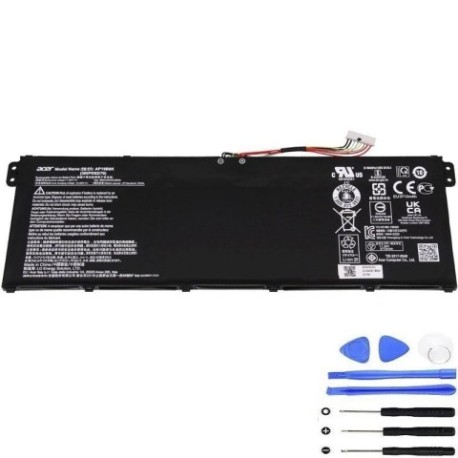
Battery models & part numbers
| Reference / P/N |
|---|
| Acer-AP19B8K-43.08Wh |
Compatible models
| Model |
|---|
| Acer Aspire (A317-52) |
| Acer Aspire 1 (A114-21) |
| Acer Aspire 1 (A114-33) |
| Acer Aspire 1 (A115-32) |
| Acer Aspire 1 (A115-32-C5MS) |
| Acer Aspire 3 (A314-22) |
| Acer Aspire 3 (A314-22G) |
| Acer Aspire 3 (A314-35) |
| Acer Aspire 3 (A315-23) |
| Acer Aspire 3 (A315-23G) |
| Acer Aspire 3 (A315-24PT) |
| Acer Aspire 3 (A315-33) |
| Acer Aspire 3 (A315-35) |
| Acer Aspire 3 (A315-510P) |
| Acer Aspire 3 (A315-56) |
| Acer Aspire 3 (A315-57G) |
| Acer Aspire 3 (A315-58) |
| Acer Aspire 3 (A315-58G) |
| Acer Aspire 3 (A317-33) |
| Acer Aspire 3 (A317-52) |
| Acer Aspire 3 (A317-53) |
| Acer Aspire 3 (A317-53G) |
| Acer Aspire 3 A315-23G |
| Acer Aspire Spin (A317-52) |
| Acer Chromebook 311 (C722) |
| Acer Chromebook 311 (C722T) |
| Acer Chromebook 314 (CB314-2H) |
| Acer Chromebook 314 (CB314-2HT) |
| Acer Chromebook 331 (C722-MT8183) |
| Acer Extensa 15 (EX215-22) |
| Acer Extensa 15 (EX215-22G) |
| Acer Extensa 15 (EX215-32) |
| Acer Extensa 15 (EX215-53G) |
| Acer Extensa 15 (EX215-54) |
| Acer Extensa 15 (EX215-54G) |
| Acer Extensa 15 (EX215-55) |
| Acer KT.0030G.022 |
| Acer Spin 1 (SP114-31) |
| Acer Spin 1 (SP114-31-C1VN) |
| Acer TravelMate (B311-31) |
| Acer TravelMate (B311R-31) |
| Acer TravelMate (B311R-32) |
| Acer TravelMate Spin B3 (B311-31) |
Common signs you need a replacement
| Symptom | Cause | Verification | Recommendation |
|---|---|---|---|
| Rapid power drain (less than 1 hour) | Battery degradation from charge cycles | Check battery health in Windows Power Report | Replace if capacity below 60% of original |
| Laptop won’t start without charger | Complete battery failure or protection circuit issue | Remove charger – if no power, battery is dead | Immediate replacement required |
| Battery swelling or bulging | Internal chemical breakdown creating gas | Visual inspection – case separation visible | Stop using immediately and replace |
| Inconsistent charging percentage | Faulty battery management system | Monitor charging behaviour over several cycles | Replace if percentage jumps erratically |
| Overheating during charging | Internal resistance increase in aged cells | Check temperature with monitoring software | Replace if consistently over 45°C |
How to check compatibility
Finding your exact Acer model number is crucial for battery compatibility. For Australian and New Zealand Acer owners, here’s how to locate your specific model information:
Physical Inspection Method: Turn your laptop upside down and look for the model sticker. For Acer Aspire and TravelMate models, you’ll typically find it near the battery compartment or on the bottom case. The format will be something like “A315-58” or “EX215-54”.
Software Method: In Windows, press Windows Key + R, type “msinfo32” and check System Model. For Chromebooks, go to Settings > About Chrome OS > Detailed build information.
Acer Official Tools: Visit the Acer Australia support website and use their product identification tool. Many Acer laptops also have a QR code on the bottom that directs to specific support pages.
Once you have your model number, cross-reference it with our compatibility table above. The AP19B8K battery is specifically designed for the listed Acer models and provides the exact fit and performance your laptop was designed for.
When to replace your Acer battery
Most Acer laptop batteries last between 2-4 years with regular use. Here are the key indicators it’s time for replacement:
- Age-based replacement: If your battery is over 3 years old and you notice reduced performance
- Cycle count: Lithium-ion batteries typically last 300-500 full charge cycles
- Performance metrics: Windows battery report showing design capacity significantly higher than full charge capacity
- Seasonal changes: Australian summers can accelerate battery degradation – consider replacement before extreme heat periods
For Acer Aspire and TravelMate users, the AP19B8K provides the same 43.08Wh capacity as your original battery, ensuring you get back to full mobile productivity.
Installation guide for Acer laptops
Replacing your Acer battery is generally straightforward. Here’s the step-by-step process for most compatible models:
- Safety first: Shut down your laptop completely and disconnect the AC adapter
- Prepare workspace: Work on a clean, static-free surface with good lighting
- Access battery: For most Acer models, flip the laptop and locate the battery release latches. Some newer models may require removing the bottom panel.
- Remove old battery: Slide the release latches to unlock the battery, then gently lift it out
- Install new AP19B8K: Align the new battery with the connectors and slide into place until it clicks
- Initial charge: Connect your charger and charge for at least 4 hours before
- First use: Power on your laptop and verify battery detection in your operating system
Model-specific notes: Acer Aspire 3 and Extensa models typically have external battery releases, while some Chromebook variants may require additional steps. Always consult your specific model’s service guide if available.
Usage & care tips for longer battery life
Maximise your new AP19B8K battery’s lifespan with these evidence-based practices:
- Optimal charging: Keep battery between 20-80% for daily use. Avoid frequent 0-100% cycles
- Temperature management: Never leave your Acer laptop in a hot car (common in Australian summers). Ideal operating temperature is 15-25°C
- Storage advice: If storing long-term, charge to 50% and store in cool, dry place
- Power settings: Use Acer’s PowerSmart utility or Windows battery saver mode for efficient power management
- Regular calibration: Every 2-3 months, allow a full discharge followed by complete recharge
Safety & recycling in AU/NZ
Battery safety and proper disposal are regulated in Australia and New Zealand. Important considerations:
- Never attempt to open or puncture lithium-ion batteries – risk of fire or chemical exposure
- Use only authorised replacement parts – non-compliant batteries may not meet Australian safety standards
- Recycling options: Most Officeworks stores accept laptop batteries for recycling. In NZ, check with your local council e-waste programme
- Transport regulations: When shipping batteries within AU/NZ, follow dangerous goods regulations
- Warranty protection: Your AP19B8K battery should come with Australian Consumer Law protections
FAQ
How long does the AP19B8K battery typically last?
With normal use, expect 2-4 years or 300-500 full charge cycles. Heavy users in hot Australian climates may see slightly shorter lifespan.
Will this battery work with my Acer laptop purchased in New Zealand?
Yes, the AP19B8K is compatible with Acer laptops sold in both Australia and New Zealand, provided your model number matches our compatibility list.
How do I know if my battery is genuine?
Genuine AP19B8K batteries will have proper Acer branding, correct specifications (43.08Wh, 11.4V), and come from authorised resellers. Check for Australian compliance marks.
Can I replace the battery myself without voiding warranty?
For most Acer models, user-replaceable batteries won’t void warranty. However, check your specific warranty terms, especially for newer ultra-thin models.
What should I do with my old Acer battery?
Never dispose of in household waste. Use battery recycling programmes available at most electronics retailers across Australia and New Zealand.
How long does shipping take to regional AU/NZ areas?
Most suppliers offer 3-7 business day delivery to major cities, with slightly longer times to regional areas. Express options are often available.
Is the battery pre-charged?
Most replacement batteries arrive with about 30-50% charge for storage purposes. We recommend a full charge cycle before first use.
Restore your Acer laptop’s mobility with the genuine AP19B8K 43.08Wh battery. With compatibility across dozens of Acer Aspire, Chromebook, Extensa, and TravelMate models, this replacement will have you working untethered again in no time. Australian and New Zealand customers can shop with confidence knowing they’re getting a quality-compatible battery backed by proper safety standards and local support.