Acer AS15B3N 88Wh Battery Replacement: Complete Guide for Australian & New Zealand Users
If you’re experiencing battery issues with your Acer Predator gaming laptop, you’ve come to the right place. This comprehensive guide covers everything Australian and New Zealand users need to know about replacing their Acer AS15B3N 88Wh battery, including compatible models, installation steps, and local safety considerations.
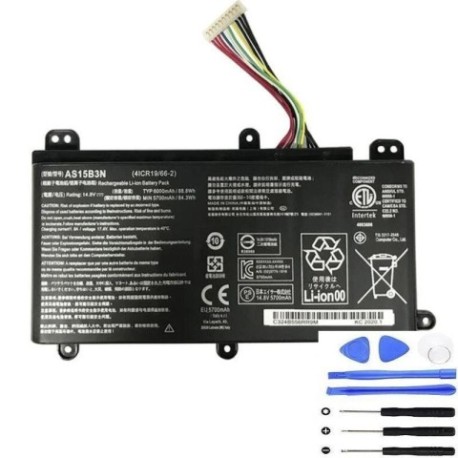
Battery models & part numbers
| Reference / P/N |
|---|
| Acer-AS15B3N-88Wh |
| KT.00803.004 |
| KT.00803.005 |
| KT00803004 |
Compatible models
| Model |
|---|
| Acer Predator 15 (G9-591) |
| Acer Predator 15 (G9-591R) |
| Acer Predator 15 (G9-592) |
| Acer Predator 15 (G9-593) |
| Acer Predator 17 (G5-793) |
| Acer Predator 17 (G9-791) |
| Acer Predator 17 (G9-792) |
| Acer Predator 17 (G9-793) |
| Acer Predator 17 G5-793 |
| Acer Predator 17 X (GX-791) |
| Acer Predator 17 X (GX-792) |
| Acer Predator 21 X (GX21-71) |
| Acer Predator G9000 |
Common signs you need a replacement
| Symptom | Cause | Verification | Recommendation |
|---|---|---|---|
| Battery drains in under 1 hour | Reduced capacity from age/cycles | Check Windows battery report | Replace if capacity < 60% |
| Laptop shuts down unexpectedly | Voltage drops under load | Monitor during gaming sessions | Immediate replacement needed |
| Battery won’t charge past 80% | Battery protection circuit failure | Check charging indicator lights | Replace to restore full capacity |
| Battery swelling or bulging | Internal gas buildup | Visual inspection of battery compartment | Stop using immediately and replace |
| Overheating during charging | Internal resistance increase | Monitor temperature with software | Replace if consistently over 45°C |
How to check compatibility
Finding your exact Acer Predator model is crucial for battery compatibility. Here’s how to locate your model information:
Physical identification methods
Check the bottom case of your laptop for a white or silver sticker containing the model number. For Acer Predator models, this is typically formatted as “Predator [screen size] (model code)” or similar. The model code in parentheses is what you need to match against our compatibility list.
Software identification
Open Command Prompt and type “wmic csproduct get name” to display your exact model. Alternatively, check System Information in Windows by pressing Windows Key + R, typing “msinfo32”, and looking for “System Model”.
Acer official tools
Visit the Acer Australia support website and use their “Identify Your Product” tool. Enter your serial number (found on the bottom sticker) to get detailed specifications including compatible parts.
Cross-referencing part numbers
If you have your old battery, remove it carefully and note the part number printed on it. Match this against our reference numbers table above. The AS15B3N-88Wh is compatible with multiple part numbers due to regional variations.
When to replace your battery
Gaming laptops like the Acer Predator series typically need battery replacement every 2-3 years with regular use. High-performance components draw more power, accelerating battery degradation. Consider replacement when:
- Battery capacity drops below 70% of original
- You experience sudden shutdowns during gaming
- The battery won’t hold charge for basic tasks
- Physical swelling or damage is visible
- Your laptop is 3+ years old with original battery
For Australian and New Zealand users, the harsh climate can affect battery life. High temperatures in summer and frequent charging cycles can reduce battery lifespan faster than in milder climates.
Installation guide
Replacing the battery in your Acer Predator is straightforward with the right tools and precautions. Here’s a step-by-step guide:
Tools required
- Phillips head screwdriver (size #0 or #1)
- Plastic spudger or guitar pick
- Anti-static wrist strap (recommended)
- Clean, well-lit workspace
Step-by-step procedure
- Power down completely: Shut down your laptop and disconnect all cables and peripherals.
- Remove bottom panel: Turn the laptop upside down and remove all screws from the bottom case. Some models may have screws hidden under rubber feet.
- Disconnect old battery: Locate the battery connector on the motherboard. Gently pull the connector straight out – never pull by the wires.
- Remove old battery: Unscrew any mounting screws securing the battery, then lift it out carefully.
- Install new battery: Place the new AS15B3N-88Wh battery in position and secure with screws.
- Reconnect battery: Firmly press the battery connector into the motherboard port until it clicks.
- Reassemble: Replace the bottom panel and all screws.
First-time setup
After installation, connect your charger and power on the laptop. Allow the battery to charge fully before disconnecting power. For optimal performance, complete 2-3 full charge cycles (0-100%) to calibrate the new battery.
Usage & care tips
Maximise your new battery’s lifespan with these expert tips tailored for Australian and New Zealand conditions:
Optimal charging practices
- Avoid frequent full discharges – recharge when battery reaches 20-30%
- Don’t leave laptop plugged in constantly – occasional discharge cycles help calibration
- Use original Acer charger or high-quality compatible charger
- Remove charger once battery reaches 100% to prevent overcharging stress
Temperature management
Australian summers can be brutal on laptop batteries. Keep your Predator in environments between 10°C and 35°C. Never leave it in a hot car or direct sunlight. Use a cooling pad during intensive gaming sessions to reduce heat stress on the battery.
Storage recommendations
If storing your laptop for extended periods, charge the battery to 50-60% and power down completely. Store in a cool, dry place away from direct sunlight. Recharge every 3 months if not in use.
Safety & recycling in AU/NZ
Safety precautions
Lithium-ion batteries require careful handling. Never puncture, crush, or expose to fire. If you notice swelling, overheating, or strange odours, stop using immediately and contact a professional. In Australia and New Zealand, only use batteries that meet local safety standards.
Proper disposal and recycling
Never dispose of laptop batteries in household waste. In Australia, take old batteries to BatteryWorld, Officeworks, or other authorised collection points. In New Zealand, use recycling centres or specific battery collection services. Many retailers offer free battery recycling when you purchase a replacement.
Local regulations
Both Australia and New Zealand have strict regulations regarding battery disposal. Fines may apply for improper disposal. Always check with your local council for specific recycling guidelines in your area.
FAQ
How long does the AS15B3N-88Wh battery last?
Under normal usage conditions, expect 2-4 hours of battery life depending on your Predator model and usage intensity. Gaming will significantly reduce this to 1-2 hours, while light web browsing may extend it to 3-4 hours.
Will this battery work with my Predator if it’s not listed?
We only guarantee compatibility with the models listed above. If your model isn’tlisted, check your exact model number and compare it with our compatibility table. Using an incompatible battery can damage your laptop.
How do I know if my battery is genuine?
Genuine Acer AS15B3N batteries will have clear, sharp printing with the correct part number and safety certifications. They should come in sealed packaging with proper documentation. Purchase only from authorised or reputable suppliers to avoid counterfeit products.
Can I replace the battery myself without voiding warranty?
For newer Predator models still under warranty, check Acer’s policy. Some allow user-replaceable batteries, while others may require authorised service centre installation to maintain warranty coverage. In Australia and New Zealand, consumer law protects your rights even for self-installation if done correctly.
Why is my new battery not charging to 100%?
New batteries often require several charge cycles to reach full capacity. Complete 2-3 full discharge/charge cycles. If the issue persists after a week, check your power settings and ensure you’re using the original charger. Some systems also have battery conservation modes that limit maximum charge.
What’s the difference between KT.00803.004 and KT.00803.005?
These are regional variations of the same battery with identical specifications. The AS15B3N-88Wh is compatible with both part numbers, so either will work perfectly in your compatible Predator model.
How should I dispose of my old battery in New Zealand?
In NZ, take your old laptop battery to any TechCollect NZ drop-off point, participating Noel Leeming, Harvey Norman, or PB Tech stores. Many councils also offer e-waste recycling services for batteries.
Does extreme heat affect battery life in Australia?
Yes, consistently high temperatures above 35°C can significantly reduce battery lifespan. Avoid leaving your laptop in hot cars or direct sunlight, especially during Australian summers. Consider using power-saving modes and reducing screen brightness in hot conditions.
Replacing your Acer Predator’s battery restores mobility and performance. With this comprehensive guide tailored for Australian and New Zealand users, you can confidently select, install, and maintain your new AS15B3N-88Wh battery. Always prioritise safety and proper disposal of your old battery to protect our unique environment.