Acer BAT1012 24Wh Battery Replacement Guide for Australian & New Zealand Users
If you’re experiencing battery issues with your Acer Iconia tablet, you’ve come to the right place. This comprehensive guide covers everything Australian and New Zealand consumers need to know about replacing their Acer BAT1012 24Wh battery, including compatibility, installation, and local safety standards.
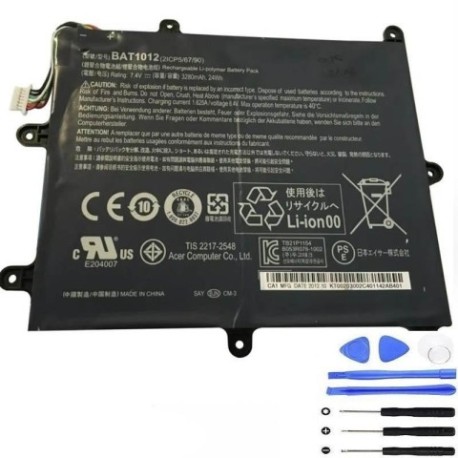
Battery models & part numbers
| Reference / P/N |
|---|
| Acer-BAT1012-24Wh |
| KT.00203.002 |
| KT00203002 |
Compatible models
| Model |
|---|
| Acer Iconia A210 |
| Acer Iconia A211 |
Introduction
The Acer BAT1012 24Wh battery is the official power source for several Acer Iconia tablet models popular in Australia and New Zealand. As these devices age, battery performance naturally degrades, leading to frustrating usage experiences. Understanding when and how to replace your battery can extend your tablet’s lifespan and restore its original performance.
Common signs you need a replacement
| Symptom | Cause | Verification | Recommendation |
|---|---|---|---|
| Rapid battery drain | Reduced capacity from age/cycles | Check battery usage in settings | Consider replacement if under 4 hours |
| Tablet shutting down unexpectedly | Voltage drops under load | Monitor shutdown percentages | Replace if shutting down above 15% |
| Swelling or bulging case | Battery degradation/gas buildup | Visual inspection, uneven surfaces | Immediate replacement required |
| Extended charging times | Reduced charging efficiency | Time full charge cycles | Replace if over 6 hours to charge |
| Overheating during use/charge | Internal resistance increase | Feel device temperature | Replace if uncomfortably hot |
How to check compatibility
For Acer Iconia tablet owners in Australia and New Zealand, verifying battery compatibility is straightforward. Start by locating your tablet’s model number, typically found on the back casing or in Settings > About tablet. The Acer BAT1012 24Wh battery is specifically designed for the Iconia A210 and A211 models. You can also cross-reference using the part numbers KT.00203.002 or KT00203002. Acer’s official support website provides compatibility checking tools, or you can contact authorised Acer service centres in major cities like Sydney, Melbourne, Auckland, or Wellington for verification.
When to replace
Most Acer Iconia tablet batteries last 2-3 years with regular use. Consider replacement when your battery holds less than 60% of its original capacity, requires charging multiple times daily for normal use, or shows physical signs of damage. Australian consumers should particularly note that our warmer climate can accelerate battery degradation, so replacement may be needed sooner than in cooler regions.
Installation guide
Replacing the battery in your Acer Iconia tablet requires careful attention to detail. Begin by powering off the device completely and disconnecting any cables. Use a plastic opening tool to carefully separate the back cover, starting from the edges. The A210 and A211 models have clips around the perimeter that require gentle pressure to release. Once inside, locate the battery connector and carefully disconnect it from the motherboard. Remove any adhesive securing the battery, then lift it out. Install the new BAT1012 battery, reconnect the connector, and reassemble the tablet. Test functionality before fully securing the back cover.
Usage & care tips
To maximise your new battery’s lifespan in Australian and New Zealand conditions, avoid exposing your tablet to extreme temperatures. Ideal operating range is 0°C to 35°C. Avoid frequent full discharges – partial charges are better for lithium-ion batteries. Don’t leave your tablet plugged in continuously after reaching 100% charge. Store in cool, dry places when not in use for extended periods. These practices will help maintain your battery’s health through our variable climate conditions.
Safety & recycling in AU/NZ
Battery safety is paramount in Australia and New Zealand. Never attempt to puncture or disassemble lithium-ion batteries. If you notice swelling, overheating, or unusual odours, discontinue use immediately and contact professionals. For recycling, most council waste facilities accept batteries, and many electronics retailers like Officeworks, JB Hi-Fi, and Noel Leeming offer battery recycling services. Proper disposal helps protect our unique environment from hazardous materials.
FAQ
How long does the Acer BAT1012 battery typically last?
With normal use, expect 2-3 years before significant capacity loss. Heavy users may need replacement sooner.
Can I use third-party batteries with my Acer Iconia tablet?
While possible, we recommend genuine Acer batteries for optimal safety and performance compatibility.
What’s the warranty on replacement batteries in Australia?
Most reputable suppliers offer 12-month warranties, complying with Australian Consumer Law guarantees.
How do I properly dispose of my old battery in New Zealand?
Take it to authorised recycling centres or retailers participating in battery recycling programmes.
Will replacing the battery void my tablet’s warranty?
If your device is still under manufacturer warranty, have replacement performed by authorised service centres.
What tools do I need for battery replacement?
Basic toolkit including plastic spudgers, screwdrivers, and tweezers. Avoid metal tools near battery.
How can I verify I’m buying a genuine Acer battery?
Purchase from authorised resellers and check for proper branding, packaging, and documentation.