ASUS A31N1302 33Wh Laptop Battery Replacement Guide
If your ASUS laptop is struggling to hold a charge or won’t power on without being plugged in, you’ve come to the right place. This comprehensive guide covers everything Australian and New Zealand consumers need to know about replacing their ASUS laptop battery with the genuine A31N1302 33Wh model.
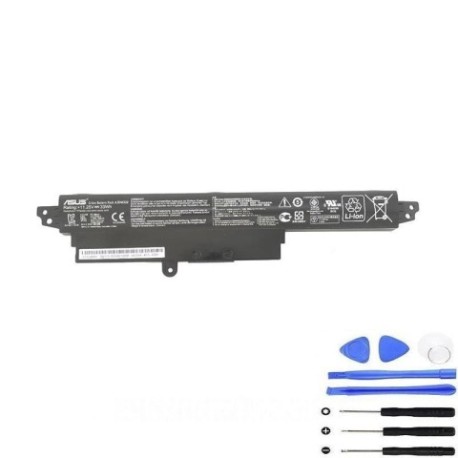
Battery models & part numbers
| Reference / P/N |
|---|
| Asus A31N1302 |
| Asus-A31N1302-33Wh |
Compatible models
| Model |
|---|
| Asus 0B110-00240000 |
| Asus 0B110-00240000M |
| Asus 0B110-00240100 |
| Asus 0B110-00240100M |
| Asus 0B110-00240200 |
| Asus 0B110-00240300 |
| Asus A31LM4H |
| Asus A31LM9H |
| Asus A31LMH2 |
| Asus R200CA |
| Asus R202CA |
| Asus R202MA |
| Asus VivoBook F200CA |
| Asus VivoBook F200MA |
| Asus X200CA |
| Asus X200LA |
| Asus X200MA |
Introduction
Welcome to your complete guide for ASUS A31N1302 33Wh battery replacement. This high-quality lithium-ion battery is specifically designed for various ASUS laptop models, particularly those in the VivoBook, R Series, and X Series ranges. Whether you’re a student, professional, or casual user in Australia or New Zealand, understanding your battery replacement options ensures you can continue using your trusted ASUS laptop without interruption.
Laptop batteries typically last 2-4 years with regular use, and when they begin to fail, it can significantly impact your productivity and mobility. The good news is that replacing your ASUS battery is often more cost-effective than purchasing a new laptop, especially when you have important files and settings already configured on your current device.
Common signs you need a replacement
| Symptom | Cause | Verification | Recommendation |
|---|---|---|---|
| Rapid battery drain | Reduced capacity from age/cycles | Check Windows battery report | Replace if under 50% original capacity |
| Laptop won’t power on without charger | Battery cannot hold charge | Remove charger – device shuts down | Immediate replacement needed |
| Battery percentage jumps erratically | Faulty battery management system | Observe percentage changes | Replace to prevent data loss |
| Battery swelling or bulging | Gas buildup from degradation | Visual inspection of battery compartment | Replace immediately – safety hazard |
| Overheating during charging | Internal resistance increase | Touch test – unusually hot | Replace to prevent damage |
| Charger light blinking abnormally | Battery communication error | Check ASUS charger indicator patterns | Replace battery and retest |
How to check compatibility
Before purchasing any replacement battery, verifying compatibility is crucial. For ASUS laptops, there are several reliable methods to ensure you’re getting the right battery for your specific model.
Finding Your Model Number: The most accurate way to identify your laptop is to check the model number printed on the device. For ASUS laptops, you’ll typically find this on a sticker on the bottom case. Look for text like “ASUS R200CA” or “ASUS X200MA” – this is your exact model identifier. Some older models might have the information under the battery compartment, requiring you to remove the battery to see the label.
Using ASUS Official Tools: ASUS provides excellent support resources for Australian and New Zealand customers. Visit the official ASUS support website and use their product identification tool. You can often input your serial number (found on the same sticker as your model number) to get precise compatibility information. The ASUS Live Update utility installed on your laptop can also provide detailed system information, including recommended replacement parts.
Cross-Reference with Our List: Compare your model number against the comprehensive compatibility list provided in this guide. The A31N1302 battery is designed to work with multiple ASUS series, including the educational R Series models, compact X Series laptops, and versatile VivoBook models. If your exact model appears in our list, you can proceed with confidence.
Physical Compatibility Check: If you have access to your current battery, remove it carefully and compare the physical dimensions and connector type. The A31N1302 measures approximately 207mm x 138mm x 19mm with a standard 3-pin ASUS connector. Ensure the shape and connector orientation match your existing battery.
When to replace
Understanding the optimal timing for battery replacement can save you from unexpected downtime and potential data loss. Most ASUS laptop batteries like the A31N1302 are rated for 300-500 full charge cycles before significant capacity degradation occurs.
Performance Indicators: When your battery life drops below 50% of its original runtime, replacement becomes economically sensible. For the 33Wh A31N1302, this typically means getting less than 1.5-2 hours of usage where you previously enjoyed 3-4 hours. Windows Battery Report (generated via powercfg /batteryreport command) provides detailed cycle count and capacity data to make informed decisions.
Age Considerations: Even with minimal use, lithium-ion batteries degrade over time. If your ASUS laptop is over 3 years old and you’re experiencing any power-related issues, battery replacement should be your first troubleshooting step. This is particularly relevant for Australian and New Zealand climates, where temperature variations can accelerate battery aging.
Seasonal Timing: Consider replacing your battery before the Australian summer or New Zealand winter periods when you’re likely to rely more heavily on portable computing. This ensures you have reliable power during critical periods of increased mobility.
Installation guide
Replacing your ASUS A31N1302 battery is a straightforward process that most users can complete in 10-15 minutes with basic tools. Always work on a clean, static-free surface and ensure your laptop is completely powered off before beginning.
Step 1: Preparation
Gather your replacement A31N1302 battery, a small Phillips head screwdriver, and an anti-static wrist strap if available. Ensure your laptop is turned off and disconnected from all power sources, including the AC adapter and any peripherals.
Step 2: Access the Battery Compartment
For most compatible ASUS models (R200CA, X200MA, VivoBook F200 series), the battery is externally accessible. Turn your laptop upside down and locate the battery release latches. These are typically located on either side of the battery compartment. Slide both latches to the unlock position simultaneously.
Step 3: Remove Old Battery
Once the latches are released, the battery should lift out easily. If it feels stuck, check that both latches are fully disengaged. Gently lift the battery at a 30-degree angle away from the laptop body, being careful not to force it. Note the orientation of the connector for when you install the new battery.
Step 4: Install New A31N1302 Battery
Take your new A31N1302 battery and align the connector with the laptop’s battery port. The connector should slide in smoothly without excessive force. Once connected, lower the battery into the compartment until it clicks into place. Ensure both locking latches engage properly.
Step 5: Initial Charging
Connect your AC adapter and charge the new battery for at least 4 hours before first use. This ensures proper calibration of the battery management system. Your ASUS laptop may take a few charge cycles to accurately report battery percentage with the new cell.
Troubleshooting Tips: If your laptop doesn’t recognize the new battery, try resetting the EC (Embedded Controller) by holding the power button for 40 seconds with the battery and AC adapter removed. Then reconnect power and restart.
Usage & care tips
Proper battery maintenance extends the life of your A31N1302 replacement and ensures optimal performance throughout its lifespan. Follow these evidence-based practices developed specifically for Australian and New Zealand usage conditions.
Charging Best Practices: Unlike older battery technologies, modern lithium-ion batteries prefer partial discharges over full cycles. Aim to keep your ASUS battery between 20-80% charge for daily use. Avoid leaving your laptop plugged in continuously at 100% charge, as this stresses the battery chemistry. The 33Wh capacity is designed for typical mobile use – if you primarily use your laptop as a desktop replacement, consider enabling ASUS Battery Health Charging in your system settings to limit maximum charge to 60-80%.
Temperature Management: Australian summers and New Zealand temperature variations can impact battery health. Never leave your laptop in a hot car or direct sunlight, as temperatures above 35°C can permanently damage lithium-ion cells. Similarly, avoid using your laptop in environments below 5°C, as cold temperatures temporarily reduce capacity and can cause condensation issues.
Storage Recommendations: If storing your ASUS laptop for extended periods, charge the battery to approximately 50% and power down completely. Store in a cool, dry place away from direct sunlight. Ideal storage temperature is between 10-25°C. For periods exceeding 3 months, consider removing the battery entirely and storingseparately in the same conditions.
Calibration Cycle: Modern ASUS laptops with lithium-ion batteries don’t require frequent full calibration, but performing a calibration every 2-3 months can help maintain accurate battery percentage reporting. To calibrate, charge your laptop to 100%, then use it on battery power until it automatically enters sleep mode (around 5-7%). Then recharge to 100% without interruption.
Safety & recycling in AU/NZ
Battery safety and responsible disposal are critical considerations for Australian and New Zealand consumers. The A31N1302 contains a lithium-ion power cell that requires proper handling throughout its lifecycle.
Safety Precautions: Never attempt to disassemble or puncture the battery casing. If you notice any swelling, leakage, or unusual heat during charging, discontinue use immediately and contact a professional. Only use ASUS-authorised chargers or high-quality third-party alternatives that meet Australian/NZ safety standards. Look for the RCM (Regulatory Compliance Mark) on charging equipment to ensure compliance with Australian electrical safety requirements.
Transportation Guidelines: When travelling with spare batteries, keep them in your carry-on luggage and ensure terminals are protected from short circuits. Australian aviation regulations limit lithium-ion batteries to 100Wh for carry-on, making the 33Wh A31N1302 well within acceptable limits for domestic and international travel.
Recycling in Australia: Never dispose of laptop batteries in household waste. Under the Australian Battery Stewardship Scheme, you can return used batteries to most electronics retailers or dedicated collection points. Major retailers like Officeworks, JB Hi-Fi, and Harvey Norman offer free battery recycling services. Some local councils also provide battery recycling at waste transfer stations.
Recycling in New Zealand: The NZ Product Stewardship Scheme for batteries ensures responsible end-of-life management. Drop off your used ASUS batteries at participating retailers like Noel Leeming, PB Tech, or at local transfer stations. Many communities have e-waste collection events specifically for batteries and electronic equipment.
FAQ
1. How long does the A31N1302 33Wh battery typically last on a single charge?
Under normal usage conditions (web browsing, document editing, moderate screen brightness), the A31N1302 provides approximately 3-4 hours of runtime. Intensive tasks like video streaming or gaming will reduce this to 1.5-2 hours. Actual runtime varies based on your specific ASUS model, system settings, and age of the battery.
2. Is this battery compatible with my ASUS laptop if it’s not explicitly listed?
While our compatibility list is comprehensive, some regional variants or slightly different model numbers may still be compatible. The safest approach is to verify using your original battery’s part number or consult the ASUS support website with your laptop’s serial number. Physical compatibility (dimensions and connector type) is the ultimate determining factor.
3. How can I verify this is a genuine ASUS replacement battery?
Genuine A31N1302 batteries will have proper ASUS branding, the correct part number laser-etched on the casing, and appropriate safety certifications (CE, UL, RCM for AU/NZ). Purchase from authorised resellers or reputable suppliers who provide warranty support. Counterfeit batteries often have misspelled branding, poor-quality labels, and lack proper safety markings.
4. What warranty comes with this replacement battery?
Quality A31N1302 replacements typically include a 12-month warranty covering manufacturing defects and premature capacity loss. Ensure you retain your purchase documentation and register the product if required. Australian Consumer Law guarantees apply regardless of warranty statements, ensuring products are of acceptable quality and fit for purpose.
5. My new battery isn’t charging to 100% – is this normal?
Modern ASUS laptops with battery health management may intentionally limit maximum charge to extend battery lifespan. Check your power management settings for features like “Battery Health Charging” or “Maximum Lifespan Mode” that could be limiting charge capacity. If these are disabled, your battery may require several full charge cycles to calibrate properly.
6. Can I use a higher capacity battery with my compatible ASUS model?
No, the A31N1302 is specifically designed for these models, and physical compatibility prevents using larger capacity batteries. Higher capacity alternatives would have different dimensions and potentially different voltage characteristics that could damage your laptop or pose safety risks.
7. How should I dispose of my old ASUS battery in Australia/New Zealand?
Never dispose of lithium-ion batteries in household waste. Use the free battery recycling services available at most electronics retailers or council waste facilities. Many retailers accept old batteries regardless of where you purchased the replacement, supporting environmental sustainability efforts across both countries.
Restoring your ASUS laptop’s mobility with a genuine A31N1302 33Wh replacement battery is a smart investment in your productivity. With proper installation and care, your replacement should provide reliable power for years of mobile computing across Australia and New Zealand.