ASUS A31N1719 33Wh Laptop Battery Replacement Guide
If your ASUS laptop is struggling to hold a charge or showing battery warning signs, our comprehensive guide helps Australian and New Zealand customers find the right replacement battery and install it safely.
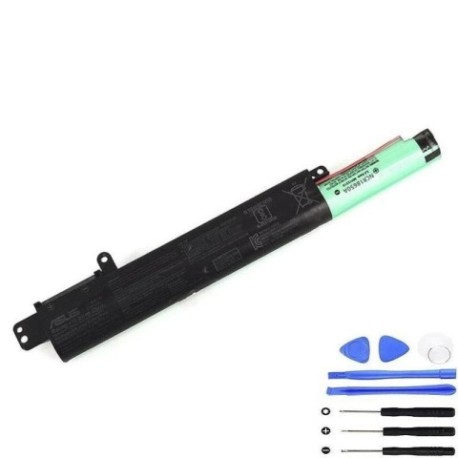
Battery models & part numbers
| Reference / P/N |
|---|
| Asus-A31N1719-33Wh |
Compatible models
| Model |
|---|
| Asus 0B110-00520000 |
| Asus 0B110-00520100 |
| Asus 0B110-00520200 |
| Asus 0B110-00520300 |
| Asus 0B110-00520400 |
| Asus A31LM5H |
| Asus A407M |
| Asus A407MA |
| Asus A407U |
| Asus A407UB |
| Asus F407M |
| Asus F407MA |
| Asus F407U |
| Asus F407UA |
| Asus f507l |
| Asus f507la |
| Asus R407UA |
| Asus R407UB |
| Asus R410MA |
| Asus R410UB |
| Asus R410UF |
| Asus R423U |
| Asus R423UB |
| Asus R507UA |
| Asus R507UB |
| Asus R507UF |
| Asus X407 |
| Asus X407M |
| Asus X407MA |
| Asus X407U |
| Asus X407UA |
| Asus X407UB |
| Asus X407UF |
| Asus X507 |
| Asus X507LA |
| Asus X507MA |
| Asus X507UA |
| Asus X507UB |
| Asus X507UF |
Introduction
Laptop batteries naturally degrade over time, and when your ASUS laptop starts showing battery issues, it can be frustrating. The ASUS A31N1719 33Wh battery replacement is designed specifically for numerous ASUS models commonly used across Australia and New Zealand. This comprehensive guide provides everything you need to identify battery problems, verify compatibility, and safely replace your laptop’s power source.
Common signs you need a replacement
| Symptom | Cause | Verification | Recommendation |
|---|---|---|---|
| Rapid power drain (less than 1 hour) | Battery capacity degradation | Check battery health in Windows settings | Replace if capacity below 60% |
| Laptop won’t power on without charger | Complete battery failure | Remove charger – if no power, battery dead | Immediate replacement needed |
| Battery swelling or bulging | Internal chemical breakdown | Visual inspection of battery compartment | Stop using immediately – safety hazard |
| Inconsistent charging percentage | Faulty battery circuitry | Monitor charging behaviour over multiple cycles | Replace to prevent damage to laptop |
| Overheating during charging | Internal resistance increase | Check temperature during charging cycle | Replace to avoid thermal damage |
How to check compatibility
Before purchasing any replacement battery, verifying compatibility is crucial. For ASUS laptops, you can find your model number in several locations:
- Bottom sticker: Look for the model number on the bottom case of your laptop, usually near the serial number and regulatory information
- System information: Press Windows Key + R, type “msinfo32” and check System Model
- Command prompt: Open Command Prompt and type “wmic csproduct get name”
- BIOS/UEFI: Restart your laptop and enter BIOS/UEFI settings to find model information
ASUS provides official support tools on their website where you can enter your serial number to verify exact compatibility. The A31N1719 battery is specifically designed for the ASUS VivoBook and ZenBook series models listed above, featuring the exact same physical dimensions (typically around 205mm x 55mm x 20mm) and electrical specifications as the original equipment.
When to replace
Most laptop batteries last 2-4 years with regular use. Consider replacement when:
- Battery health shows less than 60% of original capacity
- Your laptop can’t complete basic tasks on battery power
- You notice physical swelling or deformation
- The battery no longer charges to 100%
- You experience sudden shutdowns even with reported charge remaining
For ASUS models using the A31N1719 battery, typical replacement cycles align with 300-500 full charge cycles, after which significant capacity loss occurs.
Installation guide
Replacing your ASUS battery is generally straightforward but requires care. Before beginning, ensure you have the correct replacement battery, a small Phillips head screwdriver, and an anti-static wrist strap if available.
- Power down completely: Shut down your laptop and disconnect all cables and peripherals
- Remove power source: Unplug the AC adapter and ensure the laptop is completely powered off
- Ground yourself: Touch a metal surface to discharge static electricity that could damage components
- Access battery compartment: For most ASUS models compatible with A31N1719, turn the laptop over and locate the battery compartment. Some models may require removing the entire bottom panel
- Remove old battery: Carefully disconnect the battery connector from the motherboard. Most ASUS models use a simple plug connection that may require gentle prying with a plastic tool
- Install new battery: Position the new A31N1719 battery in the compartment and reconnect the power connector firmly
- Reassemble: Replace any covers or panels and secure with screws
- Initial charge: Connect the AC adapter and charge the new battery completely before first use
Important safety note: If you encounter any resistance during disassembly or notice damaged components, stop immediately and consult a professional technician.
Usage & care tips
Proper battery maintenance extends the life of your new A31N1719 replacement battery:
- Avoid extreme temperatures: Don’t leave your laptop in cars or direct sunlight where temperatures can exceed 45°C
- Optimal charging: Keep battery between 20-80% for daily use rather than constantly charging to 100%
- Calibration: Once every 2-3 months, allow the battery to discharge to about 10% then charge fully to recalibrate the battery meter
- Storage: If storing long-term, charge to about 50% and store in a cool, dry place around 15-25°C
- Power settings: Use ASUS power management settings to optimise battery life based on your usage patterns
Safety & recycling in AU/NZ
Battery safety and proper disposal are regulated in Australia and New Zealand. Never attempt to open or puncture lithium-ion batteries as they contain hazardous materials. If your old battery shows signs of swelling, handle with extreme care and avoid pressure on the battery casing.
In Australia, you can recycle old laptop batteries through Battery World, Officeworks, or other authorised collection points. In New Zealand, most electronics retailers accept batteries for recycling through the e-waste programme. Many local councils also provide battery recycling services at transfer stations or through special collection events.
FAQ
How long does the A31N1719 battery typically last on a full charge?
Under normal usage conditions (web browsing, document editing), expect 4-6 hours depending on your specific ASUS model, screen brightness, and applications running.
Is this battery compatible with ASUS laptops sold in Australia and New Zealand?
Yes, the A31N1719 replacement battery is designed to work with ASUS laptops regardless of regional purchase location, as long as your model number matches those listed in our compatibility table.
Will replacing the battery void my ASUS warranty?
In Australia and New Zealand, consumer law protects your right to have repairs done by third parties without voiding manufacturer warranty for unrelated issues. However, any damage caused by improper installation would not be covered.
How can I verify this is a genuine quality replacement?
Look for clear product images showing proper branding, check for detailed specifications matching the original (33Wh capacity, 11.4V output), and purchase from reputable suppliers with clear return policies.
What should I do if my laptop doesn’t recognise the new battery?
Try a full power reset: disconnect AC power, remove the battery, hold the power button for 30 seconds, then reconnect everything. If issues persist, check connector alignment and ensure the battery is properly seated.
Can I use my laptop while plugged in with the new battery installed?
Yes, modern ASUS laptops with the A31N1719 battery include circuitry that automatically stops charging once full, then runs on AC power while preserving battery health.
How should I dispose of my old ASUS battery in Australia/NZ?
Never place lithium-ion batteries in household rubbish. Use approved recycling programmes through retailers, local council e-waste services, or dedicated battery recycling facilities to ensure safe, environmentally responsible disposal.
Replacing your ASUS laptop battery with the genuine A31N1719 33Wh model restores portability and performance. With proper installation and care, your replacement should provide reliable power for years. Always purchase from authorised suppliers and follow local recycling guidelines for old batteries.