ASUS A32N1511 67Wh Laptop Battery Replacement Guide
If your ASUS ROG gaming laptop is struggling to hold charge or experiencing power issues, our comprehensive guide helps you find the right replacement battery and install it with confidence.
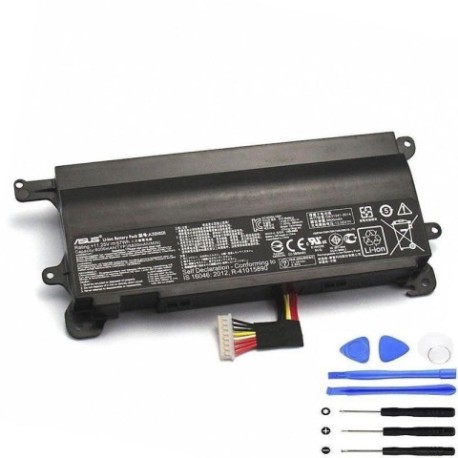
Battery models & part numbers
| Reference / P/N |
|---|
| Asus-A32N1511-67Wh |
Compatible models
| Model |
|---|
| Asus 0B110-00370000 |
| Asus A32LM9H |
| Asus G752VL |
| Asus G752VL-1A |
| Asus G752VL-2A |
| Asus G752VL-BHI7N32 |
| Asus G752VL-DH71 |
| Asus G752VL-GC057T |
| Asus G752VL-GC058T |
| Asus G752VL-GC059T |
| Asus G752VL-GC060T |
| Asus G752VL-GC085T |
| Asus G752VM |
| Asus G752VM-1A |
| Asus G752VM-GC012T |
| Asus G752VM-GC017T |
| Asus G752VM-GC034D |
| Asus G752VM-GC056T |
| Asus G752VM-GC058T |
| Asus G752VM-GC063T |
| Asus G752VT-1A |
| Asus ROG G752VL |
| Asus ROG G752VM |
| Asus ROG G752VT |
| Asus ROG G752VT-DH72 |
| Asus ROG G752VT-DH74 |
| Asus ROG G752VT-GC030T |
| Asus ROG G752VT-GC031T |
| Asus ROG G752VT-GC032T |
| Asus ROG G752VT-GC037T |
| Asus ROG G752VT-GC046D |
| Asus ROG G752VT-GC053T |
| Asus ROG G752VT-GC062T |
| Asus ROG G752VT-GC075T |
| Asus ROG G752VT-GC104T |
| Asus ROG G752VT-RH71 |
Introduction
The ASUS A32N1511 67Wh battery is specifically designed for the ROG G752 series gaming laptops, providing reliable power for your high-performance gaming sessions. These batteries typically last 2-3 years with regular use before showing signs of degradation.
Common signs you need a replacement
| Symptom | Cause | Verification | Recommendation |
|---|---|---|---|
| Rapid power drain during gaming | Battery capacity degradation | Check battery health in Windows | Replace if capacity below 60% |
| Laptop won’t hold charge overnight | Internal battery circuit failure | Test with multimeter if skilled | Immediate replacement needed |
| Battery swelling or bulging | Chemical breakdown | Visual inspection | Stop using immediately |
| Inconsistent charging percentage | Battery management system issues | Monitor charging behaviour | Replace battery unit |
| Overheating during charging | Internal resistance increase | Check temperature with software | Replace to prevent damage |
How to check compatibility
Finding your exact ASUS model number is crucial for battery compatibility. For ROG G752 series laptops, check the bottom sticker near the battery compartment or use the ASUS System Information utility. The model number typically starts with “G752” followed by specific variant codes. You can also check your original purchase documentation or invoice for the precise model specification.
ASUS provides official compatibility checking tools through their support website. Enter your serial number or model name to verify battery requirements. The A32N1511-67Wh is specifically designed for the G752 chassis and uses the standard ASUS battery connector configuration.
When to replace
Most ASUS gaming laptop batteries need replacement after 500-800 charge cycles or when they hold less than 60% of original capacity. For heavy gamers, this could be as soon as 18 months. Regular users might get 3-4 years from their original battery. Monitor your battery health through Windows Battery Report or third-party utilities like HWMonitor.
Installation guide
Replacing the battery in your ASUS ROG G752 requires careful handling. First, power down completely and disconnect the AC adapter. Remove the bottom panel screws (usually 10-12 Phillips head screws). Gently pry open the bottom cover starting from the rear vents. Locate the battery connector near the centre-left of the motherboard. Carefully disconnect the battery cable by pulling the connector straight out, not the wires. Remove the 4-6 screws securing the battery, then lift it out. Install the new A32N1511-67Wh battery in reverse order, ensuring all connections are secure before reassembling.
Usage & care tips
To maximise your new battery’s lifespan, avoid constant 100% charging. For gaming sessions, keep your laptop plugged in to reduce battery cycles. Store between 20-80% charge when not in use for extended periods. Keep your laptop in cool environments (15-25°C) as heat accelerates battery degradation. Calibrate your battery monthly by charging to 100%, then discharging to 5% before recharging.
Safety & recycling in AU/NZ
In Australia and New Zealand, lithium-ion batteries must be recycled properly. Never dispose of laptop batteries in household waste. Use authorised recycling centres like Battery World, Officeworks, or council e-waste collection points. Damaged or swollen batteries should be handled with care – place in a fire-proof container and take to a professional recycling facility immediately.
FAQ
How long does the A32N1511-67Wh battery last on a single charge?
For ROG G752 models with standard usage (web browsing, document work), expect 3-4 hours. During intensive gaming, battery life reduces to 1-2 hours due to high power draw from dedicated graphics cards.
Will this battery work with my ASUS G752 if it’s not listed?
The compatibility list includes all verified models. If your specific variant isn’t listed, check the physical battery compartment for the part number or consult ASUS support for confirmation.
How do I know if my battery is genuine ASUS?
Genuine ASUS batteries have proper branding, serial numbers, and safety certifications. Purchase from authorised retailers and verify packaging holograms and quality markings.
Can I use a higher capacity battery in my G752?
What’s the warranty on replacement batteries?
Most reputable suppliers offer 12-24 month warranties on replacement batteries. Always check warranty terms before purchase and keep your receipt for claims.
How long does shipping take to Australia/New Zealand?
Standard shipping typically takes 7-14 business days to major AU/NZ cities. Express options can deliver within 3-5 business days. Check with your supplier for specific delivery timelines.
Is professional installation recommended?
While the installation process is straightforward for technically confident users, those uncomfortable with internal components should seek professional assistance from authorised ASUS service centres.