ASUS A32-N56 56Wh Laptop Battery Replacement Guide
If your ASUS laptop is struggling to hold a charge or won’t power on without being plugged in, you’ve found the right replacement battery. Our comprehensive guide covers everything Australian and New Zealand users need to know about the ASUS A32-N56 56Wh battery replacement.
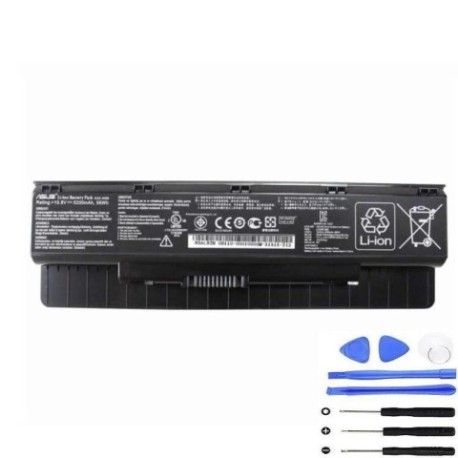
Battery models & part numbers
| Reference / P/N |
|---|
| Asus-A32-N56-56Wh |
Compatible models
| Model |
|---|
| Asus 0B110-00060000 |
| Asus 0B110-00060000M |
| Asus 0B110-00060200 |
| Asus 0B110-00060200M |
| Asus 90-NAJ1B1000Y |
| Asus A31-N56 |
| Asus A33-N56 |
| Asus N46JV-1A |
| Asus N46JV-1B |
| Asus N46VB |
| Asus N46VB-1A |
| Asus N46VB-1B |
| Asus N46VB-V3018H |
| Asus N46VJ |
| Asus N46VJ-1A |
| Asus N46VJ-1B |
| Asus N46VJ-V2G-V3010H |
| Asus N46VM |
| Asus N46VM-1A |
| Asus N46VM-1B |
| Asus N46VM-V3018V |
| Asus N46VZ |
| Asus N46VZ-1A |
| Asus N46VZ-1B |
| Asus N46VZ-V3035V |
| Asus N56DP |
| Asus N56DP-1A |
| Asus N56DP-S3005H |
| Asus N56DP-S3007H |
| Asus N56DP-S3007V |
| Asus N56DP-S3010H |
| Asus N56DP-S4008H |
| Asus N56DP-S4008V |
| Asus N56DP-S4024V |
| Asus N56DP-S4037H |
| Asus N56DY |
| Asus N56DY-1A |
| Asus N56DY-S3012H |
| Asus N56DY-S3035H |
| Asus N56DY-S3047H |
| Asus N56DY-S4015H |
| Asus N56DY-S4018H |
| Asus N56DY-S4021H |
| Asus N56DY-S4033H |
| Asus N56DY-S4036H |
| Asus N56DY-S4040H |
| Asus N56JK |
| Asus N56JK-2A |
| Asus N56JK-2C |
| Asus N56JK-CN015H |
| Asus N56JK-CN121H |
| Asus N56JK-CN140D |
| Asus N56JK-XO061H |
| Asus N56JK-XO103H |
| Asus N56JN |
| Asus N56JN-1A |
| Asus N56JN-CN023H |
| Asus N56JN-CN024H |
| Asus N56JN-DM127H |
| Asus N56JN-XO065H |
| Asus N56JR |
| Asus N56JR-1A |
| Asus N56JR-2A |
| Asus N56JR-2C |
| Asus N56JR-S4023H |
| Asus N56JR-S4056H |
| Asus N56JR-S4068H |
| Asus N56JR-S4080H |
| Asus N56JR-S4094H |
| Asus N56JR-S4104H |
| Asus N56L82H |
| Asus N56VB |
| Asus N56VB-1A |
| Asus N56VB-S4024H |
| Asus N56VB-S4028H |
| Asus N56VB-S4038H |
| Asus N56VB-S4039H |
| Asus N56VB-S4040H |
| Asus N56VB-S4041H |
| Asus N56VB-S4042H |
| Asus N56VB-S4050H |
| Asus N56VB-S4107H |
| Asus N56VB-S4108H |
| Asus N56VB-S4135H |
| Asus N56VJ |
| Asus N56VJ-1A |
| Asus N56VJ-S4042H |
| Asus N56VJ-S4045H |
| Asus N56VJ-S4175H |
| Asus N56VM |
| Asus N56VM-1A |
| Asus N56VM-1B |
| Asus N56VM-S4032V |
| Asus N56VM-S4082V |
| Asus N56VM-S4117V |
| Asus N56VM-S4120V |
| Asus N56VV |
| Asus N56VV-1A |
| Asus N56VV-S3043H |
| Asus N56VV-S3074H |
| Asus N56VV-S4009P |
| Asus N56VV-S4012H |
| Asus N56VV-S4013H |
| Asus N56VV-S4021H |
| Asus N56VV-S4027H |
| Asus N56VV-S4036H |
| Asus N56VV-S4037H |
| Asus N56VV-S4069H |
| Asus N56VV-S4085H |
| Asus N56VZ |
| Asus N56VZ-1A |
| Asus N56VZ-1B |
| Asus N56VZ-S4016H |
| Asus N56VZ-S4016V |
| Asus N56VZ-S4066H |
| Asus N56VZ-S4066V |
| Asus N56VZ-S4095V |
| Asus N56VZ-S4415H |
| Asus N56VZ-S4416H |
| Asus N76 |
| Asus N76V |
| Asus N76V8 |
| Asus N76VB |
| Asus N76VB-1A |
| Asus N76VB-T4002H |
| Asus N76VB-T4003H |
| Asus N76VB-T4006H |
| Asus N76VB-T4021H |
| Asus N76VB-T4022H |
| Asus N76VB-T4024H |
| Asus N76VB-T4052H |
| Asus N76VB-T4054H |
| Asus N76VB-T4064H |
| Asus N76VB-T4065H |
| Asus N76VB-T4066H |
| Asus N76VB-T4076H |
| Asus N76VB-T4081H |
| Asus N76VB-T4083H |
| Asus N76VB-T4093H |
| Asus N76VB-T5009H |
| Asus N76VB-T5010H |
| Asus N76VB-T5071H |
| Asus N76VB-T5171H |
| Asus N76VJ |
| Asus N76VJ-1A |
| Asus N76VJ-T4019H |
| Asus N76VJ-T4021H |
| Asus N76VJ-T4024H |
| Asus N76VJ-T4106H |
| Asus N76VJ-T4107H |
| Asus N76VM |
| Asus N76VM-1A |
| Asus N76VM-V2G-T1024V |
| Asus N76VM-V2G-T1072V |
| Asus N76VM-V2G-T1077V |
| Asus N76VM-V2G-T1078V |
| Asus N76VM-V2G-T1132V |
| Asus N76VZ |
| Asus N76VZ-1A |
| Asus N76VZ-V2G-T1007V |
| Asus N76VZ-V2G-T1011H |
| Asus N76VZ-V2G-T1011V |
| Asus N76VZ-V2G-T1031H |
| Asus N76VZ-V2G-T1031V |
| Asus N76VZ-V2G-T1056V |
| Asus N76VZ-V2G-T1083H |
| Asus N76VZ-V2G-T1132H |
| Asus N76VZ-V4G-T1230H |
| Asus N76VZ-V4G-T1231H |
| Asus ROG G56JK |
| Asus ROG G56JK-CN063H |
| Asus ROG G56JK-CN085H |
| Asus ROG G56JK-CN113H |
| Asus ROG G56JK-DM156D |
| Asus ROG G56JR |
| Asus ROG G56JR-CN135H |
| Asus ROG G56JR-CN140D |
| Asus ROG G56JR-CN140H |
| Asus ROG G56JR-CN141 |
| Asus ROG G56JR-CN142D |
| Asus ROG G56JR-CN169D |
| Asus ROG G56JR-CN179H |
| Asus ROG G56JR-CN199H |
| Asus ROG G56JR-CN212H |
| Asus ROG G56JR-CN232H |
| Asus ROG G56JR-CN234H |
| Asus ROG G56JR-CN249H |
| Asus ROG G56JR-CN283H |
Common signs you need a replacement
| Symptom | Cause | Verification | Recommendation |
|---|---|---|---|
| Battery drains quickly (under 1 hour) | Ageing cells, reduced capacity | Check battery health in Windows | Replace battery immediately |
| Laptop won’t power on without charger | Battery no longer holds charge | Remove charger, try to power on | Urgent replacement needed |
| Battery percentage jumps erratically | Faulty battery management system | Monitor percentage changes | Replace to prevent damage |
| Battery swelling or bulging | Gas buildup from cell degradation | Visual inspection, trackpad lifting | Stop using immediately – safety risk |
| Overheating during charging | Internal resistance increased | Feel battery temperature | Replace to avoid fire hazard |
How to check compatibility
Finding your exact ASUS model number is crucial for battery compatibility. Check the bottom of your laptop for a sticker showing the model number. For ASUS N-series laptops, you’ll typically find labels like “N56VB” or “N76VZ” followed by additional codes. You can also check in Windows by pressing Windows Key + R, typing “msinfo32” and looking under System Model. Cross-reference your model with our comprehensive compatibility list above.
When to replace your battery
Most ASUS laptop batteries last 2-3 years with regular use. If your battery health shows less than 60% capacity in Windows battery report, it’s time for replacement. For gaming laptops like the ROG series, batteries may degrade faster due to high power demands.
Installation guide
Replacing your ASUS battery is straightforward. First, shut down your laptop and unplug all cables. Flip it over and locate the battery compartment. Most ASUS N-series models have external batteries with simple release latches. Slide the latches to unlock and carefully remove the old battery. Align the new A32-N56 battery with the connectors and press firmly until it clicks into place. Power on your laptop to verify proper installation.
Usage & care tips
To maximise your new battery’s lifespan, avoid frequent full discharges. Keep your battery between 20-80% charge when possible. Store in cool conditions (15-25°C) and avoid leaving your laptop in hot cars. Calibrate your battery monthly by charging to 100%, then discharging to 5% before recharging.
Safety & recycling in AU/NZ
Never dispose of lithium-ion batteries in household waste. In Australia, use Battery Recycling services at Officeworks, Aldi, or B-cycle collection points. In New Zealand, take old batteries to designated recycling centres. Damaged or swollen batteries should be handled with care – place in a fire-proof container and take to a hazardous waste facility.
FAQ
How long does shipping take to Australia/NZ?
Most orders arrive within 5-7 business days to major cities, with rural areas taking 7-10 days.
Is this battery genuine ASUS?
This is a high-quality compatible battery meeting or exceeding original specifications.
What warranty do you offer?
All our batteries come with 12 months warranty covering defects and premature failure.
Can I use this battery for gaming?
Yes, the 56Wh capacity provides adequate power for ASUS ROG and N-series gaming laptops.
How do I maximise battery life?
Avoid extreme temperatures, don’t leave plugged in constantly, and perform monthly calibrations.
What if my model isn’t listed?
Contact our support team with your exact model number for compatibility verification.
Is installation difficult?
Most ASUS batteries are user-replaceable with no tools required – simply follow our guide above.