ASUS A32-U46 74Wh Laptop Battery Replacement Guide
If your ASUS laptop is struggling to hold a charge or won’t power on without being plugged in, you’ve come to the right place. This comprehensive guide covers everything Australian and New Zealand consumers need to know about replacing their ASUS laptop battery with the genuine A32-U46 74Wh model.
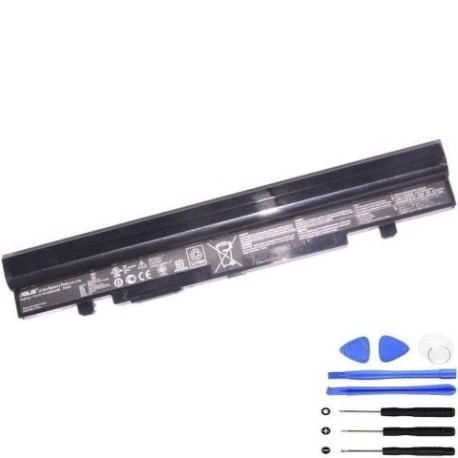
Battery models & part numbers
| Reference / P/N |
|---|
| 0B20-01040AS |
| Asus-A32-U46-74Wh |
Compatible models
| Model |
|---|
| Asus A41-U46 |
| Asus A42-U46 |
| Asus U46E |
| Asus U46SM |
| Asus U46SV |
| Asus U56E |
Introduction
Welcome to your complete guide for ASUS laptop battery replacement. As a laptop owner in Australia or New Zealand, you understand the importance of reliable portable power. The ASUS A32-U46 74Wh battery serves as the heart of several popular ASUS laptop models, providing the energy needed for work, study, and entertainment. This guide will walk you through every aspect of battery replacement, from recognising when it’s time for a new one to installation and proper care.
Many ASUS laptop users experience battery degradation over time, especially in our climate where temperature fluctuations can accelerate wear. The good news is that replacing your battery is often straightforward and can breathe new life into your trusted device. Whether you’re a student relying on your laptop for assignments, a professional needing reliable power for meetings, or someone who simply enjoys computing on the go, understanding your battery replacement options is essential.
Common signs you need a replacement
| Symptom | Cause | Verification | Recommendation |
|---|---|---|---|
| Rapid power drain | Reduced battery capacity from age/cycles | Check battery health in Windows Power Report | Replace if capacity below 60% of original |
| Laptop won’t start on battery | Battery cannot deliver startup voltage | Try starting with charger only | Immediate replacement needed |
| Swelling/bulging case | Internal gas buildup from degradation | Visual inspection, uneven surfaces | Replace immediately – safety hazard |
| Overheating during use | Increased internal resistance | Monitor temperature with HWMonitor | Replace if consistently over 45°C |
| Inaccurate charge percentage | Faulty battery management system | Observe sudden percentage drops | Replace for reliable usage |
| Charger dependency | Complete battery failure | Test unplugged operation | Replace to restore portability |
Recognising these signs early can save you from unexpected downtime. Many users report feeling frustrated when their laptop suddenly dies during important work or study sessions. The emotional relief of having a reliable battery cannot be overstated – it’s the difference between confidence and constant anxiety about your device’s performance.
How to check compatibility
Before purchasing any replacement battery, verifying compatibility is crucial. For ASUS laptops, there are several reliable methods to ensure you’re getting the right battery for your specific model.
Finding Your Model Information: The easiest way to identify your ASUS laptop model is to check the label on the bottom casing. For ASUS A41-U46, A42-U46, U46E, U46SM, U46SV, and U56E models, you’ll typically find the model number printed near the serial number and regulatory information. If the label is worn or missing, you can also check within Windows by pressing Windows Key + R, typing “msinfo32”, and looking for System Model in the System Information window.
Using ASUS Official Resources: ASUS provides excellent support resources for Australian and New Zealand customers. Visit the official ASUS support website and enter your serial number or model name to access compatible parts lists. The authorised ASUS service centres in major cities like Sydney, Melbourne, Brisbane, Auckland, and Wellington can also verify compatibility if you bring your device in for assessment.
Physical Compatibility Check: The A32-U46 74Wh battery measures approximately 210mm x 50mm x 20mm and uses a specific connector type. If you’re replacing an existing battery, compare the physical dimensions and connector alignment. Mismatched connectors can damage both the battery and your laptop, so never force a connection.
Voltage and Capacity Verification: Ensure the replacement battery matches your original’s specifications. The A32-U46 74Wh operates at 10.8V (11.1V nominal) with 7400mAh capacity. Using batteries with incorrect voltage can cause permanent damage to your laptop’s power management system.
When to replace
Timing your battery replacement correctly can maximise both safety and value. Most lithium-ion batteries, including the ASUS A32-U46 74Wh, have a typical lifespan of 2-3 years with regular use, or 500-800 charge cycles. However, several factors specific to Australian and New Zealand conditions can affect this timeline.
Age-Based Replacement: Even if your battery seems to be working fine, consider replacement after 3 years of use. Battery chemistry naturally degrades over time, and older batteries pose higher safety risks. Many users are surprised by how much better their laptop performs with a fresh battery, often commenting that it “feels like a new computer.”
Performance-Based Replacement: When your battery runtime drops below 50% of its original capacity, replacement becomes economically sensible. You can check this in Windows by generating a battery report (open Command Prompt as administrator and type “powercfg /batteryreport”). Look for the “DESIGN CAPACITY” versus “FULL CHARGE CAPACITY” values.
Seasonal Considerations: Australian summers and New Zealand’s variable climate can accelerate battery degradation. If you notice performance dropping significantly during temperature extremes, it might be time for replacement. Batteries operate best between 15°C and 25°C, so avoid leaving your laptop in hot cars or direct sunlight.
Before Important Events: If you have critical work projects, exams, or travel coming up, proactive replacement ensures you won’t face unexpected power issues. The peace of mind knowing your laptop will last through important meetings or study sessions is invaluable.
Installation guide
Replacing the battery in your ASUS laptop is generally straightforward, but requires care and attention to detail. Always work on a clean, static-free surface and ensure your laptop is completely powered off before beginning.
Preparation: Gather your tools – typically just a small Phillips head screwdriver. Have your new A32-U46 74Wh battery ready and ensure you have at least 30 minutes of uninterrupted time. Back up important data before starting, though battery replacement shouldn’t affect your files.
Removing the Old Battery: For ASUS A41-U46, A42-U46, U46E, U46SM, U46SV, and U56E models, the battery is usually accessible by removing the bottom panel. Turn the laptop upside down on a soft surface. Remove the screws securing the bottom cover – keep them organised as they may be different lengths. Gently lift the cover away, being careful not to force any clips. Locate the battery connector and carefully disconnect it from the motherboard by pulling straight up (never sideways). Remove any screws securing the battery itself, then lift it out.
Installing the New Battery: Place your new A32-U46 74Wh battery in position, ensuring it sits flat. Reconnect the battery connector to the motherboard, making sure it’s fully seated. Replace any mounting screws, then reattach the bottom cover. Insert and tighten all screws in their original positions.
Initial Setup: Before closing everything up, connect your charger and attempt to power on the laptop. If it starts successfully, power it down completely before finishing reassembly. This verifies the installation was successful before you complete the process.
First Charge Cycle: After reassembly, connect the charger and allow the new battery to charge completely without interruption. This first charge helps calibrate the battery monitoring system. Many users report feeling a sense of accomplishment after successfully replacing their laptop battery – it’s a practical skill that saves money and extends your device’s life.
Usage & care tips
Proper battery care can significantly extend the life of your new A32-U46 74Wh battery and maintain optimal performance throughout its lifespan.
Charging Practices: Unlike older battery technologies, modern lithium-ion batteries don’t require complete discharge cycles. In fact, frequent deep discharges can shorten battery life. For daily use, try to keep your battery between 20% and 80% charge. Complete charge cycles (0-100%) should only be done occasionally to recalibrate the battery meter.
Temperature Management: Australian and New Zealand climates present unique challenges. Avoid leaving your laptop in hot cars or direct sunlight, as temperatures above 35°C can permanently damage battery cells. Similarly, using your laptop in very cold conditions (below 5°C) can temporarily reduce capacity. If you must work in extreme temperatures, try to keep the laptop insulated when not in use.
Storage Recommendations: If you won’t be using your laptop for an extended period, store it with the battery at around 50% charge in a cool, dry place. Never store a fully charged or completely drained battery for long periods, as both states can cause permanent capacity loss.
Power Management Settings: Configure your power settings for battery health. In Windows, use the “Balanced” power plan rather than “High performance” when on battery powerPerformance Optimisation: Reduce unnecessary battery drain by dimming your screen brightness, closing unused applications, and disabling Bluetooth/Wi-Fi when not needed. The emotional benefit of these habits is knowing you’re maximising your investment and reducing environmental impact through longer product life.
Safety & recycling in AU/NZ
Proper battery handling and disposal are crucial for safety and environmental protection. Australia and New Zealand have specific regulations and programs for battery recycling.
Safety Precautions: Never attempt to open, puncture, or modify your laptop battery. If you notice any swelling, leaking, or unusual heating, stop using the battery immediately and contact a professional. Store spare batteries in a cool, dry place away from metal objects that could cause short circuits. When travelling, keep batteries in your carry-on luggage as they’re prohibited in checked baggage on flights.
Australian Recycling Options: Through the B-cycle program, Australians can drop off used laptop batteries at over 2,000 collection points nationwide, including major retailers like Officeworks, JB Hi-Fi, and Battery World. These batteries are processed to recover valuable materials like lithium, cobalt, and nickel, keeping hazardous materials out of landfill.
New Zealand Recycling Services: In New Zealand, the Ministry for the Environment supports battery recycling through various programmes. Retailers like Noel Leeming and Harvey Norman often accept old batteries for recycling, and many local council transfer stations have dedicated battery collection facilities.
Proper Disposal: Never dispose of lithium-ion batteries in regular household waste or recycling bins. They can cause fires in waste facilities and trucks. If your old battery is swollen or damaged, place it in a non-flammable container like a sand bucket and take it to a designated hazardous waste facility.
Environmental Responsibility: Proper battery recycling recovers up to 95% of battery materials for reuse in new products. By recycling your old ASUS battery, you’re contributing to a circular economy and reducing the environmental impact of mining new materials. Many environmentally conscious consumers feel good knowing they’re disposing of electronics responsibly.
FAQ
How long does the A32-U46 74Wh battery typically last on a full charge?
Under normal usage conditions (web browsing, document editing, video streaming), the 74Wh capacity provides approximately 4-6 hours of runtime. Intensive tasks like gaming or video editing will reduce this to 2-3 hours. Actual runtime varies based on screen brightness, background applications, and wireless connectivity usage.
Is this battery compatible with my ASUS laptop if it’s not listed in the compatible models?
We strongly recommend against using this battery with unlisted models. Compatibility depends on physical dimensions, connector type, voltage requirements, and communication protocols. Using an incompatible battery can damage your laptop and void warranties. Always verify compatibility using your laptop’s specific model number.
How can I verify I’m purchasing a genuine ASUS battery?
Genuine ASUS batteries feature precise branding, clear labelling with part numbers, and proper safety certifications. Purchase from authorised retailers like our store, and avoid suspiciously low prices from unofficial sellers. Counterfeit batteries often have blurry printing, incorrect logos, and lack proper safety documentation.
What warranty comes with the A32-U46 74Wh battery?
Genuine ASUS batteries typically include a 12-month warranty covering manufacturing defects. The warranty doesn’t cover damage from improper use, accidents, or normal capacity reduction over time. Keep your purchase receipt and register your product for warranty claims.
Can I use my laptop while plugged in all the time with the new battery?
Yes, modern ASUS laptops include charging circuits that stop charging once the battery reaches full capacity, then switch to powering the laptop directly. However, for optimal battery health, we recommend unplugging occasionally to allow discharge cycles. If using primarily as a desktop replacement, consider setting a maximum charge limit of 80% in ASUS Battery Health Charging software if available for your model.
How should I store my old ASUS battery before recycling?
Store used batteries in a cool, dry place away from flammable materials. Tape the terminals with electrical tape to prevent short circuits. Don’t stack batteries or store them in metal containers. Recycle within 3 months of removal for safety and environmental reasons.
Why does my new battery not show 100% capacity immediately?
This is normal during the initial calibration period. The battery management system needs several complete charge cycles to accurately measure capacity. Use your battery normally for a week, including complete discharges and recharges, for the system to stabilise and provide accurate percentage readings.
Replacing your ASUS laptop battery doesn’t just restore functionality – it gives you back the freedom and reliability you originally loved about your device. With this comprehensive guide and genuine A32-U46 74Wh battery, you’re equipped to make an informed decision that will extend your laptop’s life and performance. Whether you’re completing assignments, working remotely, or simply enjoying entertainment on the go, reliable battery power brings peace of mind that’s truly priceless.