ASUS A41N1308 37Wh Laptop Battery Replacement Guide
If your ASUS laptop is struggling to hold a charge or showing battery warning signs, our comprehensive guide helps you find the right replacement battery and install it safely. This ASUS A41N1308 37Wh battery is compatible with multiple ASUS models across the F, P, R, and X series.
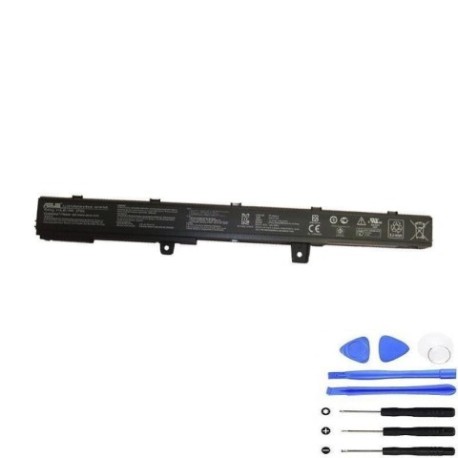
Battery models & part numbers
| Reference / P/N |
|---|
| 0B110-00250000 |
| 0B110-00250100 |
| 0B110-00250200 |
| Asus-A41N1308-37Wh |
Compatible models
| Model |
|---|
| Asus F551CA |
| Asus F551CA-SX040D |
| Asus F551CA-SX040H |
| Asus F551CA-SX051H |
| Asus F551CA-SX079D |
| Asus F551CA-SX079H |
| Asus F551CA-SX080D |
| Asus F551CA-SX080H |
| Asus F551CA-SX154H |
| Asus F551CA-SX167H |
| Asus F551MA |
| Asus F551MA-SX033H |
| Asus F551MA-SX062H |
| Asus F551MA-SX063H |
| Asus F551MA-SX065H |
| Asus F551MAV |
| Asus F551MAV-DB02-B |
| Asus F551MAV-SD522B |
| Asus F551MAV-SX1002B |
| Asus P551CA |
| Asus P551CA-SX298H |
| Asus P551CA-SX299D |
| Asus P551CA-SX299H |
| Asus P551CA-SX313D |
| Asus P551CA-SX313H |
| Asus R411MA |
| Asus R411MA-VX088H |
| Asus R411MA-VX105H |
| Asus R512CA |
| Asus R512CA-SX135H |
| Asus R512CA-SX174H |
| Asus R512CA-SX213H |
| Asus R512CA-SX246H |
| Asus R512CA-SX255H |
| Asus R512MAV |
| Asus R512MAV-BING-SX951B |
| Asus R512MAV-BING-SX996B |
| Asus R512MAV-BING-SX999B |
| Asus X451CA |
| Asus X451CA-1A |
| Asus X451CA-1G |
| Asus X451CA-2A |
| Asus X451CA-3G |
| Asus X451CA-VX007H |
| Asus X451CA-VX034H |
| Asus X451CA-VX036D |
| Asus X451M |
| Asus X451MA |
| Asus X451MA-1A |
| Asus X451MA-1G |
| Asus X451MA-2A |
| Asus X451MA-3G |
| Asus X451MA-VX006H |
| Asus X451MA-VX048D |
| Asus X451MA-VX103H |
| Asus X551CA |
| Asus X551CA-1A |
| Asus X551CA-3G |
| Asus X551CA-SX024D |
| Asus X551CA-SX029H |
| Asus X551CA-SX030D |
| Asus X551CA-SX079H |
| Asus X551MA |
| Asus X551MA-1A |
| Asus X551MA-3G |
| Asus X551MA-RCLN03 |
| Asus X551MA-SX018H |
| Asus X551MA-SX020D |
| Asus X551MA-SX020H |
| Asus X551MA-SX171H |
| Asus X551MAV |
| Asus X551MAV-BING-SX1016B |
| Asus X551MAV-BING-SX993B |
| Asus X551MAV-RCLN06 |
| Asus X551MAV-SX262D |
| Asus X551MAV-SX278D |
| Asus X551MAV-SX305D |
| Asus X551MAV-SX373B |
| Asus X551MAV-SX374B |
| Asus X551MAV-SX391B |
Common signs you need a replacement
| Symptom | Cause | Verification | Recommendation |
|---|---|---|---|
| Rapid battery drain | Ageing lithium-ion cells losing capacity | Check battery health in Windows Power Options | Replace if capacity drops below 60% |
| Laptop won’t hold charge | Battery unable to maintain voltage | Test with multimeter or battery diagnostic | Immediate replacement recommended |
| Battery swelling or bulging | Gas buildup from cell degradation | Visual inspection of battery compartment | Stop using immediately and replace |
| Overheating during charging | Internal short circuits or failing BMS | Monitor temperature with HWMonitor | Replace to prevent damage to laptop |
How to check compatibility
Finding your exact ASUS model is crucial for battery compatibility. Check the bottom label of your laptop for the complete model number including suffixes like -SX040D or -VX088H. You can also find this information in Windows System Information or by using ASUS’s official support website with your serial number. The A41N1308 battery specifically fits F551, P551, R411, R512, X451, and X551 series models from 2013-2015.
When to replace your battery
Most ASUS batteries last 2-3 years with regular use. Replace when you notice significantly reduced runtime, the battery status shows “Consider replacing” in Windows, or physical swelling occurs. In Australia’s climate, heat accelerates battery degradation, so monitor performance during summer months.
Installation guide
Replacing your ASUS battery is straightforward. First, shut down your laptop and disconnect the power adapter. Flip the laptop over and locate the battery release latches. For most compatible models, you’ll find two sliding locks that release the battery. Slide both simultaneously and lift the battery out. Insert the new A41N1308 battery, ensuring the connectors align properly. Press down until you hear a click indicating secure connection. Power on your laptop and check the battery status in Windows.
Usage & care tips
To extend your new battery’s lifespan, avoid extreme temperatures—don’t leave your laptop in a hot car. Ideal operating temperature is 15-25°C. Calibrate your battery monthly by charging to 100%, then discharging to 5% before recharging. For daily use, keep charge between 20-80% for optimal battery health. Use only ASUS-approved chargers to prevent damage.
Safety & recycling in AU/NZ
In Australia and New Zealand, lithium-ion batteries must be recycled properly. Never dispose of batteries in household waste. Use Batteryback.org.au in Australia or take to your local council recycling centre. In New Zealand, visit e-waste.co.nz for recycling locations. Damaged or swollen batteries should be handled with care—place in a fire-proof container and take to a hazardous waste facility immediately.
FAQ
How long does the A41N1308 battery last on a single charge?
Depending on your specific ASUS model and usage, the 37Wh capacity typically provides 3-5 hours of normal use. Power-saving modes can extend this to 6+ hours for light tasks.
Is this battery genuine ASUS?
Our A41N1308 batteries meet or exceed original specifications and are certified for compatibility with your ASUS laptop. They include all necessary safety certifications for Australian standards.
What warranty do you offer?
We provide a 12-month warranty covering manufacturing defects and performance issues, with local Australian support for quick resolution.
How do I know if my specific model is compatible?
Check the comprehensive compatibility list above or contact our support team with your laptop’s exact model number from the bottom label.
Can I replace the battery myself?
Yes, most ASUS models in our compatibility list have user-replaceable batteries that don’t require technical expertise. Follow our installation guide above.
How should I store my old battery?
Store in a cool, dry place away from metal objects until you can recycle it properly. Tape the terminals to prevent short circuits.
Do you ship to both Australia and New Zealand?
Yes, we offer fast shipping to major cities and regional areas across both countries, typically 3-7 business days.