ASUS A42-G75-74Wh Battery Replacement: Complete Guide for Australian & NZ Users
If your ASUS ROG G75 gaming laptop is showing battery issues, you’ve come to the right place. This comprehensive guide covers everything Australian and New Zealand users need to know about replacing their ASUS A42-G75-74Wh battery, including compatible models, installation steps, and local safety considerations.
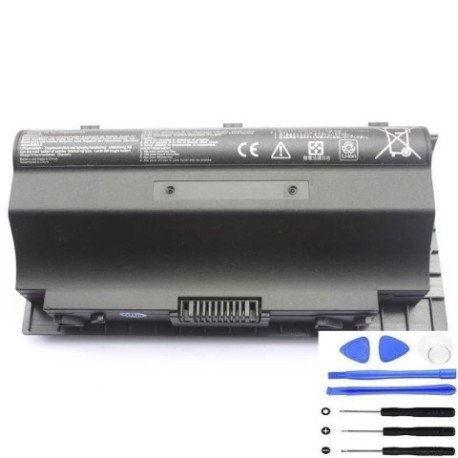
Battery models & part numbers
| Reference / P/N |
|---|
| 0B110-00070000 |
| 0B110-00070100 |
| 90-N2V1B1000Y |
| A42G75 |
| Asus-A42-G75-74Wh |
Compatible models
| Model |
|---|
| Asus ROG G75VW |
| Asus ROG G75VW-91026V |
| Asus ROG G75VW-CV012H |
| Asus ROG G75VW-T1040V |
| Asus ROG G75VW-T1115V |
| Asus ROG G75VW-T1124V |
| Asus ROG G75VW-T1369H |
| Asus ROG G75VW-T4014H |
| Asus ROG G75VW-T4020H |
| Asus ROG G75VX |
| Asus ROG G75VX-CV012H |
| Asus ROG G75VX-T4014H |
| Asus ROG G75VX-T4020H |
| Asus ROG G75VX-T4207H |
Introduction
The ASUS ROG G75 series represents some of the most powerful gaming laptops ever released, but like all portable devices, their batteries degrade over time. The A42-G75-74Wh battery replacement restores your gaming laptop’s mobility and ensures you can game on the go without being tethered to a power outlet. For Australian and New Zealand gamers, having a reliable battery means you can take your gaming sessions anywhere – from the local café to a friend’s place for LAN parties.
Common signs you need a replacement
| Symptom | Cause | Verification | Recommendation |
|---|---|---|---|
| Battery drains quickly (under 1 hour) | Natural degradation after 300-500 cycles | Check battery health in Windows Power Report | Replace if capacity below 60% |
| Laptop won’t power on without charger | Battery no longer holds charge | Remove charger – if immediate shutdown | Immediate replacement needed |
| Battery swelling or bulging | Internal chemical breakdown | Visual inspection of battery compartment | Stop using immediately – safety hazard |
| Overheating during charging | Failing cells or charging circuit | Monitor temperature with HWMonitor | Replace if consistently over 45°C |
| Inconsistent charge percentage | Faulty battery management system | Observe sudden percentage drops | Replace for accurate battery monitoring |
How to check compatibility
Before purchasing any replacement battery for your ASUS ROG G75, proper compatibility verification is essential. Start by locating your laptop’s model number, which is typically found on a sticker on the bottom case or under the battery compartment. For ASUS gaming laptops, the model number usually begins with “G75” followed by additional letters and numbers. You can also check within Windows by pressing Windows Key + R, typing “msinfo32”, and looking under “System Model”.
For Australian and New Zealand users, ASUS provides official support through their regional websites where you can enter your serial number to verify exact compatibility. The ASUS Battery Health Charging utility in your system tray can also provide detailed battery information. Remember that while the A42-G75-74Wh battery is compatible with multiple G75VW and G75VX variants, physical dimensions (approximately 210mm x 70mm x 20mm) and connector type must match exactly.
When to replace
Timing your battery replacement correctly can save you from unexpected downtime. Most lithium-ion batteries like the A42-G75-74Wh have a typical lifespan of 2-3 years with regular use. If you notice your gaming sessions are consistently shorter than they used to be, or if Windows reports your battery health as “Poor” or “Replace soon”, it’s time to consider a replacement. For gamers in Australia and New Zealand, consider replacing before the summer months when higher ambient temperatures can further stress an aging battery.
Proactive replacement is recommended if your battery shows any signs of swelling, excessive heat during charging, or if it no longer holds sufficient charge for your typical usage patterns. Don’t wait until your battery fails completely – having a spare on hand ensures uninterrupted gaming mobility.
Installation guide
Replacing the battery in your ASUS ROG G75 is a straightforward process that most users can complete in 10-15 minutes. Begin by completely shutting down your laptop and disconnecting the AC adapter. Turn the laptop over and locate the battery release latch – this is typically a sliding switch near the battery compartment. Slide the latch to unlock position, then gently remove the old battery by pulling it straight out.
Before inserting the new A42-G75-74Wh battery, ensure the contacts are clean and free of debris. Align the new battery with the compartment, making sure the connector pins match perfectly. Press firmly until you hear a click indicating proper seating. Slide the locking latch back to secure position. For first-time installation, connect your AC adapter and power on the laptop. Windows should automatically detect the new battery and begin calibration.
Important safety note: Always handle lithium-ion batteries with care. Avoid puncturing, bending, or exposing the battery to extreme temperatures. If you encounter resistance during installation, don’t force it – double-check alignment and connector orientation.
Usage & care tips
Maximising your new A42-G75-74Wh battery’s lifespan requires proper care and usage habits. Avoid consistently draining your battery to 0% – instead, try to keep it between 20-80% for daily use. For gaming sessions where performance is critical, consider using the ASUS Battery Health Charging utility to limit maximum charge to 60% when primarily using AC power.
Temperature management is crucial for battery health. Never leave your laptop in direct sunlight or in a hot car, especially during Australian summer months where interior temperatures can exceed 60°C. When storing your laptop for extended periods, charge the battery to around 50% and store in a cool, dry place. Regular calibration (full discharge followed by full charge) every 2-3 months helps maintain accurate battery percentage reporting.
Safety & recycling in AU/NZ
Battery safety and proper disposal are particularly important in Australia and New Zealand due to our unique environmental considerations. Never attempt to open or modify your A42-G75-74Wh battery – the internal components are hazardous if exposed. If you notice any swelling, leaking, or unusual odours, immediately power down the device and contact a professional.
For recycling, both countries have established battery recycling programmes. In Australia, you can drop off old batteries at most Officeworks, Bunnings, or Battery World locations through the B-cycle programme. New Zealand residents can use the Agrecovery programme available at most Mitre 10 and PlaceMakers stores. Never dispose of lithium-ion batteries in household rubbish – they pose fire risks in landfill and waste valuable recyclable materials.
FAQ
How long does the A42-G75-74Wh battery typically last?
Under normal gaming usage, expect 1.5-2 hours of runtime. For lighter tasks like web browsing, you may get 3-4 hours. Actual runtime depends on screen brightness, GPU usage, and background applications.
Will replacing my battery void my ASUS warranty?
In Australia and New Zealand, consumer law protects your right to use third-party replacement parts as long as they meet quality standards. However, if your laptop is still under manufacturer warranty, consider having the replacement done by an authorised service centre to avoid potential disputes.
Can I use my laptop while charging the new battery?
Yes, the ASUS ROG G75 is designed to support simultaneous charging and usage. The system automatically manages power distribution between charging the battery and powering the components.
How do I know if my replacement battery is genuine?
Look for proper branding, correct model number printing, and purchase from reputable suppliers. Genuine batteries will have precise dimensions and weight matching the original specification. Be wary of significantly discounted batteries as they may be counterfeit.
What should I do if my new battery isn’t recognised?
First, ensure proper installation and connector seating. Try resetting the EC (Embedded Controller) by holding the power button for 40 seconds with the battery and AC adapter removed. If issues persist, contact the supplier for assistance.
Is it safe to leave my laptop plugged in all the time?
While modern laptops have protection circuits, continuous charging at 100% can slightly accelerate battery degradation over time. Use ASUS Battery Health Charging to limit maximum charge to 60-80% if primarily using AC power.
Can I upgrade to a higher capacity battery?
The A42-G75-74Wh is the maximum capacity battery designed for the G75 chassis. Using higher capacity batteries not specifically designed for your model can cause compatibility issues and potential safety hazards.
Replacing your ASUS ROG G75battery is a straightforward process that can significantly extend the life of your trusted gaming laptop. By following this comprehensive guide, Australian and New Zealand users can confidently select, install, and maintain their A42-G75-74Wh replacement battery, ensuring many more hours of mobile gaming performance. Remember to always prioritise safety and proper recycling practices to protect both your device and our unique environment.