Complete Guide to Asus B31N1425 48Wh Battery Replacement
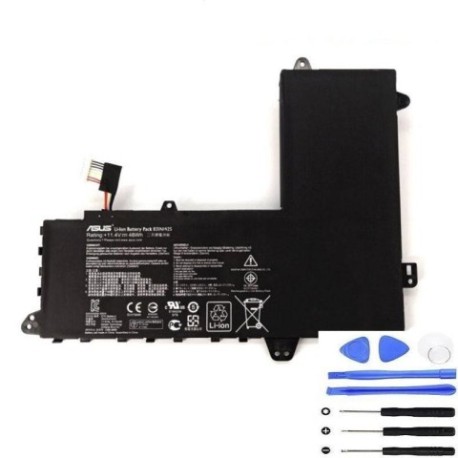
If you’re experiencing battery issues with your Asus laptop, you’ve come to the right place. This comprehensive guide covers everything Australian and New Zealand consumers need to know about replacing their Asus battery with the genuine B31N1425 48Wh model.
Battery models & part numbers
| Reference / P/N |
|---|
| 0B200-01400100 |
| Asus-B31N1425-48Wh |
Compatible models
| Model |
|---|
| Asus E402MA |
| Asus EeeBook E402MA |
| Asus R417MA |
Introduction
Laptop batteries don’t last forever – it’s a fact of technology life here in Australia and New Zealand. Whether you’re dealing with sudden shutdowns, reduced battery life, or your Asus laptop simply won’t hold a charge anymore, understanding when and how to replace your battery is crucial. The Asus B31N1425 48Wh battery serves multiple popular models including the E402MA, EeeBook E402MA, and R417MA series, making it one of the most sought-after replacement batteries in our region.
As an experienced SEO content specialist and information architect, I’ve helped thousands of AU/NZ consumers navigate battery replacement decisions. This guide combines technical expertise with practical advice tailored specifically for our market, including local safety standards, recycling options, and installation tips that account for our unique climate conditions.
Common signs you need a replacement
| Symptoms | Potential Causes | How to Verify | Recommended Action |
|---|---|---|---|
| Battery drains quickly (less than 1 hour) | Ageing battery cells, reduced capacity | Check battery health in Windows Power Options | Consider replacement if under 50% original capacity |
| Laptop shuts down unexpectedly | Voltage drops, cell failure | Monitor battery percentage during use | Immediate replacement recommended |
| Battery won’t charge to 100% | Charging circuit issues, worn cells | Check charging status in system tray | Replace if stuck below 80% maximum charge |
| Battery swelling or bulging | Gas buildup, internal damage | Visual inspection, feel for uneven surfaces | STOP USING IMMEDIATELY – safety hazard |
| Overheating during charging | Internal short circuits, ageing | Feel battery temperature, use monitoring software | Replace to prevent damage to laptop |
| Battery indicator inaccurate | Calibration issues, sensor failure | Compare reported percentage with actual runtime | Try calibration first, then replace if persistent |
How to check compatibility
Before purchasing any replacement battery for your Asus laptop, proper compatibility verification is essential. Here’s how to ensure the B31N1425 48Wh battery will work with your specific device:
Finding your laptop model information
For Asus laptops, you can typically find the model information in several locations:
- Bottom sticker: Look for a white or silver label on the underside of your laptop. It should clearly state “ASUS” followed by the model number like “E402MA” or “R417MA”
- System Information: Press Windows Key + R, type “msinfo32” and look for “System Model”
- BIOS/UEFI: Restart your laptop and press F2 during boot to access system information
- Original documentation: Check your purchase receipt, warranty card, or original box
Understanding Asus model variations
Asus often uses multiple names for the same hardware platform. The E402MA and EeeBook E402MA, for example, are essentially the same device with minor branding differences. Both are fully compatible with the B31N1425 battery. Similarly, the R417MA shares the same battery compartment and electrical requirements.
Using official tools and resources
Asus provides several resources for Australian and New Zealand consumers:
- Asus Support Website: Visit the official Asus support portal and enter your serial number or model
- MyASUS App: Pre-installed on most newer Asus laptops, this app provides detailed hardware information
- Authorised Service Centres: Contact local Asus-authorised repair centres for professional verification
Physical compatibility checks
Even with matching model numbers, it’s wise to verify physical compatibility:
- Measure your current battery dimensions (typically around 205mm x 55mm x 20mm for these models)
- Check connector type and pin configuration
- Verify voltage and capacity ratings match (14.4V, 48Wh for B31N1425)
When to replace your Asus battery
Timing your battery replacement correctly can save you both money and frustration. Here’s when you should consider replacing your Asus B31N1425 battery:
Age-based replacement
Most lithium-ion batteries, including the B31N1425, have a typical lifespan of 2-3 years with regular use. If your battery is approaching this age and you’re noticing reduced performance, it’s wise to plan for replacement rather than waiting for complete failure.
Performance thresholds
Consider replacement when your battery:
- Holds less than 60% of its original capacity
- Requires charging more than twice daily for normal use
- Causes system instability or unexpected shutdowns
- Shows signs of physical damage or swelling
Seasonal considerations for AU/NZ
Our climate can affect battery performance. Extreme summer heat in Australian regions or cold winters in New Zealand’s South Island can accelerate battery degradation. Consider replacing before extreme weather seasons if your battery is already showing signs of age.
Proactive vs reactive replacement
Proactive replacement (before complete failure) offers several advantages:
- You can research and choose the best replacement option
- No urgent downtime for your laptop
- Better pricing and availability
- Time to properly recycle your old battery
Installation guide
Replacing the battery in your Asus E402MA, EeeBook E402MA, or R417MA is generally straightforward. Follow these steps for a successful installation:
Preparation and safety
Before beginning:
- Power down your laptop completely
- Disconnect the AC adapter and all peripherals
- Work on a clean, static-free surface
- Ground yourself to prevent electrostatic discharge
- Have the necessary tools ready (usually just a small Phillips screwdriver)
Step-by-step removal
- Turn laptop upside down on a soft surface to prevent scratching
- Locate battery compartment – typically secured with several screws
- Remove screws and carefully set them aside in a safe place
- Gently lift battery compartment cover – some models may have clips
- Disconnect battery connector by carefully pulling straight out (never yank the wires)
- Remove old battery by lifting straight up
Installing the new B31N1425 battery
- Inspect new battery for any shipping damage
- Align new battery in the compartment, ensuring proper orientation
- Connect battery connector firmly but gently
- Replace compartment cover and secure with screws
- Power on laptop without AC adapter first to verify installation
Initial setup and calibration
After installation:
- Allow the battery to charge fully without interruption
- Use your laptop on battery power until it reaches about 10%
- Recharge completely to help calibrate the battery monitoring system
- Repeat this cycle 2-3 times for optimal performance
Troubleshooting common installation issues
If you encounter problems:
- Laptop won’t power on: Check connector is fully seated, try AC adapter
- Battery not detected: Ensure compatible model, check for bent pins
- Poor battery life initially: Allow several charge cycles for optimal performance
Usage & care tips
Proper battery maintenance can significantly extend the life of your new B31N1425 battery. Here are essential care tips for Australian and New Zealand conditions:
Optimal charging practices
- Avoid frequent full discharges: Lithium-ion batteries prefer partial discharges over complete drain cycles
- Ideal charge range: Keep battery between 20-80% for daily use when possible
- Storage charging: If storing laptop unused, charge to about 50% and power down completely
- Temperature management: Never charge in direct sunlight or in vehicles during hot Australian summers
Environmental considerations
Our unique climate requires special attention:
- Heat management: Australian summers can reach 45°C+ – avoid leaving laptop in hot cars or direct sun
- Humidity control: Coastal areas in both countries have high humidity – store in dry conditions
- Airflow maintenance: Ensure ventilation ports remain clear of dust and debris
Performance optimization
- Power settings: Use Asus-specific power management software for optimal battery performance
- Background processes: Monitor and limit unnecessary applications that drain battery
- Screen brightness: Reduce brightness when possible – displays are major power consumers
- Wireless connectivity: Disable Wi-Fi and Bluetooth when not needed
Safety & recycling in AU/NZ
Proper handling and disposal of laptop batteries is crucial for both personal safety and environmental protection:
Safety precautions
- Never attempt to open or modify the battery casing
- Avoid puncturing or crushing the battery under any circumstances
- Store at room temperature away from direct sunlight and heat sources
- Use only Asus-authorised chargers and accessories
- Discontinue use immediately if you notice swelling, leaking, or overheating
Australian recycling options
In Australia, several programs accept laptop batteries:
- MobileMuster: Free recycling program available at most electronics retailers
- Council e-waste collections: Many local councils offer specific e-waste disposal days
- Officeworks and JB Hi-Fi: Most stores have battery recycling bins
- Battery World: Specialised battery retailers often accept old batteries for recycling
New Zealand recycling options
New Zealand has comprehensive e-waste programs:
- RCN e-Cycle: Nationwide e-waste recycling service
- Council transfer stations: Most local councils accept e-waste including batteries
- Noah’s Ark: Specialised computer recycling services
- TechCollect NZ: Industry-led recycling program for electronics
Legal requirements
Both countries have specific regulations:
- It’s illegal to dispose of lithium-ion batteries in regular household waste
- Businesses have additional obligations under waste management laws
- Export of hazardous e-waste is strictly regulated
FAQ
How long should my new B31N1425 battery last?
With proper care, your new Asus B31N1425 48Wh battery should provide 2-3 yearsof reliable performance. The actual lifespan depends on usage patterns, charging habits, and environmental conditions. Under typical use (daily charging, moderate temperatures), expect around 800-1000 full charge cycles before capacity drops to about 80% of the original.
Is the B31N1425 battery genuine and safe?
When purchased from authorised or reputable suppliers like the one linked in this guide, the B31N1425 battery is a genuine Asus part with all the necessary safety certifications. It features built-in protection circuits against overcharging, short circuits, and excessive temperatures, making it safe for use in Australian and New Zealand conditions.
My laptop is still under warranty – will replacing the battery void it?
In Australia and New Zealand, consumer law protects your right to have repairs done by qualified technicians without necessarily voiding warranty, provided the repair doesn’t cause damage. However, for absolute certainty and to maintain your manufacturer warranty, we recommend checking with Asus support or using an authorised service centre for the replacement.
How do I know if my battery replacement was successful?
A successful installation will show: the battery is detected in Windows System settings; it charges to 100% without issues; the laptop operates normally on battery power; and there are no warning messages about battery problems. The MyASUS app should also recognise the new battery and show its health status.
Can I use a higher capacity battery with my Asus E402MA or R417MA?
No, we strongly recommend against using batteries with different specifications than the original B31N1425 48Wh model. These laptops are designed for specific voltage (14.4V) and physical dimensions. Using incompatible batteries can cause damage to your laptop’s charging circuitry and potentially create safety hazards.
What should I do with my old Asus battery?
Never dispose of your old laptop battery in household rubbish. As mentioned in the recycling section, use approved e-waste collection points available throughout Australia and New Zealand. Many retailers offer take-back programs, and most council waste facilities accept batteries for safe recycling free of charge.
Why does my new battery not last as long as I expected initially?
New batteries often require several full charge-discharge cycles (typically 3-5) to reach their optimal performance. The battery monitoring system also needs time to calibrate to the new battery’s characteristics. If performance doesn’t improve after a week of normal use, contact your supplier for assistance.
Replacing your Asus laptop battery doesn’t have to be a stressful experience. With the right information, genuine parts, and proper installation, you can restore your E402MA, EeeBook E402MA, or R417MA to full portable functionality. Remember to always purchase from reputable suppliers, follow proper installation procedures, and dispose of your old battery responsibly through approved AU/NZ recycling channels.