Asus B31N1429 48Wh Laptop Battery Replacement Guide
If your Asus laptop is struggling to hold charge or won’t power on without being plugged in, you likely need a replacement battery. This comprehensive guide covers everything Australian and New Zealand users need to know about the Asus B31N1429 48Wh battery replacement.
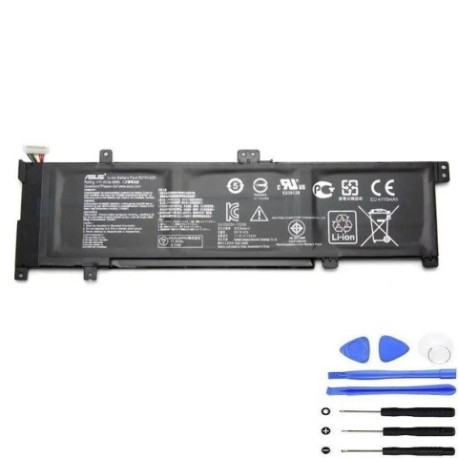
Battery models & part numbers
| Reference / P/N |
|---|
| Asus-B31N1429-48Wh |
Compatible models
| Model |
|---|
| Asus 0B200-01460000 |
| Asus 0B200-01460100 |
| Asus A501UX |
| Asus B31Bn95 |
| Asus K501LB |
| Asus K501LB-1A |
| Asus K501LX |
| Asus K501LX-1A |
| Asus K501UB |
| Asus K501UB-2A |
| Asus K501UQ |
| Asus K501UQ-2A |
| Asus K501UW |
| Asus K501UW-2A |
| Asus K501UX |
| Asus K501UX-2A |
| Asus K501UX-AH71 |
| Asus R516UW |
| Asus R516UX |
Introduction
The Asus B31N1429 48Wh battery is a crucial component for many popular Asus laptop models used across Australia and New Zealand. This lithium-ion battery provides reliable power for your computing needs, whether you’re working from home in Sydney, studying in Auckland, or travelling between cities. Understanding when and how to replace this battery can save you from unexpected downtime and extend your laptop’s lifespan significantly.
Common signs you need a replacement
| Symptom | Cause | Verification | Recommendation |
|---|---|---|---|
| Battery drains quickly (under 1 hour) | Ageing cells, reduced capacity | Check battery health in Windows | Replace if capacity below 60% |
| Laptop won’t start on battery | Dead battery cells | Test with power adapter only | Immediate replacement needed |
| Battery percentage jumps erratically | Faulty battery management system | Monitor percentage changes | Replace to prevent damage |
| Battery swelling or bulging | Gas buildup from cell degradation | Visual inspection, uneven surface | Replace immediately – safety risk |
| Overheating during charging | Internal short circuits | Check temperature, smell for burning | Stop using and replace urgently |
| Charger light blinking abnormally | Battery communication failure | Consult Asus diagnostic codes | Replace battery module |
How to check compatibility
Before purchasing a replacement battery for your Asus laptop in Australia or New Zealand, proper compatibility checking is essential. Start by locating your laptop’s model number, which is typically found on a sticker on the bottom case, under the battery compartment, or in the system information (type “msinfo32” in Windows search). For Asus K501 and R516 series models specifically, the compatibility is well-documented, but always double-check. You can also use Asus’s official support website by entering your serial number or model to verify battery part numbers. Many authorised service centres in major cities like Melbourne, Brisbane, or Wellington can also confirm compatibility if you bring your laptop in for assessment.
When to replace
Most Asus laptop batteries like the B31N1429 last 2-3 years with regular use before showing significant capacity loss. If your battery health shows less than 60% of original capacity in Windows battery report, it’s time to consider replacement. Other triggers include physical damage, inability to hold charge for reasonable work sessions, or any signs of swelling. Don’t wait until complete failure – proactive replacement ensures you’re never caught without power during important work or study sessions.
Installation guide
Replacing your Asus B31N1429 battery is straightforward with proper preparation. First, ensure you’re working in a clean, static-free environment. Power down your laptop completely and disconnect the AC adapter. For most compatible Asus models, you’ll need a Phillips screwdriver to remove the bottom panel. Carefully disconnect the old battery connector – never pull on the wires. Align the new B31N1429 battery properly, reconnect the connector securely, and reassemble. After installation, charge the battery fully before first use. Many users in AU/NZ find the process takes 15-30 minutes with basic technical confidence.
Usage & care tips
To maximise your new Asus battery’s lifespan in Australian and New Zealand conditions, avoid extreme temperatures – don’t leave your laptop in hot cars or direct sunlight. Ideal operating temperature is 10-35°C. For daily use, partial discharges are better than full cycles – charge between 20-80% when possible. If storing long-term, charge to about 50% and store in a cool place. Modern lithium-ion batteries don’t need complete discharge cycles. Also, using genuine Asus chargers ensures proper charging voltage and extends battery life.
Safety & recycling in AU/NZ
Battery safety is crucial – never attempt to open or modify lithium-ion batteries. If you notice swelling, overheating, or damage, stop using immediately and contact professionals. In Australia and New Zealand, never dispose of laptop batteries in household waste. Most electronics retailers like Officeworks, JB Hi-Fi, or Noel Leeming offer free battery recycling services. Many council waste facilities also accept batteries for proper recycling. Proper disposal prevents environmental contamination and potential fire hazards.
FAQ
How long does the Asus B31N1429 48Wh battery typically last?
With normal use, expect 2-3 years before significant capacity loss. Heavy users might see reduced lifespan, while light users could get 4+ years.
Can I use a higher capacity battery in my Asus laptop?
No, stick with the original 48Wh specification. Higher capacity batteries may not fit physically and could cause compatibility issues or damage.
My laptop shows “plugged in, not charging” – is this a battery issue?
Often yes, especially with older batteries. The B31N1429 replacement typically resolves this common issue with Asus K501 and R516 series models.
How do I calibrate my new Asus battery?
Charge to 100%, use until it shuts down from low battery, then charge uninterrupted to 100% again. This helps the battery gauge accuracy.
Are aftermarket batteries safe for my Asus laptop?
Only use certified replacements from reputable suppliers. Genuine or high-quality compatible batteries ensure safety and performance.
What’s the warranty on replacement Asus batteries?
Quality replacements typically offer 12-24 month warranties. Always check warranty terms specific to Australian consumer law protections.
Can I replace the battery myself without voiding warranty?
For out-of-warranty devices, yes. For in-warranty laptops, check Asus’s policy – some allow user replacement, others require authorised service centres.