ASUS B41N1327 45Wh Laptop Battery Replacement Guide
Is your ASUS laptop struggling to hold charge or shutting down unexpectedly? Our comprehensive guide covers everything Australian and New Zealand users need to know about replacing their laptop battery with the genuine ASUS B41N1327 45Wh model.
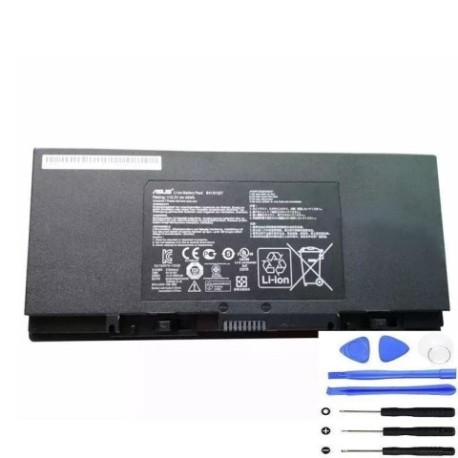
Battery models & part numbers
| Reference / P/N |
|---|
| 0B200-00790000 |
| Asus-B41N1327-45Wh |
| B41Bj25 |
| B551 M551L B551LG |
| B551LA |
| B551LG |
Compatible models
| Model |
|---|
| Asus 0B200-00790000 |
| Asus B41Bj25 |
| Asus B551 M551L B551LG |
| Asus Pro Advanced B551LA |
| Asus Pro Advanced B551LG |
Introduction
Laptop batteries are consumable components that naturally degrade over time, typically lasting 2-4 years with regular use. The ASUS B41N1327 45Wh battery is designed specifically for several ASUS business and professional laptop models, providing reliable power for mobile computing needs across Australia and New Zealand.
Common signs you need a replacement
| Symptom | Cause | Verification | Recommendation |
|---|---|---|---|
| Rapid discharge (less than 1 hour) | Battery cell degradation | Check battery health in Windows Power Report | Replace if capacity below 60% |
| Laptop won’t power on without charger | Complete battery failure | Remove charger – laptop immediately shuts down | Immediate replacement required |
| Battery swelling or bulging | Internal gas buildup | Visual inspection of battery compartment | Stop using immediately – safety hazard |
| Inconsistent charge levels | Faulty battery management system | Battery percentage jumps unexpectedly | Replace to prevent data loss |
| Overheating during charging | Internal short circuits | Battery feels unusually hot to touch | Replace to prevent damage to laptop |
How to check compatibility
Before purchasing any replacement battery, verifying compatibility is crucial. For ASUS laptops, you have several reliable methods to ensure you’re getting the correct battery.
Finding Your Model Information: The easiest method is to check the label on the bottom of your laptop. Look for the model number near the serial number and regulatory markings. For ASUS B series laptops, this is typically printed clearly in white or black text. You can also find this information in Windows by pressing Windows Key + R, typing “msinfo32” and checking the System Model field.
Using ASUS Official Tools: ASUS provides excellent support resources for Australian and New Zealand customers. Visit the official ASUS support website and use their compatibility checker tool. Simply enter your laptop model number, and the system will display all compatible accessories, including genuine replacement batteries.
Physical Inspection: Remove your current battery (if removable) and check for any printed part numbers or model information. The ASUS B41N1327 battery typically measures approximately 210mm x 50mm x 20mm and features a standard 3-pin connector compatible with the listed models.
Cross-Reference Verification: Compare your current battery’s specifications with the B41N1327: 45Wh capacity, 11.4V output, and lithium-ion chemistry. Any significant differences in these specifications indicate incompatibility.
When to replace
Timing your battery replacement correctly can save you from unexpected downtime and potential data loss. Consider replacement when:
- Battery health drops below 70%: Most ASUS laptops will display a warning when battery health deteriorates significantly
- After 2-3 years of regular use: Lithium-ion batteries naturally degrade over time, even with optimal care
- Before important travel or projects: Proactive replacement ensures reliability during critical usage periods
- When experiencing multiple power-related issues: Frequent unexpected shutdowns indicate advanced battery wear
- Seasonal considerations: Extreme Australian summer temperatures can accelerate battery degradation
For business users in Australia and New Zealand, we recommend replacing batteries during quieter periods to minimise disruption to your workflow.
Installation guide
Installing your new ASUS B41N1327 battery is straightforward, but requires care and attention to detail. Follow these steps for a successful installation:
Preparation: Before beginning, ensure your laptop is completely powered off and disconnected from any power sources. Work on a clean, static-free surface with good lighting. Have a small Phillips head screwdriver ready.
Removing the Old Battery: For ASUS B series laptops with removable batteries, locate the battery release latches on the bottom of the unit. Slide both latches to the unlock position simultaneously, then lift the battery out carefully. If your model has an internal battery, you’ll need to remove the bottom cover first – consult your specific model’s service manual for detailed instructions.
Installing the New Battery: Align the new B41N1327 battery with the compartment, ensuring the connector pins match perfectly. Gently press the battery into place until you hear a click from the locking mechanism. For internal batteries, secure with the provided screws in the correct sequence.
Initial Charging: After installation, connect your laptop to power and allow the battery to charge completely before first use. This initial calibration helps ensure accurate battery level reporting.
Common Installation Issues: If the laptop doesn’t recognise the new battery, try a hard reset by holding the power button for 30 seconds with the battery installed but no power connected. For persistent issues, check that all connectors are properly seated and free of debris.
Usage & care tips
Proper battery maintenance can significantly extend the lifespan of your ASUS B41N1327 battery. Follow these best practices developed for Australian and New Zealand conditions:
- Avoid extreme temperatures: Never leave your laptop in a hot car or direct sunlight, as temperatures above 35°C can permanently damage battery cells
- Optimal charging range: Keep battery between 20-80% for daily use, with full charge cycles only when necessary for extended mobile use
- Storage considerations: If storing your laptop for extended periods, charge to 50-60% and store in a cool, dry place away from direct sunlight
- Power management: Use ASUS Battery Health Charging software (available through MyASUS app) to optimise charging patterns based on your usage habits
- Regular maintenance: Perform a full discharge-charge cycle every 2-3 months to recalibrate the battery level indicator
- Avoid deep discharges: Don’t let your battery completely drain to 0% regularly, as this stresses the cells and reduces overall lifespan
Safety & recycling in AU/NZ
Battery safety and proper disposal are critical responsibilities for all Australian and New Zealand consumers. Lithium-ion batteries like the ASUS B41N1327 require careful handling throughout their lifecycle.
Safety Precautions: Never attempt to open or modify the battery casing. Avoid exposing batteries to water or other liquids. If you notice any swelling, leaking, or unusual heating, discontinue use immediately and contact professional disposal services. Keep batteries away from children and pets.
Australian Recycling Options: In Australia, most council waste transfer stations accept laptop batteries for recycling free of charge. Major retailers like Officeworks and JB Hi-Fi also provide battery recycling bins in their stores. Through the B-cycle program, Australians can recycle batteries at over 3,000 drop-off points nationwide.
New Zealand Recycling Services: In New Zealand, the Ministry for the Environment recommends using accredited e-waste recyclers for battery disposal. Most major centres have dedicated e-waste collection facilities, and some retailers like Noel Leeming offer take-back programs. Check with your local council for specific battery recycling options in your area.
Transport Considerations: When shipping or transporting used batteries within Australia or New Zealand, ensure they’re properly packaged to prevent short circuits. Tape the terminals and place in separate plastic bags if possible.
FAQ
How long does the ASUS B41N1327 battery typically last?
With normal usage patterns, you can expect 2-4 years of reliable performance. Heavy users might see reduced lifespan, while light users may get longer service. The 45Wh capacity provides approximately 4-6 hours of typical usage depending on your power settings and applications.
Will this battery work with my ASUS laptop if it’s not exactly the same model number?
Compatibility depends on physical fit and electrical specifications. While we’ve listed all verified compatible models, some similar ASUS models may also work. Always check physical dimensions (approximately 210mm x 50mm x 20mm) and connector type before purchasing. When in doubt, consult ASUS official compatibility tools or contact their support centre.
How can I maximise my new battery’s lifespan?
Avoid frequent full discharges, keep the battery between 20-80% charge for daily use, and store in cool conditions (15-25°C ideal). Use ASUS power management software to optimise charging patterns, and avoid leaving your laptop plugged in constantly at 100% charge.
What’s the warranty on genuine ASUS batteries?
Genuine ASUS batteries typically come with a 12-month warranty in Australia and New Zealand. ThirdIs it safe to replace the battery myself?
Most ASUS B series laptops with removable batteries are designed for user replacement. However, if your model requires removing the bottom cover, consider professional installation if you’re uncomfortable with disassembly. Always follow proper safety precautions, power off the device, and use appropriate tools.
How do I know if my battery issues are actually charger-related?
Test with a known working charger first. Check if the charging indicator lights up, and verify charger output with a multimeter if possible. ASUS laptops typically display charging status in Windows. If the system recognises the charger but battery doesn’t charge, the battery likely needs replacement.
Can I use a higher capacity battery with my ASUS laptop?
No, you should only use batteries with the specified voltage and compatible physical dimensions. Higher capacity batteries may not fit properly and could damage your laptop’s charging circuitry. Always use the manufacturer-recommended specifications for safety and optimal performance.
What should I do with my old ASUS battery?
Never dispose of laptop batteries in household waste. Use authorised battery recycling services available through council waste facilities, Officeworks in Australia, or Noel Leeming in New Zealand. Many computer repair shops also accept old batteries for proper recycling.
Investing in a genuine ASUS B41N1327 45Wh battery ensures optimal performance and safety for your laptop. With proper installation and care, your replacement battery will restore your laptop’s mobility and reliability, keeping you productive wherever your work takes you across Australia or New Zealand.