ASUS C21N1347 37Wh Laptop Battery Replacement Guide
If your ASUS laptop is struggling to hold a charge or shutting down unexpectedly, you’ve come to the right place. This comprehensive guide covers everything Australian and New Zealand consumers need to know about replacing their ASUS laptop battery with the genuine C21N1347 37Wh model.
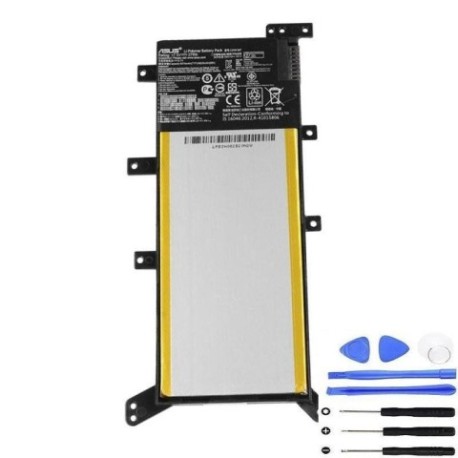
Battery models & part numbers
| Reference / P/N |
|---|
| Asus C21N1347 |
| Asus-C21N1347-37Wh |
Compatible models
| Model |
|---|
| Asus 0B200-01000000 |
| Asus 0B200-01000100 |
| Asus 0B200-01000200 |
| Asus 0B200-01000300 |
| Asus 0B200-01000400 |
| Asus 0B200-01000500 |
| Asus 0B200-01001000 |
| Asus 0B200-01200000 |
| Asus 0B200-01200100 |
| Asus 0B200-01200200 |
| Asus 0B200-01200300 |
| Asus 0B200-01200400 |
| Asus A555LJ |
| Asus C21PqC1 |
| Asus F554LA |
| Asus F554LD |
| Asus F555LA |
| Asus F555LD |
| Asus F555LF |
| Asus F555LJ |
| Asus F555LN |
| Asus F555LP |
| Asus F555UB |
| Asus F555UJ |
| Asus F555YA |
| Asus K555LB |
| Asus K555LJ |
| Asus R556LA |
| Asus R556LD |
| Asus R556LJ |
| Asus R556LN |
| Asus R556UA |
| Asus R556UB |
| Asus R556UF |
| Asus R556UJ |
| Asus R557LA |
| Asus X554LA |
| Asus X555BA |
| Asus X555BP |
| Asus X555DG |
| Asus X555LA |
| Asus X555LB |
| Asus X555LD |
| Asus X555LF |
| Asus X555LI |
| Asus X555LJ |
| Asus X555LN |
| Asus X555LP |
| Asus X555QA |
| Asus X555QG |
| Asus X555SJ |
| Asus X555UA |
| Asus X555UB |
| Asus X555UF |
| Asus X555UJ |
| Asus X555YA |
| Asus X555YI |
Introduction
Laptop batteries are consumable components that naturally degrade over time. The ASUS C21N1347 37Wh battery is designed for various ASUS laptop models, primarily from the F, K, R, and X series. Understanding when and how to replace your battery can save you from unexpected shutdowns and extend your laptop’s usable life.
Common signs you need a replacement
| Symptom | Cause | Verification | Recommendation |
|---|---|---|---|
| Battery drains quickly (less than 1 hour) | Reduced capacity from age/cycles | Check battery health in Windows | Replace if capacity below 60% |
| Laptop shuts down unexpectedly | Voltage drops under load | Monitor battery percentage drops | Immediate replacement needed |
| Battery won’t charge fully | Charging circuit degradation | Check charging indicator behaviour | Replace battery and check charger |
| Battery swelling or bulging | Internal gas buildup | Visual inspection of battery compartment | Replace immediately – safety hazard |
| Overheating during charging | Internal resistance increase | Feel battery temperature | Replace to prevent damage |
How to check compatibility
Finding your exact ASUS model number is crucial for battery compatibility. For ASUS laptops compatible with the C21N1347 battery, you’ll typically find the model number in these locations:
- Bottom sticker: Look for a white or silver label on the underside of your laptop. The model number usually starts with letters like F, K, R, or X followed by numbers
- System Information: Press Windows Key + R, type “msinfo32” and check System Model
- Command Prompt: Open Command Prompt and type “wmic csproduct get name”
- BIOS/UEFI: Restart your laptop and enter BIOS to find model information
For ASUS-specific verification, you can use the official ASUS support website by entering your serial number or model. The compatible models listed above represent the most common ASUS laptops using the C21N1347 battery design.
When to replace
Most laptop batteries last 2-4 years with regular use. Consider replacement when:
- Battery capacity drops below 60% of original
- You experience sudden shutdowns at 20-30% charge
- The battery has completed 300-500 charge cycles
- Your laptop is 3+ years old with original battery
- You notice physical swelling or deformation
For ASUS laptops using the C21N1347 battery,you can check battery health in Windows by opening Command Prompt as administrator and typing “powercfg /batteryreport”. This generates a detailed report showing your battery’s current capacity versus design capacity.
Installation guide
Replacing your ASUS battery is straightforward with the right tools and precautions. You’ll need a small Phillips screwdriver, plastic spudger or guitar pick, and an anti-static wrist strap (recommended). Always work on a clean, flat surface and ensure your laptop is completely powered off and unplugged.
Step-by-step replacement:
- Turn off your laptop and disconnect the AC adapter
- Flip the laptop over and locate the battery compartment
- Remove the screws securing the battery cover (if applicable)
- For internal batteries: Remove the bottom case screws and carefully pry open the case using a plastic tool
- Locate the battery connector and gently disconnect it from the motherboard
- Remove any screws securing the battery in place
- Lift the battery out carefully, noting its orientation
- Place the new C21N1347 battery in position and secure with screws
- Reconnect the battery connector to the motherboard
- Replace the bottom case or battery cover and secure all screws
Important notes for ASUS models: Some ASUS laptops in the compatible list have slightly different internal layouts. The F555 series typically has easier battery access than the X555 models. If you’re uncomfortable with internal disassembly, consider professional installation, especially for models with more complex internal designs.
Usage & care tips
Maximise your new ASUS battery’s lifespan with these evidence-based practices:
- Initial calibration: After installation, charge your battery to 100% without interruption, then use until it reaches 5-10% before recharging. Repeat this cycle 2-3 times
- Optimal charging: Keep your battery between 20-80% for daily use. Avoid frequent 0-100% cycles
- Temperature management: Never expose your laptop to temperatures above 45°C. High temperatures are the primary cause of battery degradation
- Storage advice: If storing your laptop long-term, charge the battery to 50-60% and store in a cool, dry place around 15-20°C
- Power settings: Use ASUS Power4Gear Hybrid or Windows battery saver mode when unplugged
Safety & recycling in AU/NZ
Battery safety is crucial for protecting both your device and the environment. In Australia and New Zealand, lithium-ion batteries must be handled responsibly:
- Never puncture or disassemble batteries – internal components are hazardous
- Avoid exposing batteries to extreme heat or direct sunlight
- Use only authorised ASUS chargers and accessories
- Recycle responsibly: In Australia, use Battery World, Officeworks, or council recycling centres. In NZ, take to designated recycling centres – never dispose of in household waste
- Transport safely: When mailing batteries, ensure they’re properly packaged and declared according to Australia Post/NZ Post regulations
FAQ
How long does the C21N1347 battery typically last?
With normal use, expect 2-4 years or 300-500 complete charge cycles before significant capacity loss.
Will this battery work with my ASUS laptop if it’s not on the compatible list?
We strongly recommend against using batteries with unverified compatibility. Physical fit and electrical specifications must match exactly.
How can I verify this is a genuine ASUS battery?
Genuine ASUS batteries have proper branding, correct model numbering, and come with appropriate documentation. Purchase from authorised retailers only.
What’s the difference between 37Wh and other capacity ratings?
Watt-hours (Wh) indicate total energy storage. Higher Wh ratings mean longer runtime, but must match your laptop’s design specifications.
Can I use my laptop while plugged in with the new battery?
Yes, modern ASUS laptops have smart charging circuits that protect the battery when continuously plugged in.
How do I dispose of my old ASUS battery in Australia?
Take it to any Battery Recycling collection point – most electronics retailers and council waste centres offer free battery recycling.
What should I do if my new battery isn’t recognised by the system?
Try resetting the EC (Embedded Controller) by shutting down, disconnecting power, holding the power button for 40 seconds, then reconnecting and powering on.
Replacing your ASUS laptop battery with the genuine C21N1347 37Wh model will restore your device’s mobility and reliability. With proper installation and care, your new battery will provide consistent performance for years to come. Always purchase from authorised suppliers to ensure safety and compatibility.