Asus C23 UX21 35Wh Battery Replacement Guide for Australian & New Zealand Users
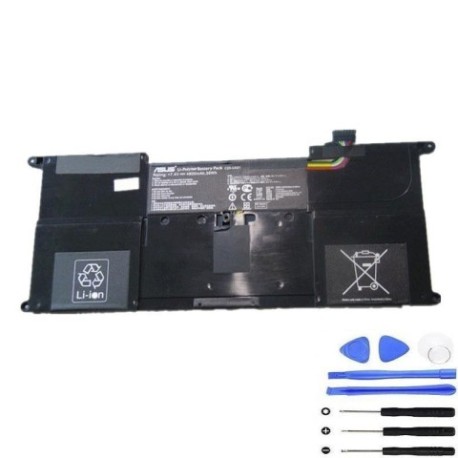
If your Asus Zenbook UX21 series laptop is showing signs of battery fatigue, you’ve come to the right place. This comprehensive guide covers everything Australian and New Zealand users need to know about replacing their laptop battery with the genuine Asus C23 UX21 35Wh model.
Battery models & part numbers
| Reference / P/N |
|---|
| 0B200-00010000 |
| 0B200-00010100 |
| 0B23-003F0AS |
| Asus-C23-UX21-35Wh |
| C23-UX21 |
Compatible models
| Model |
|---|
| Asus Zenbook UX21A |
| Asus Zenbook UX21E |
| Asus Zenbook UX21EP |
Introduction
Your Asus Zenbook UX21 series laptop was designed for mobility and performance, but like all lithium-ion batteries, its power source has a limited lifespan. Typically lasting 2-3 years with regular use, these batteries gradually lose their capacity to hold charge. For Australian and New Zealand users who rely on their Zenbooks for work, study, or personal use, a failing battery can be incredibly frustrating – especially when you’re trying to work from your favourite café or during power outages.
The good news is that replacing your battery is often more cost-effective than buying a new laptop, and with the right guidance, you can extend your Zenbook’s life significantly. This guide is specifically tailored for AU/NZ consumers, covering local safety standards, recycling options, and installation tips that consider our unique climate conditions.
Common signs you need a replacement
| Symptom | Cause | Verification | Recommendation |
|---|---|---|---|
| Rapid discharge (less than 1 hour) | Reduced battery capacity | Check battery health in Windows | Consider replacement if under 50% capacity |
| Laptop shuts down unexpectedly | Voltage drops under load | Monitor during intensive tasks | Replace immediately to prevent data loss |
| Battery won’t charge past 80% | Charging circuit protection | Check charging cycles in BIOS | Battery nearing end of life |
| Laptop feels hot near battery area | Internal resistance increase | Use temperature monitoring software | Safety concern – replace urgently |
| Battery percentage jumps erratically | Faulty battery management system | Observe percentage changes | Indicates serious battery degradation |
| Physical swelling or bulging | Gas buildup from chemical breakdown | Visual inspection | STOP USING IMMEDIATELY – fire risk |
How to check compatibility
Before purchasing any replacement battery for your Asus Zenbook, it’s crucial to verify compatibility. For Australian and New Zealand users, here’s how to ensure you’re getting the right battery:
Finding Your Model Information: The easiest way to identify your exact Zenbook model is to check the label on the bottom casing. Look for “UX21” followed by a letter (A, E, or EP). You can also find this information in Windows by pressing Windows Key + R, typing “msinfo32”, and checking the System Model field.
Using Asus Official Tools: Visit the Asus support website and use their compatibility checker tool. Enter your serial number or model name to get authorised part numbers. For AU/NZ users, make sure you’re on the regional Asus website to get localised information.
Physical Verification: Remove your current battery (if possible) and check for the part number printed on it. The Asus C23 UX21 35Wh battery should match one of the part numbers listed in our compatibility table above.
Regional Considerations: Australian and New Zealand models sometimes have slight variations in hardware. Always purchase from reputable suppliers who understand these regional differences and can provide batteries that meet Australian safety standards.
When to replace
Timing your battery replacement correctly can save you both money and frustration. For Asus Zenbook UX21 users in Australia and New Zealand, consider replacement when:
Battery Health Drops Below 60%: Use Windows Battery Report (run “powercfg /batteryreport” in Command Prompt) to check your battery’s design capacity versus current capacity. Once it falls below 60%, you’ll notice significant performance issues.
After 500 Complete Charge Cycles: Lithium-ion batteries typically maintain about 80% of their original capacity after 500 complete charge cycles. The UX21 series batteries are no exception.
Seasonal Considerations: Australian summers and New Zealand’s variable climate can accelerate battery degradation. If you’re heading into summer and notice reduced performance, consider replacing before the heat exacerbates the problem.
Before Important Projects: If you have critical work, studies, or travel coming up, don’t wait for complete failure. Proactive replacement ensures reliability when you need it most.
Installation guide
Replacing the battery in your Asus Zenbook UX21 series laptop is relatively straightforward, but requires care and the right tools. Here’s a step-by-step guide for Australian and New Zealand users:
Tools Required: You’ll need a Phillips #00 screwdriver, plastic spudger or guitar pick, anti-static wrist strap (recommended), and a clean, well-lit workspace.
Safety First: Always start by shutting down your laptop completely and disconnecting the AC adapter. Remove any peripherals and place the laptop on a static-free surface.
Step-by-Step Process:
- Turn the laptop upside down and locate the battery compartment. The UX21 series typically has a separate battery cover.
- Remove the screws securing the battery cover. Keep them organised as they may be different lengths.
- Gently lift the cover and locate the battery connector. Carefully disconnect it by pulling straight up – never pull by the wires.
- Remove any screws securing the battery itself. The C23 UX21 battery usually has 4-6 screws.
- Lift the battery out carefully. If it’s stuck, use a plastic tool to gently pry it loose – never use metal tools.
- Place your new Asus C23 UX21 35Wh battery in position and secure with screws.
- Reconnect the battery connector, ensuring it clicks into place.
- Replace the battery cover and screws.
- Connect the AC adapter and allow the battery to charge for at least 4 hours before first use.
Common Installation Issues: Some UX21 models may have slightly different screw arrangements. If you encounter resistance, stop and double-check your model compatibility. Australian users should note that humidity can affect plastic components – work in a dry environment if possible.
Usage & care tips
Proper battery care can significantly extend the life of your new Asus C23 UX21 35Wh battery. Here are essential tips for Australian and New Zealand conditions:
Optimal Charging Practices: Avoid letting your battery drain completely before recharging. Lithium-ion batteries prefer partial discharges rather than full cycles. Try to keep your battery between 20% and 80% for daily use.
Temperature Management: Australian heat and New Zealand’s temperature variations can impact battery life. Never leave your laptop in a hot car or in direct sunlight. Ideal operating temperature is between 10°C and 35°C.
Storage Advice: If storing your laptop for extended periods, charge the battery to about 50% and store in a cool, dry place. Check and recharge every 3-6 months.
Power Settings Optimisation: Use Asus Power4Gear Hybrid or Windows power plans to optimise battery usage. For general use, balanced mode provides the best compromise between performance and battery life.
Regular Maintenance: Calibrate your battery every 2-3 months by fully charging, then fully discharging, and recharging completely. This helps the battery management system accurately report remaining capacity.
Safety & recycling in AU/NZ
Battery safety and proper disposal are particularly important in Australia and New Zealand due to our unique environmental considerations:
Safety Precautions: Never attempt to open or modify the battery casing. If you notice any swelling, overheating, or unusual odours, discontinue use immediately and contact a professional. Always use genuine Asus chargers and accessories to ensure proper voltage regulation.
Australian Recycling Options: In Australia, you can return old laptop batteries to any B-cycle collection point. Major retailers like Officeworks, JB Hi-Fi, and Harvey Norman participate in this program. Never dispose of lithium-ion batteries in household waste.
New Zealand Recycling: In New Zealand, take old batteries to accredited e-waste recyclers or participating retailers. The TechCollect NZ program provides free recycling services across both islands.
Transport Considerations: When shipping or transporting spare batteries within AU/NZ, ensure they’re properly packaged to prevent short circuits. Tape the terminals or keep batteries in their original packaging.
Emergency Procedures: If a battery leaks or catches fire, use a Class D fire extinguisher (for metal fires) or smother with sand or dirt. Never use water on lithium battery fires.
FAQ
How long does the Asus C23 UX21 35Wh battery typically last?
With normal use, you can expect 2-3 years of reliable performance, or approximately 500 complete charge cycles. Australian climate conditions may slightly reduce this lifespan due tohigher average temperatures. Proper care can extend this to 4 years in some cases.
Will this battery work with my Zenbook purchased in New Zealand?
Yes, the Asus C23 UX21 35Wh battery is compatible with all regional variants of the UX21A, UX21E, and UX21EP models sold in both Australia and New Zealand. The part numbers are standardised globally.
How can I verify this is a genuine Asus battery and not a counterfeit?
Purchase from authorised resellers and check for proper Asus branding on the battery itself. Genuine batteries will have precise printing, proper serial numbers, and should come in official packaging. The battery should also be recognised correctly by your Zenbook’s BIOS and Asus diagnostic tools.
My laptop still isn’t holding charge after replacement. What could be wrong?
First, ensure you’ve allowed a full 4-6 hour initial charge. If problems persist, check the power adapter and charging port for issues. Sometimes, a BIOS update is required for proper battery recognition. If none of these resolve the issue, you may have received a faulty battery or there could be a motherboard problem.
Is it safe to replace the battery myself, or should I use a professional service?
For most technically inclined users, self-replacement is safe and straightforward following our guide. However, if you’re uncomfortable with electronics or your laptop is still under warranty, we recommend using an Asus-authorised service centre in Australia or New Zealand to maintain your warranty coverage.
Can I use a higher capacity battery with my UX21 series laptop?
No, the Zenbook UX21 series is specifically designed for the 35Wh form factor. Using a different capacity or physically larger battery could damage your laptop and poses safety risks. Always use the specified C23 UX21 35Wh replacement.
How do I properly dispose of my old battery in Melbourne/Sydney/Auckland?
Most council waste transfer stations accept e-waste free of charge. In major cities, Officeworks (AU), JB Hi-Fi (AU), and Noel Leeming (NZ) stores have battery recycling bins. Some computer repair shops also accept old batteries for proper disposal.
Replacing your Asus Zenbook UX21 battery doesn’t have to be a daunting task. With the right information and genuine parts, you can restore your laptop’s mobility and performance. Remember that investing in a quality replacement battery like the Asus C23 UX21 35Wh model ensures safety, compatibility, and optimal performance for your computing needs across Australia and New Zealand.